SEEDMASTER 2023
24
UNFOLDING, FOLDING, AND WING LOCKS
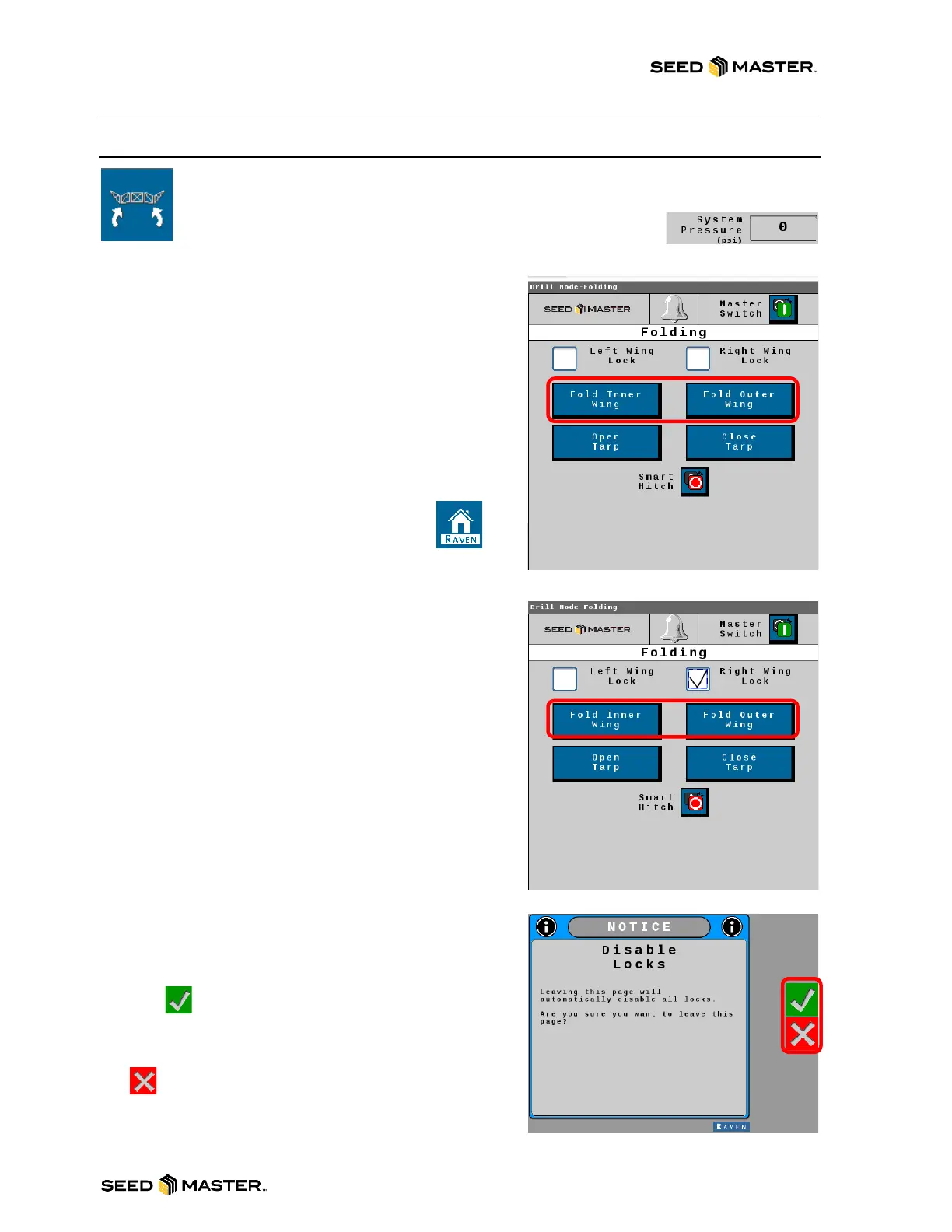
Touch the Fold button soft key located in the soft key area to access the Unfold Operation &
Wing Locks. The machine’s system pressure will need to be engaged before the unfold
process can begin. The live pressure can be viewed in the System
Information Area on the Home Page. System pressure must be
2600psi or greater to unfold.
Wing Unfold Buttons
Begin by unfolding the INNER Wings first. It is important to
unfold the INNER Wings first as you can damage the
OUTER Wings by unfolding them into each other if the
INNER wings are not completely unfolded.
1. Touch and hold the FOLD INNER WING button to
unfold the inner wings. Ensure that the wings have
completely finished unfolding before moving to the
next step.
2. Touch and hold the FOLD OUTER WING button to
unfold the outer wings.
3. Once the wings are unfolded, touch
the home button and touch YES to
acknowledge that you are leaving the
page to return to the Home screen.
4. OPEN TARP and CLOSE TARP are for future use.
These do not function currently.
Wing Lock Buttons
Left Wing Lock Check Box: When the wings are
unfolding, or folding up, use the check box to lock the left
wing into its current position. Uncheck the check box to
unlock the wing.
Right Wing Lock Check Box: When the wings are
unfolding, or folding up, use the check box to lock the right
wing into its current position. Uncheck the check box to
unlock the wing.
Unfold Operation and Wing Lock Safety Page
After touching the Home soft key, a safety page will be
displayed. You must acknowledge the fact that you will be
leaving the page and the wing locks will be disabled. Before
touching , make sure the machine is free and clear of
any persons, animals, or objects. After touching yes, you
will return to the home page and wing locks are disabled. If
you are not ready to disable the wing locks, simply touch
the button and the wing locks will stay enabled.



 To Next Page