SEEDMASTER 2023
114
SETTING THE TRACTOR MEASUREMENTS
The Viper 4+ and RCM are set up for your specific SeedMaster machine from factory. The Viper 4+ IS
NOT SETUP for your specific tractor pulling your SeedMaster machine. It is important to configure
the tractor measurements to ensure proper as-applied mapping. Follow the procedure below to set
up the tractor.
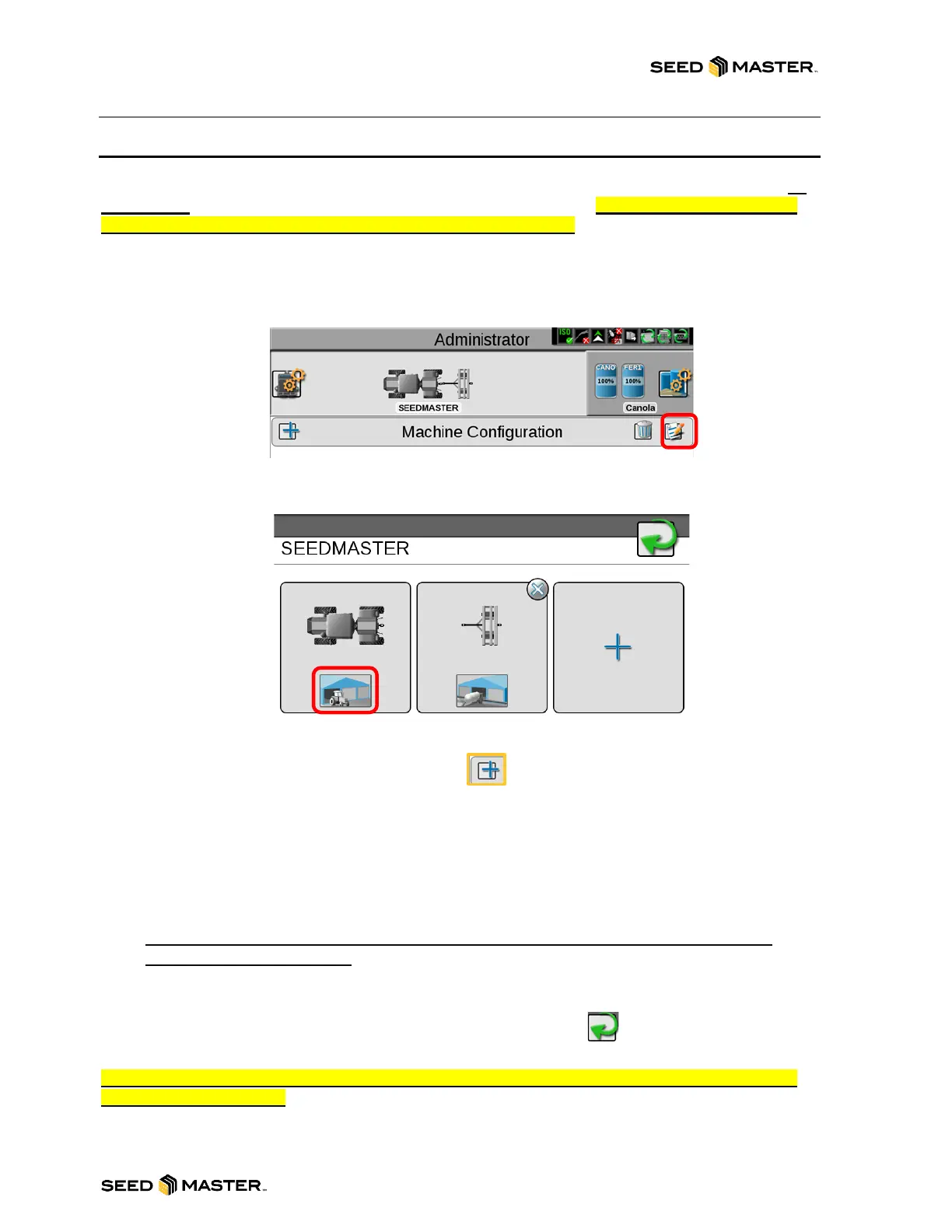
1. Touch the Machine Configuration Panel.
2. Touch the edit icon.
3. The setup will take you to the Machine/Implement Garages. Touch the Tractor garage button to
edit the tractor measurements of the tractor pulling your SeedMaster machine.
4. The setup will take you to the Machine Garage. Touch the add new Machine Button to add the
tractor type pulling your SeedMaster machine.
5. Choose the Tractor Type: Traditional, Track, or Articulated (Swipe left).
6. After choosing the tractor type, name the Tractor. IE. MY4WD.
7. Enter any General Information if desired.
8. Touch the blue arrow pointing to the right. Measure and enter ALL measurements for the tractor.
9. Touch the blue arrow pointing to the right. Measure and enter ALL measurements for the tractor
on page 2.
NOTE: It is important to measure and enter all the machine measurements to ensure
correct as applied mapping.
10. Touch the Green check mark to finish setting up the tractor.
11. Touch the Green check mark to exit the Machine Garage.
12. Touch the Green check mark to exit the Tractor Machine Setup.
NOTE: The TXB implement Tongue and Hitch Lengths should be set to 275 inches for Tongue
and 164 inches for Hitch.



 To Next Page