SEEDMASTER 2023
92
REMOTE CATCH TEST CALIBRATION PROCEDURE
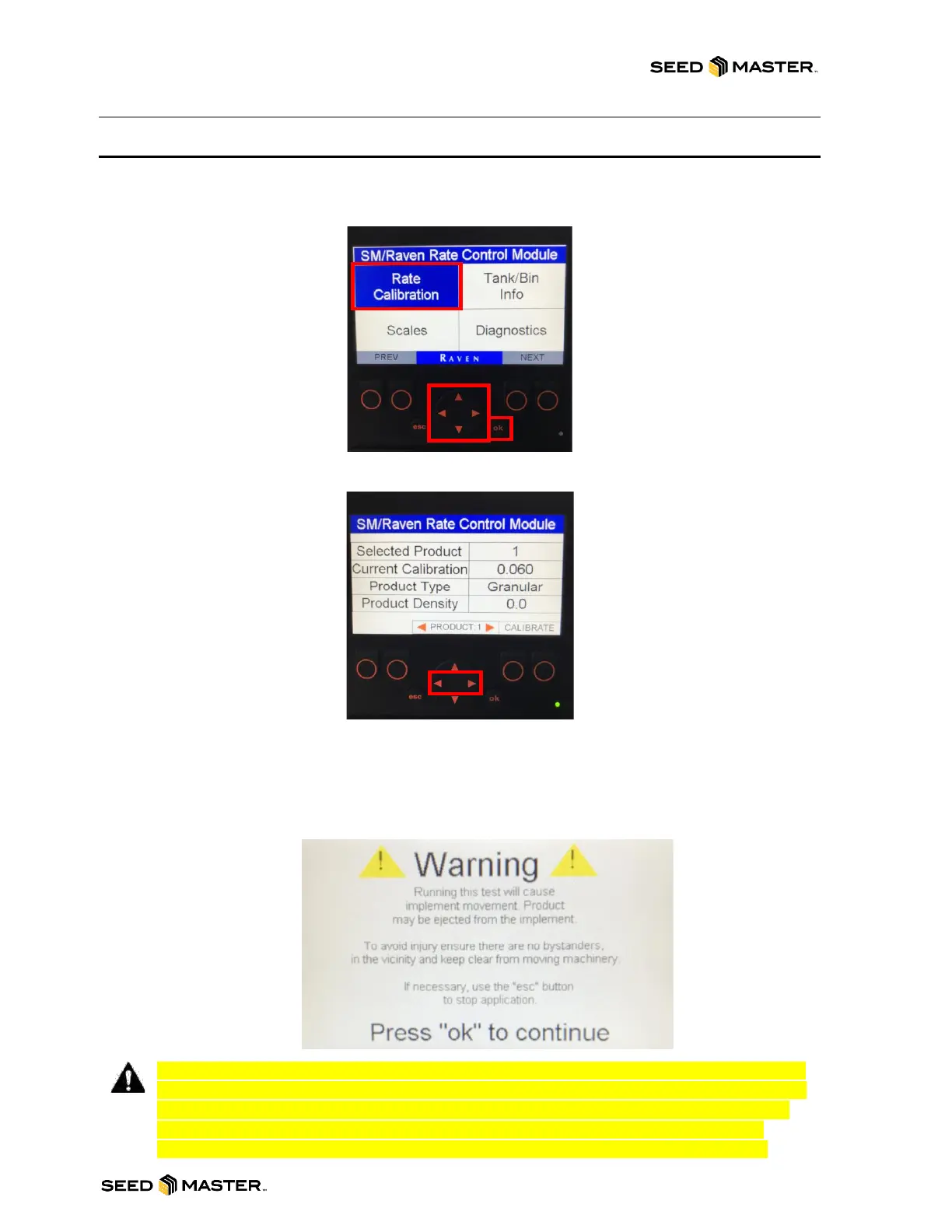
1. Power on the remote monitor by pressing the “esc” button on the front of the monitor.
2. Using the UP/DOWN or LEFT/RIGHT arrows, highlight the box “Rate Calibration” blue.
3. Touch “ok” to enter the “Rate Calibration” info screen.
4. The Calibration Information of the previously selected product will be displayed.
5. To change the selected product, press the LEFT/RIGHT arrows.
6. The display will show what product is selected, the current calibration value, product type, and
product density. The product density can be ignored.
7. After confirming the product that is to be calibrated, press either button below the text that says
“CALIBRATE”.
8. A warning will be displayed that indicates that product will be metered from the meters.
9. Press “ok” to continue or press the “esc“ button to exit the calibration.
NOTE: Before continuing to the next step of the calibration process, please ensure that
the System Pressure Hydraulic Remote is engaged and that the Zone Command has air
pressure. The meter will not turn over if there is no system pressure. If there is no air
pressure ALL ZONES WILL BE ENGAGED, and ALL METERS WILL TURN causing
product build up in the drop tubes. After confirming the above continue to step 10.



 To Next Page