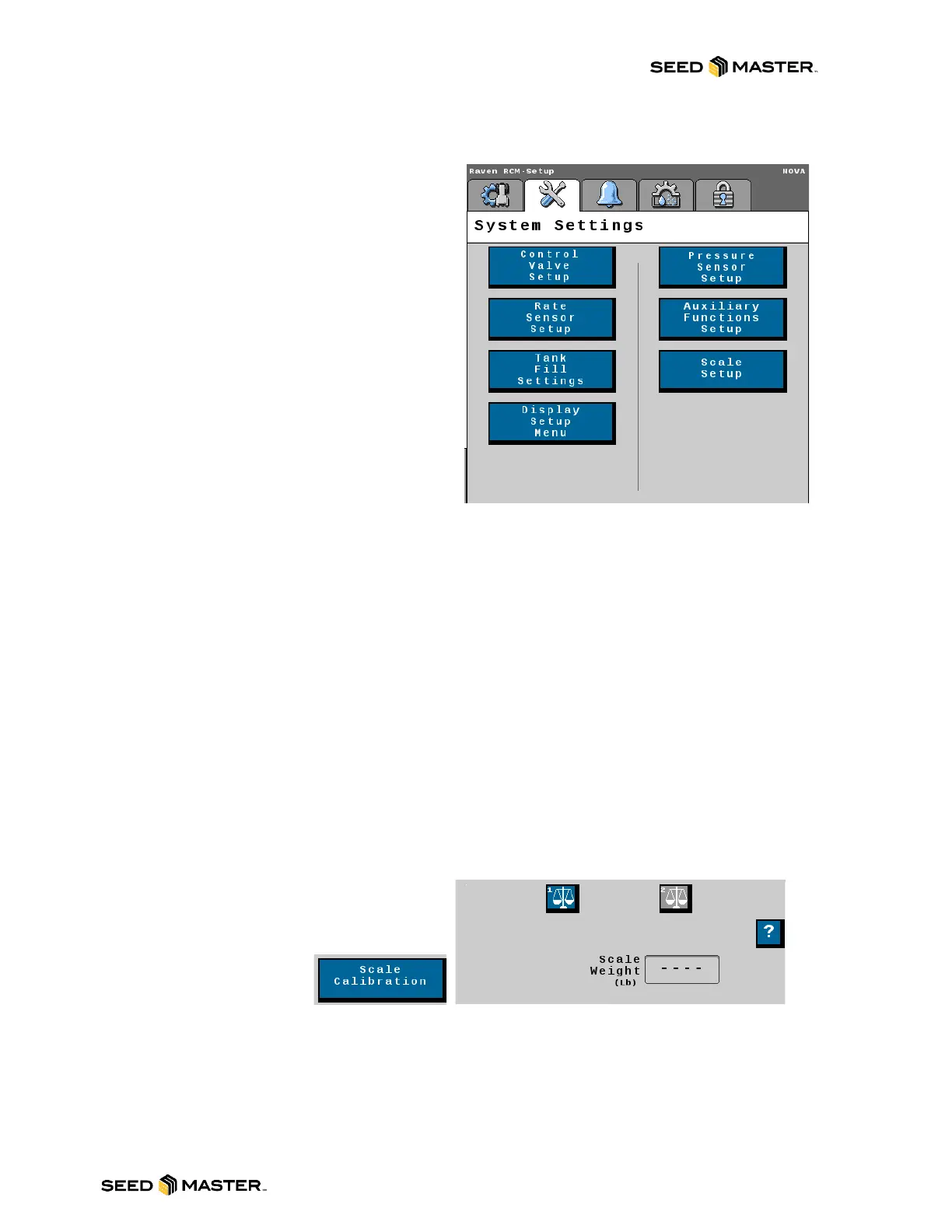
- Control Valve Setup Button: Touch the
control valve button to access settings for the
control valve including the valve response rate,
Control Deadband, and PWM settings. SEE
PAGE 72 FOR MORE INFORMATION.
- Rate Sensor Button: Access the Product
Density, Calibration Weight, and
Pulses/Revolution setting. These are also
available from the main page. Also, access to
the Catch Test and Applied Product pages is
here.
- Tank Fill Settings Button: Set the Tank
Capacity from this page. It also includes the
ability to set a Low Tank Level Alarm.
- Display Setup Menu Button: Change the
selected readout desired in the selected location
on the Main Run screen.
- Pressure Sensor Setup Button: Touch here
to access pressure sensor settings.
NOTE: SeedMaster does not use pressure sensors on granular products.
- Auxiliary Functions Setup Button: Access the FAN RPM calibration values from here. This page
allows for setting a Low and High RPM limit for the fans. The RPM Assignment Setup button lets you
view what product is assigned to each fan.
NOTE: If the product stream for the fan changes, you must edit the profile to change the RPM Sensor
Assignment for the product being changed.
- Scale Setup Button: View the weight of each
product scale. You can zero the scale from
here. If the scale needs to be calibrated, touch
the Scale Calibration
button. See Scale
Calibration on page 73 for
more information.



 To Next Page