Distance and angle measurement
9-64
9
- Items
3
and
4
will be displayed unless NO is selected in item
2
.
- If either PERIMETR (center of circle) or C-GRAV (center of gravity) is selected in item ②, then
item
5
will be displayed.
Continued on the following page
Continued from pages 9-60, 9-61 and 9-63: GRAY & EDGE, GRAV.
Return to the [MEASURING COND] (measurement conditions) menu and select item 5 DISTANCE
COND (distance conditions) if the GRAY&EDGE is selected, and select item 3 DISTANCE
CONDITIONS (distance conditions) if the GRAV (center of gravity) mode is selected.
Those settings already
established for auxiliary
points may also be used as
measurement conditions.
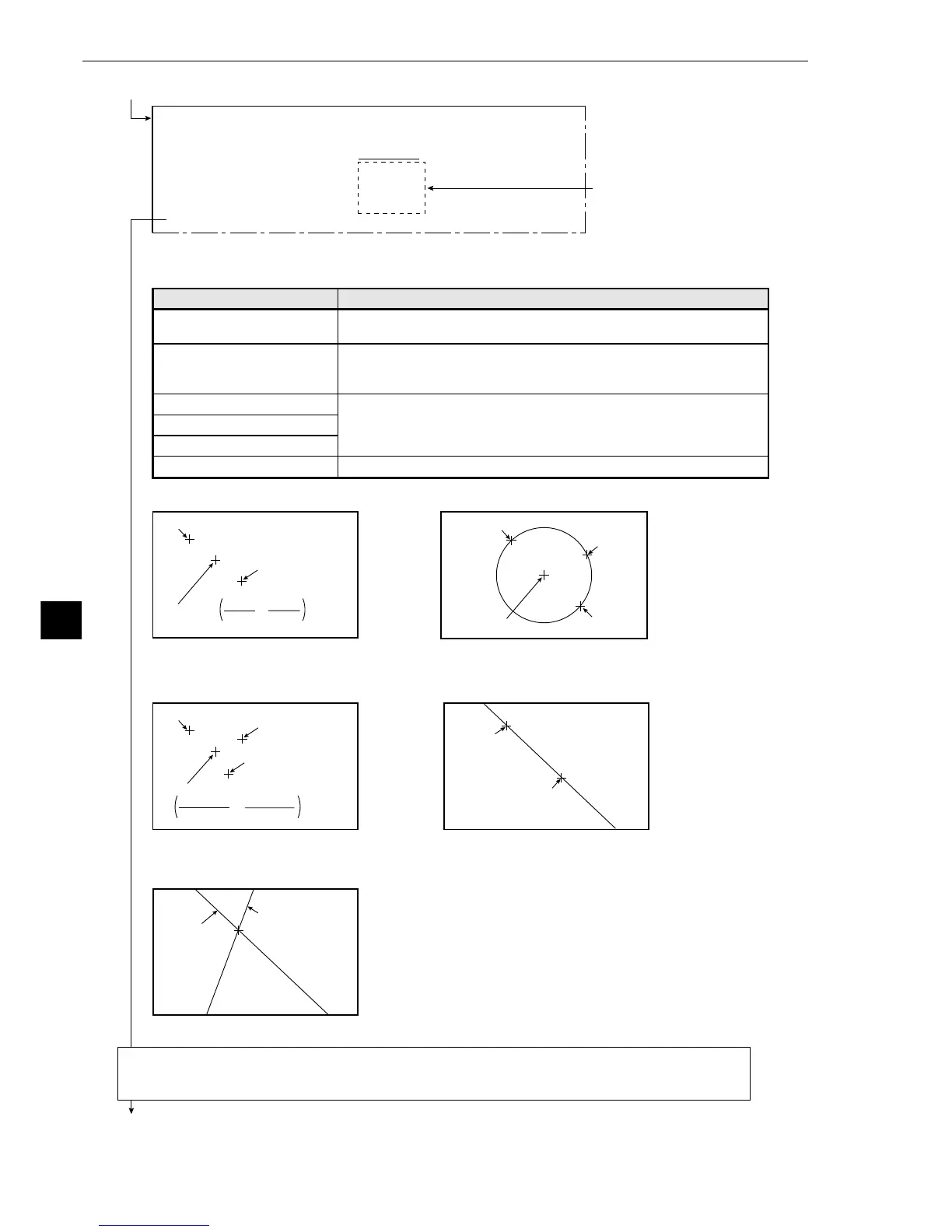
The auxiliary when MID-PNT
has been selected
Point 1 (X1, Y1)
Point 2 (X2, Y2)
Center point
,
X1+X2
2
Y1+Y2
2
The auxiliary when C-GRAV
has been selected
Point 1 (X1, Y1)
Point 3 (X3, Y3)
Center of Gravity
,
X1+X2+X3
3
Y1+Y2+Y3
3
Point 2 (X2, Y2)
The auxiliary when PERIMETR
has been selected
Point 1
Point 2
Point 3
Center of the circle
The center of the circle is the central coordinate of three
points positioned on the circumference of the circle.
Point 1
Point 2
Point 1
(Aux.: 2-P line)
Point 2
(Aux.: 2-P line)
The center point is the coordinate
half way between points 1 and 2.
The auxiliary when LEG
has been selected
The auxiliary when INTRSCT-PT has been selected
The center of gravity between points 1 to
3 is calculated as the mean of the three
A straight line between points 1 and 2.
Crosspoint of the two lines that were
specified in "AUX.TYPE: LEG."
[AUX. CONDITIONS] (TYPE00-MEAS.1-DST&ANGL MEAS)
1AUX.NO. 00(0~15)
2AUX.TYPE NO MID-PNT PERIMETR C-GRAV LEG INTRSCT-PT
3POINT NO.1 : ST-PNT00
AUX.NO
4POINT NO.2 : ST-PNT00
AUX.NO
5POINT NO.3 : ST-PNT00 AUX.NO
6UPPER MENU
Auxiliary conditions
1AUX.NO.
(auxiliary number)
2AUX. TYPE
(auxiliary type)
3POINT NO.1
4POINT NO.2
5POINT NO.3
6UPPER MENU
Setting details
Set this to any number from 0 to 15.
Select from NO (none), MID-PNT (set 2 points), PERIMETR (set 3
points), C-GRAV (set 3 points), LEG (set 2 points), or INTRSCT-PT
(set 2 points).
If the starting point number (either the starting point number or the
label number) is entered for points 1 to 3 (points 1 and 2 when MID-
PNT, LEG, or INTRSCT-PT is selected ) then the type of auxiliary
that was selected in 2 will be displayed next to each point.
This will return you to the [MEASURING COND] menu.



 To Next Page