Distance and angle measurement
9-65
9
Continued on the following page
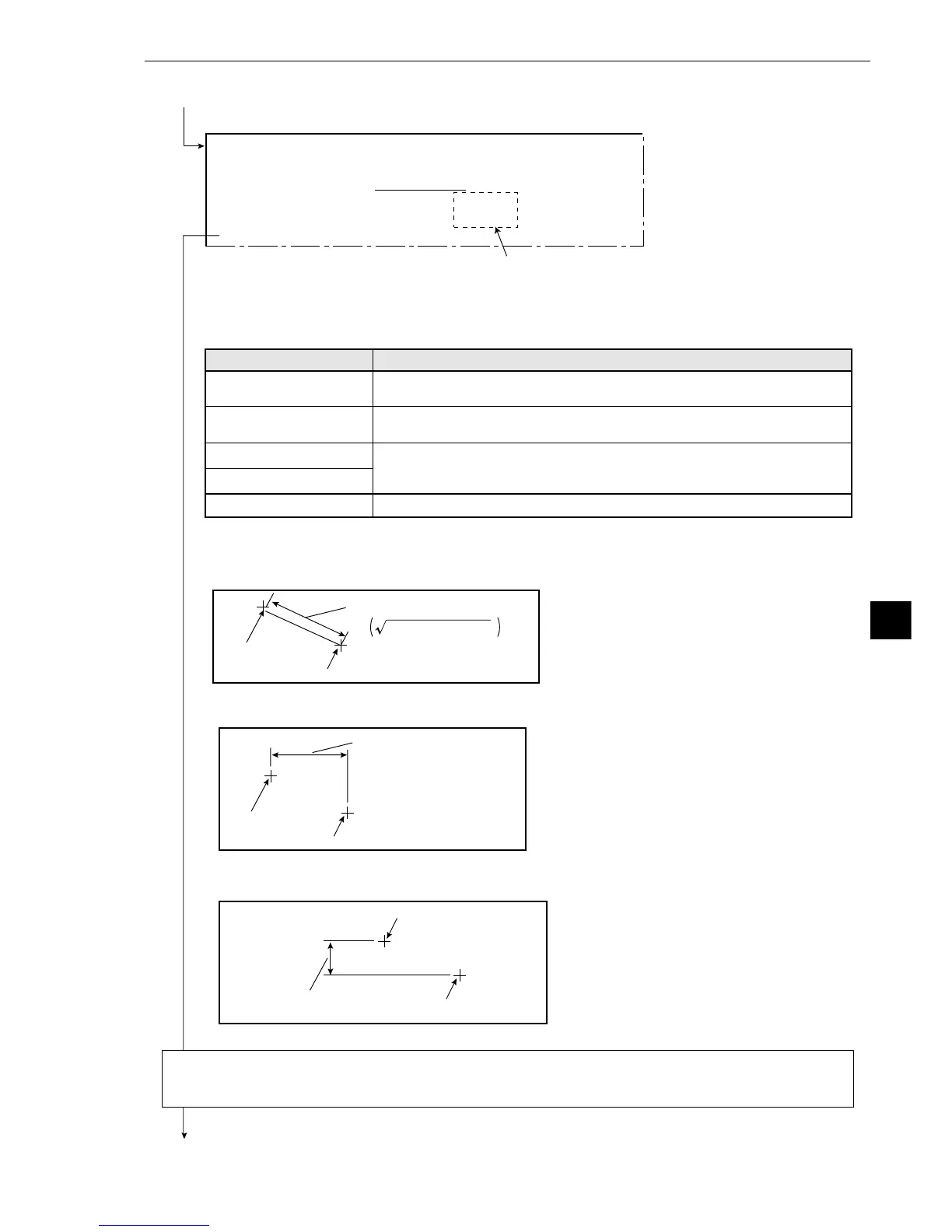
Point 1 (X1, Y1)
Point 2 (X2, Y2)
The distance between 2 points
If auxiliary point settings have been made in the [AUX.CONDITIONS] (auxiliary
condition) menu, then they may be used for the measurement conditions here.
Continued from the previous page: GRAY&EDGE, GRAV.
(X2-X1)
2
+(Y2-Y1)
2
- Items 3 and 4 will be displayed if except NO is selected in item 2.
Return to the [MEASURING COND] (measurement conditions) menu and select item 6 ANGLE
CONDITIONS if the GRAY&EDGE is selected, and select item 4 ANGLE CONDITIONS if the GRAV
(center of gravity) mode is selected.
The distance type when distance between two
points has been selected
The distance type when distance between X
coordinates has been selected
[DISTANCE SETTINGS]
(TYPE00-MEAS.1-DST&ANGL MEAS)
1DISTANCE NUMBER
00(0~15)
2DISTANCE TYPE NO DIST-BETW-2PT DIST-BETW-X DIST-BETW-Y
3POINT NO.1 :
ST-PNT00 AUX.NO
4POINT NO.2 :
ST-PNT00 AUX.NO
5UPPER MENU
Distance settings
1
DISTANCE NUMBER
(distance selection)
2DISTANCE TYPE
3POINT NO.1
4POINT NO.2
5UPPER MENU
Setting details
Set this to any number from 0 to 15.
Set the distance type to be the distance between two points, distance
between X coordinates, or distance between Y coordinates.
Enter the number (either the starting point number) or the auxiliary
number for the starting point of the measurement distance between two
points, that was specified in item 2.
This will return you to the [MEASURING COND] menu.
Point 1 (X1, Y1)
Point 2 (X2, Y2)
The distance between X
coordinates (|X2-X1|)
The distance type when distance between Y
coordinates has been selected
Point 1 (X1, Y1)
Point 2 (X2, Y2)
The distance between Y
coordinates (|Y2-Y1|)



 To Next Page