14-20
Computer Link
14
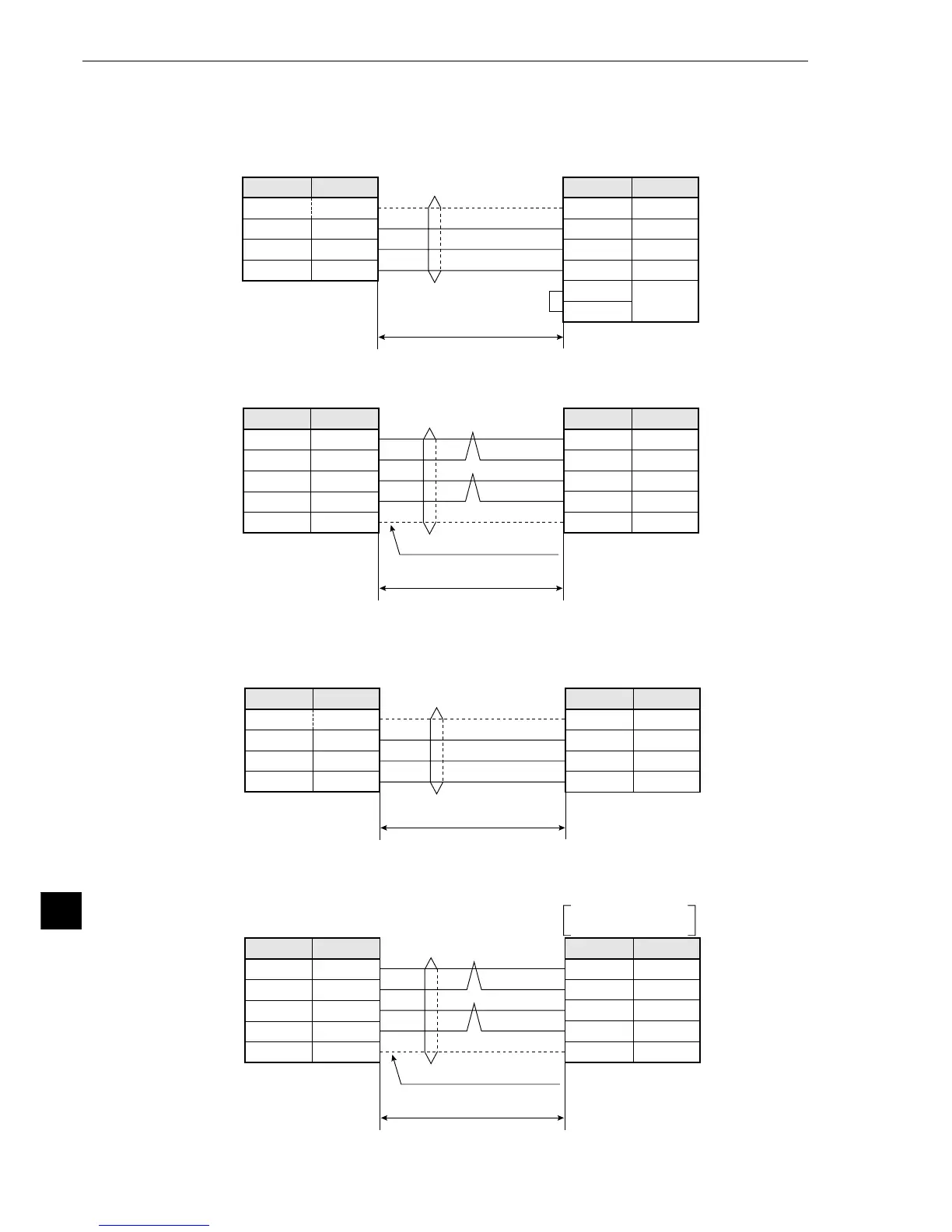
(3) Connections
1 When a JW-22CU or JW-70CUH/100CUH is used
1. Communication through the RS-232C port
2 When a JW-32CUH/H1/M1 or JW-33CUH/H1/H2/H3 is used
1. Communication through the RS-232C port
1
3
2
7
12
14
15 m or less
RS-232C
FG
RD
SD
SG
Short-circuit
terminal
JW-22CU
JW-70CUH/100CUH
(Communication port)
Communication connector on
the IV-S20 (RS232C/RS422)
Connector
shield
FG
SD
RD
SG
3
2
5
Pin No. Signal name
JW-22CU
JW-70CUH/100CUH
(Communication port)
12
13
10
11
1
RD (+)
RD (
-
)
SD (+)
SD (
-
)
FG
TA
TB
RA
RB
FG
4
7
8
9
1 km or less
RS-422
Shielded, twisted-pair cable
Pin No. Signal name
Pin No. Signal name
Pin No. Signal name
Communication connector on
the IV-S20 (RS232C/RS422)
Connector
shield
1
4
2
7
FG
RD
SD
SG
JW-32CUH/H1/M1
JW-33CUH/H1/H2/H3
(PG/COMM2 port)
JW-32CUH/H1/M1
JW-33CUH/H1/H2/H3
PG/COMM1 port
PG/COMM2 port
9
10
3
11
1
RD (+)
RD (
-
)
SD (+)
SD (
-
)
FG
1 km or less
RS-422
Communication connector on
the IV-S20 (RS232C/RS422)
Connector
shield
FG
SD
RD
SG
3
2
5
Pin No. Signal name
TA
TB
RA
RB
FG
4
7
8
9
Pin No. Signal name
Communication connector on
the IV-S20 (RS232C/RS422)
Connector
shield
Shielded, twisted-pair cable
15 m or less
RS-232C
Pin No. Signal name
Pin No. Signal name
2. Communication through the RS-422 port (4-wire system)
2. Communication through the RS-422 port (4-wire system)



 To Next Page