Section 10: PRS Alpha Control Box Wiring • May 2, 2016
© Copyright 2016 ShopBot Tools, Inc. page 10-6
ShopBot Control Software Familiarization
Easy and Full Modes
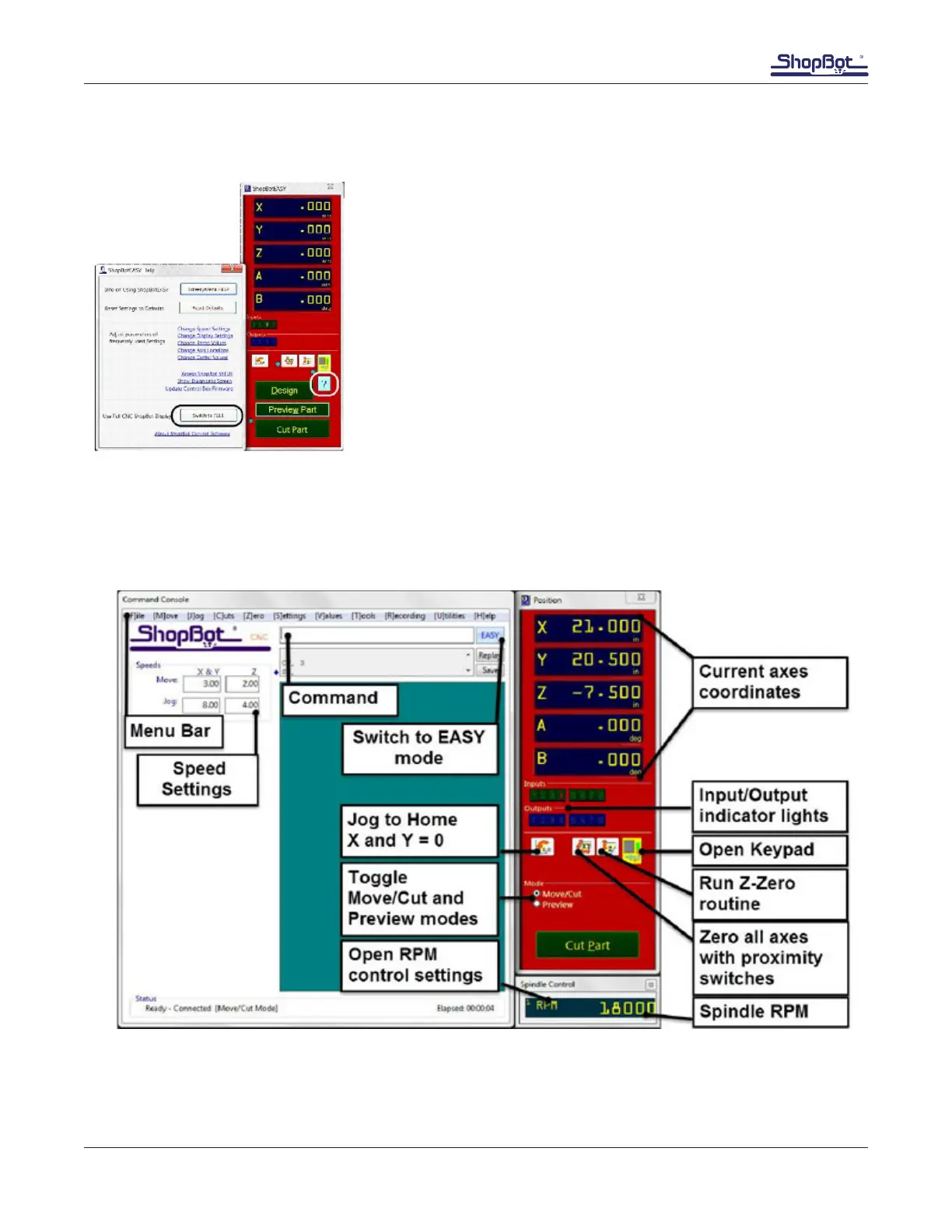
ShopBot 3 software has two user interface formats; “Easy” and
“Full” modes. Easy mode is the default, and works well to run
parts after all set up has taken place.
To access all features needed for setup, switch to the “Full” mode
by pressing the blue question mark button. Select “Switch to
FULL.”
Once setup is complete, return to the Easy display by pressing
the “EASY” button at the top right of the command console win-
dow.
Full Display Overview
The Command Console window (left side) allows for adjusting settings, loading part les, and enter-
ing commands. The Position window (right side) is how the machine provides feedback in terms of its
coordinates, switch positions, and alarms.



 To Next Page