1250 Frequency Response Analyzer The RS423 and GPIB Ports. Remote Control
AMK/1250/4 13-7
13.6 REMOTE/LOCAL FACILITY
The REMOTE/LOCAL facility enables the 1250 to receive commands from either a
REMOTE or a LOCAL source. The REMOTE facility is provided via the GPIB Interface
and has priority over other devices.
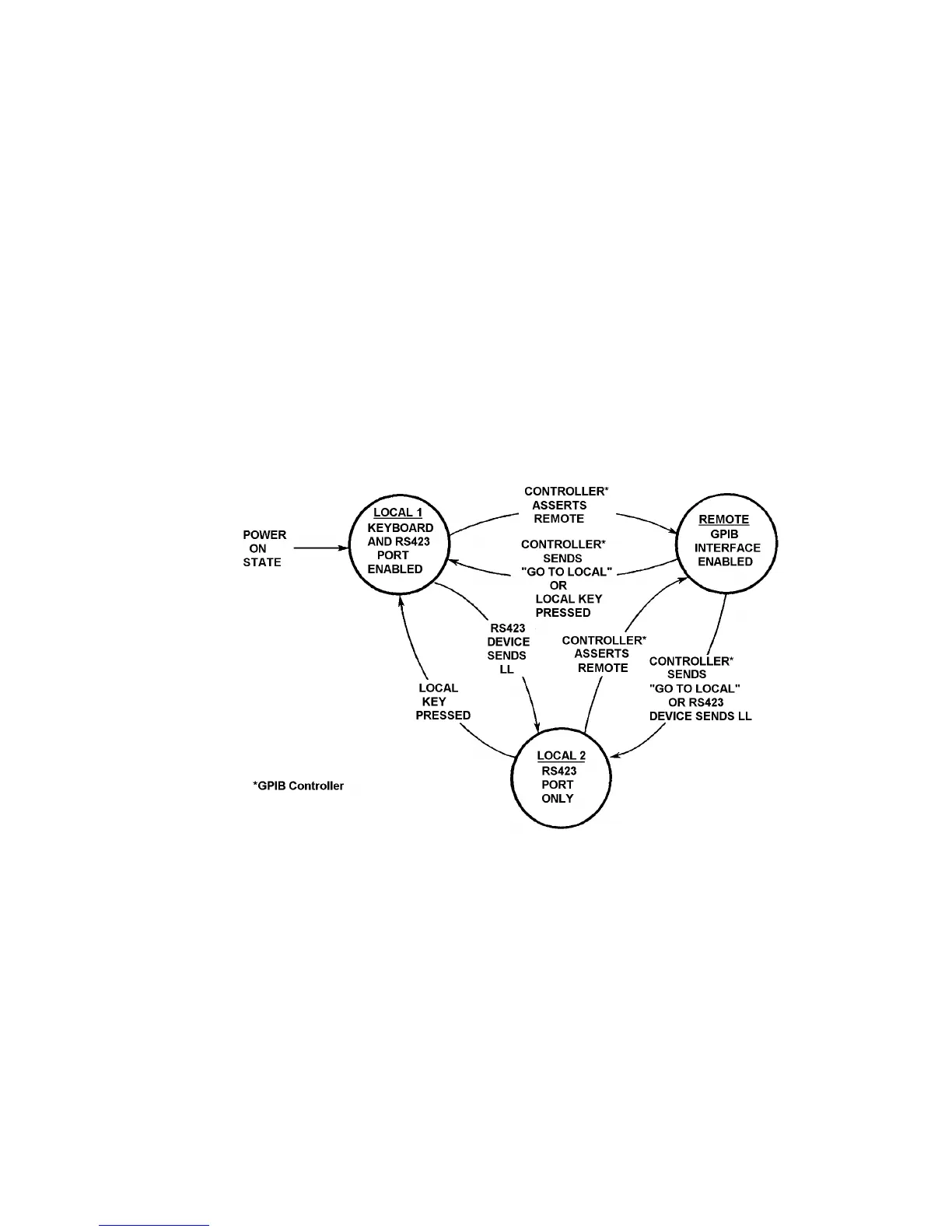
The 1250 offers two forms of control under the heading LOCAL:
a. From the 1250 Front Panel and/or via the RS423 port. Both have equal priority. This
mode is referred to as LOCAL 1.
b. Via the RS423 port only. No settings can be changed from the Front Panel, but the
LOCAL key and the Main ON/OFF switch are still operative. The Menu keys can be
used to verify, but not alter, the state of the controls. The STATUS key itself is
inoperative, but the MINI-STATUS display is still available. This mode is referred to
as LOCAL 2.
Note that the MINI-STATUS display will show "remote" when the 1250 is in LOCAL 2
mode.
The 1250 powers up in LOCAL 1 mode. Fig. 13.3 indicates how control can be
transferred from LOCAL 1 to LOCAL 2 to REMOTE and back again.
Figure 13.3 - REMOTE/LOCAL State Diagram
Note that whichever LOCAL mode was in force prior to a REMOTE command will
resume control when the REMOTE mode is relinquished.
The full set of instructions for transfer from LOCAL to REMOTE and vice-versa is given
in the IEEE Standard, where LOCAL 1 and LOCAL 2 are simply referred to as LOCAL.



 To Next Page