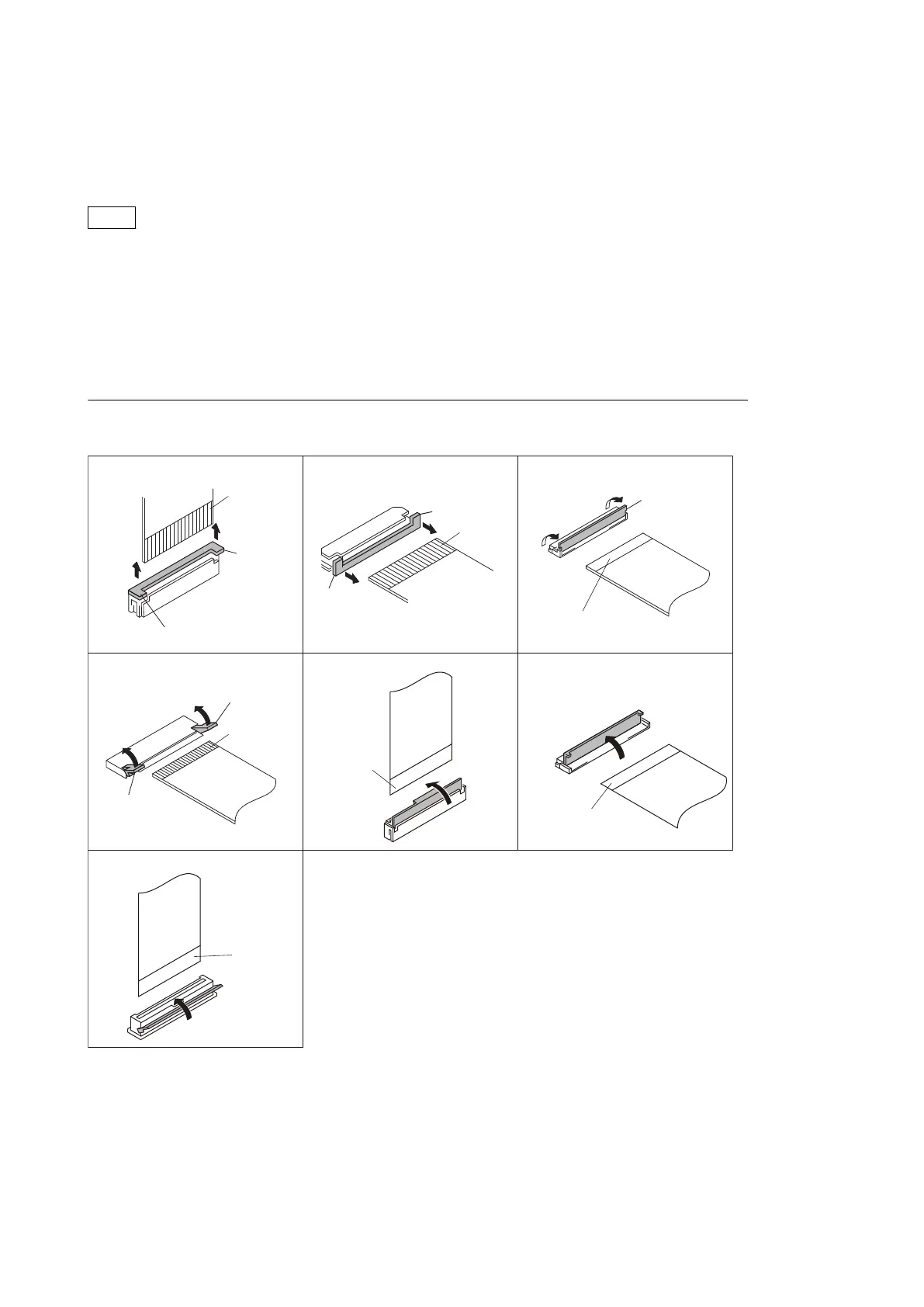
1-7. Flexible Card Wire and Coaxial Cable
1-7-1. Connecting/Disconnecting Flexible Card Wire
Note
• Be very careful not to fold flexible card wires. Life of flexible card wire will be significantly shortened if it is
folded.
• Each flexible card wire has conductor side and insulated side. If the flexible card wire is connected in the wrong
orientation of the conductor side and the insulated side, the circuit will not function.
• Insert the flexible card wire straight.
• Check that the conductive surface of the flexible card wire is not contaminated.
Type A to G
A
A
A
A
A
A
A
Contact
surface
Contact
surface
A
A
A
Contact
surface
Isolation
surface
Isolation
surface
Isolation
surface
Isolation
surface
Type A Type B Type C
Type D
Type G
Type E Type F
Disconnecting
1. Turn off the power.
2. Slide or lift up the portion A in the direction of the arrow to unlock and pull out the flexible card wire.
Connecting
1. Insert the flexible card wire firmly as far as it will go with the insulating surface facing upward.
HDC4300
1-14



 To Next Page