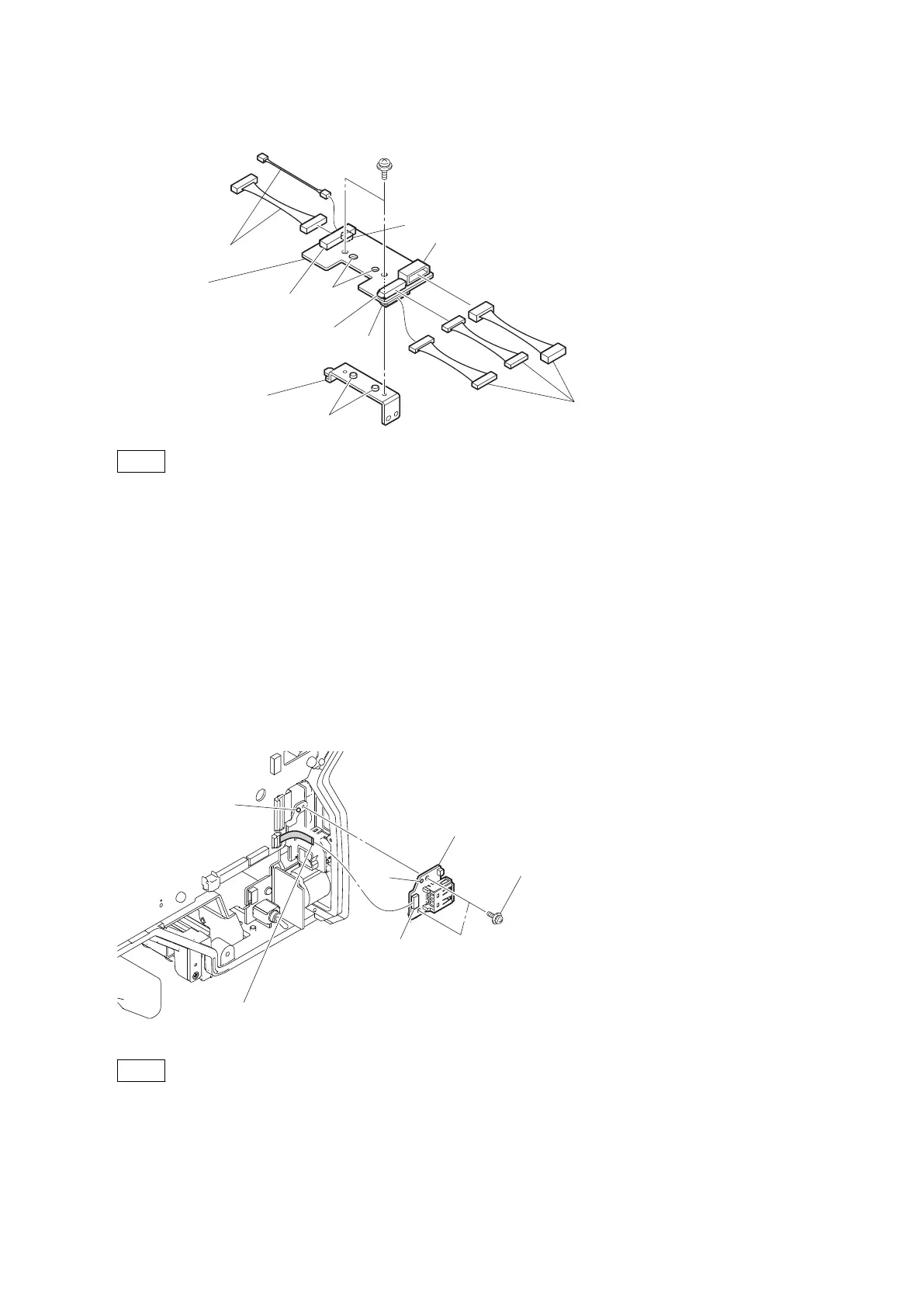
3. Remove the two screws, and detach the bracket (CN-3424).
Harnesses
PSW2 x 5
Harnesses
CN2
CN-3424 board
Bracket (CN-3424)
Bosses
Holes
CN5
CN1
CN4
CN3
Note
When installing the bracket (CN-3424), match the two bosses with the two holes.
4. Install the removed parts by reversing the steps of removal.
4-8-11. CN-3426 Board
Preparation
1. Remove the inside panel assembly. (Refer to “4-2. Inside Panel Assembly”.)
Procedure
1. Disconnect the flexible flat cable from the connector (CN1) on the CN-3426 board.
2. Remove the two screws, and detach the CN-3426 board.
PSW2 x 5
CN-3426 board
CN1
Hole
Boss
Flexible flat cable
Note
When installing the CN-3426 board, match the boss with the hole.
3. Install the removed parts by reversing the steps of removal.
HDC4300
4-40



 To Next Page