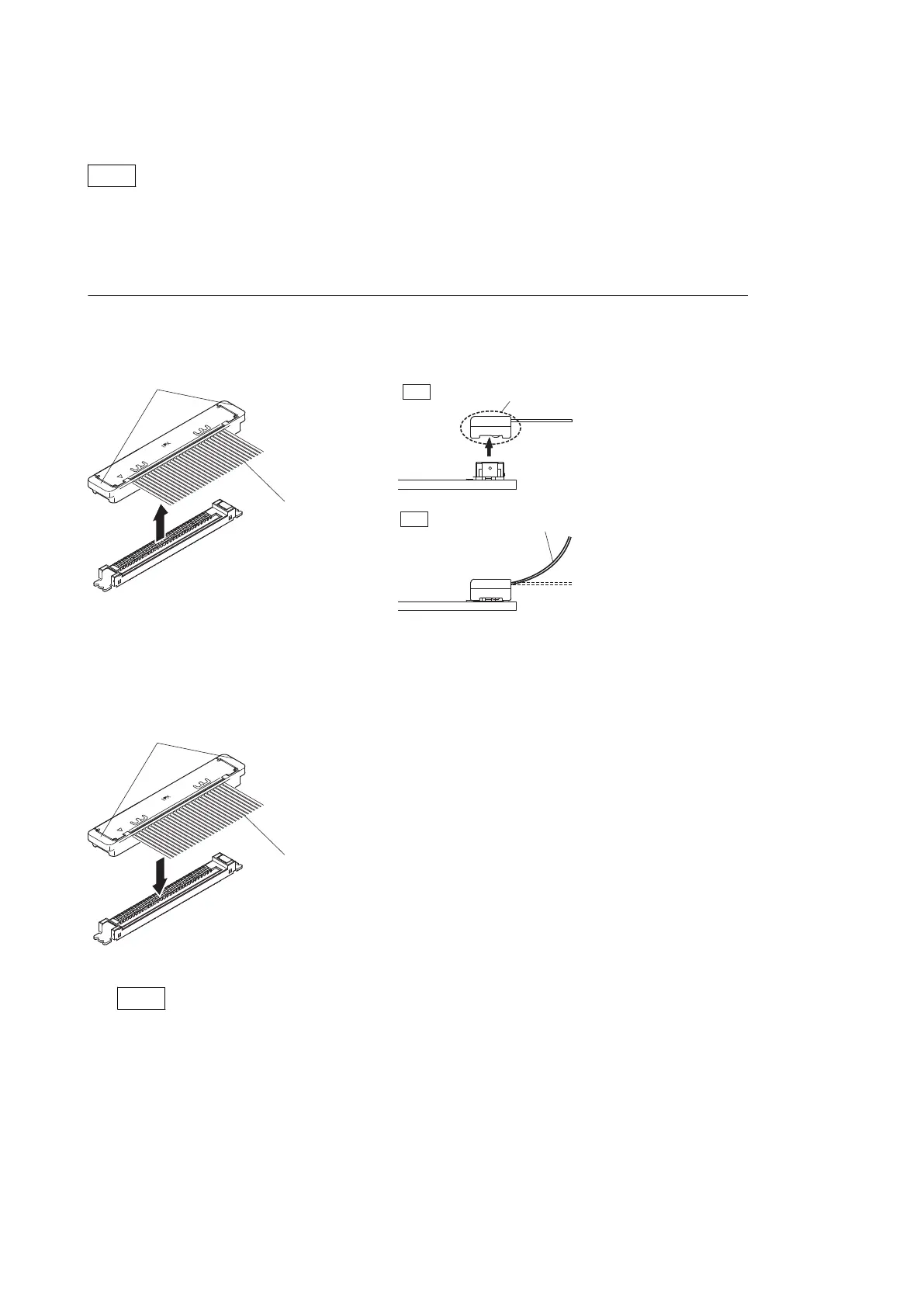
1-7-3. Disconnecting/Connecting Fine-Wire Coaxial Cable
Note
• Be very careful when handling the fine-wire coaxial cable so that fine wires are not disconnected.
• When disconnecting the fine-wire coaxial cable, be sure to hold the connector. Do not attempt to pull the cable.
• Check that the contact surface of the fine-wire coaxial cable connector is free from dirt or dust.
Type A
Disconnecting
Fine-wire coaxial cable
Hold the connector to disconnect.
Do not attempt to disconnect by
pulling the cable.
OK
NG
Both sides of connector
1. Hold both sides of the fine-wire coaxial cable connector, and pull the connector in the arrow direction to disconnect
it.
Connecting
Fine-wire coaxial cable
Both sides of connector
1. Insert the connector of fine-wire coaxial cable in the arrow direction to connect it.
Note
Insert firmly the connector of fine-wire coaxial cable in the interior.
HDC4300
1-16



 To Next Page