2-3. Replacing Lithium Battery
2-3-1. Note on Replacement of Lithium Battery
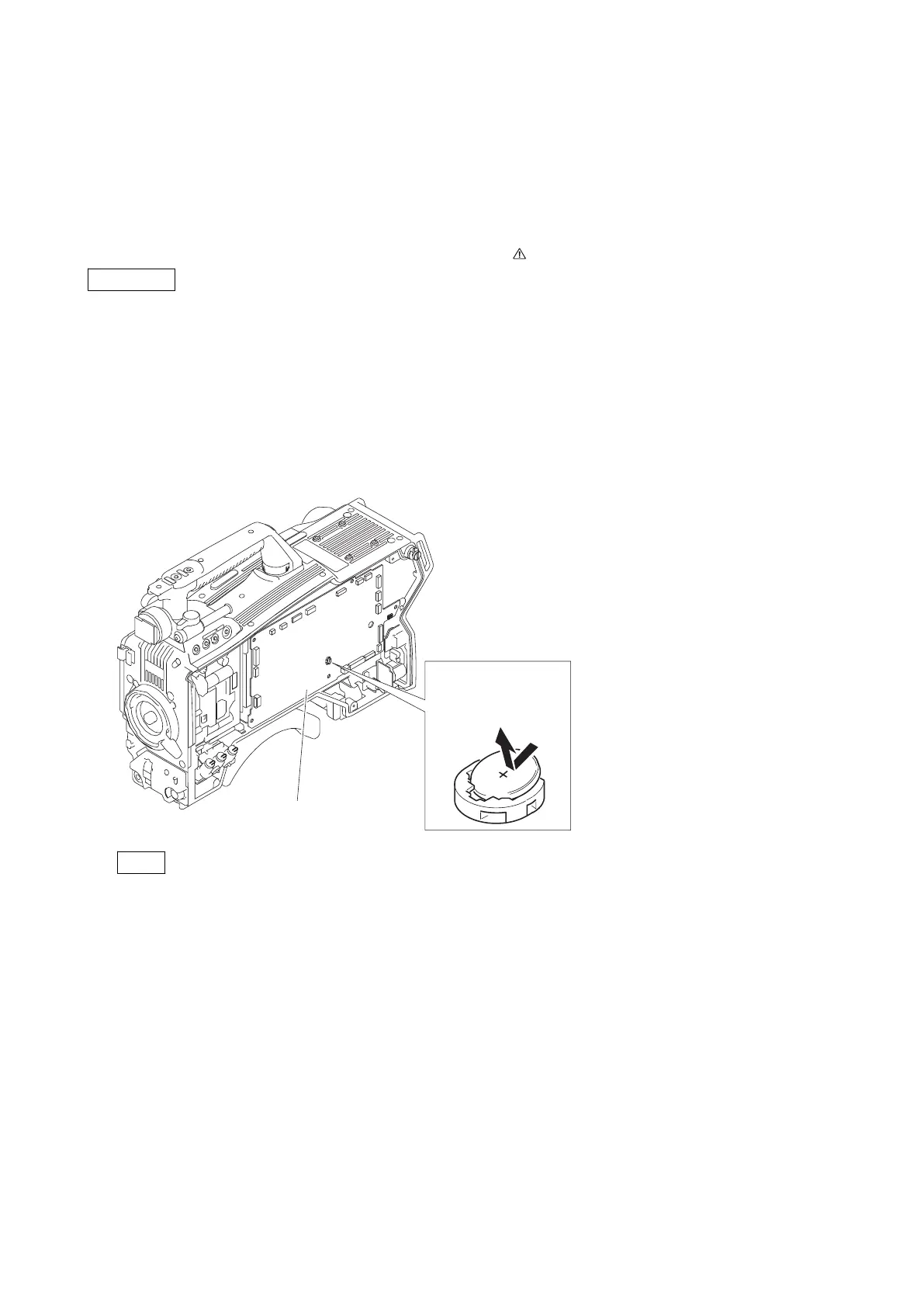
A lithium battery is mounted on the SY-408 board to back up the real time clock (RTC). If a battery comes to the lifetime,
then RTC stops. Therefore, the battery must be replaced.
• SY-408 board/Lithium secondary battery (ML621 (U)): Sony Part No. 1-756-134-15
CAUTION
In replacing, ensure that the battery is installed with “+” and “-” poles connected to the correct terminals.
Improper connection may cause an explosion or leakage of fluid, resulting in injury or damage to surrounding
properties.
2-3-2. Replacing Procedure
1. Remove the two screws and remove the inside panel assembly. (Refer to “4-2. Inside Panel Assembly”)
2. Replace the lithium secondary battery (ML621 (U)) on SY-408 board.
Push the lithium battery
with an insulated stick to
detach it from the battery
case.
SY-408
board
Note
Be sure to use an insulating stick to remove the lithium secondary battery (ML621 (U)).
3. Attach the inside panel assembly by reversing the steps of removal.
HDC4300
2-3



 To Next Page