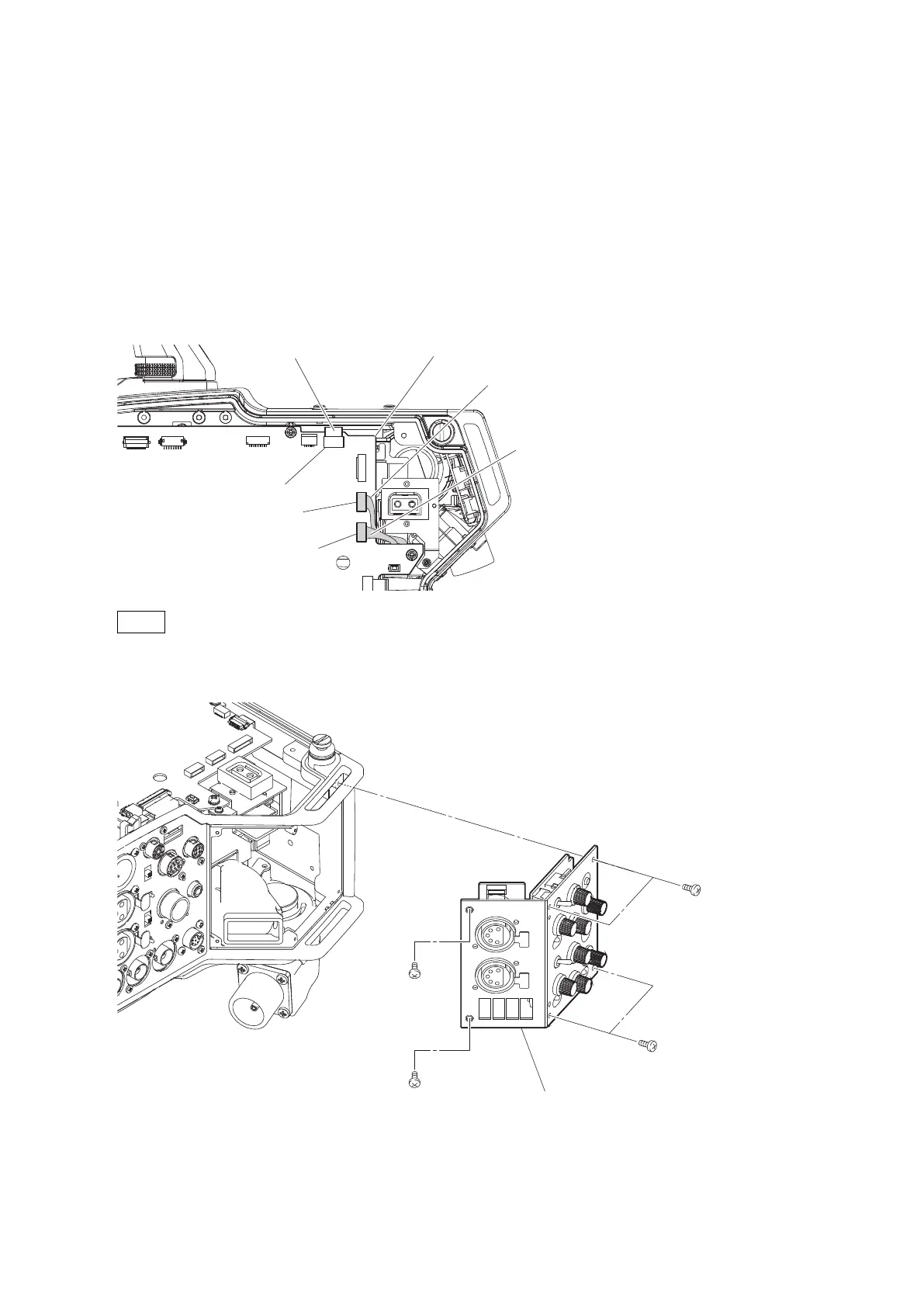
4-12. INCOM Panel Assembly
4-12-1. INTERCOM Connector (CN-3431 Board)
Preparation
1. Remove the inside panel assembly. (Refer to“4-2. Inside Panel Assembly”)
Procedure
1. Disconnect the flexible flat cable from the connector (CN5) on the SY-408 board.
2. Disconnect the two harnesses from the two connectors (CN6, CN7) on the SY-408 board.
Flexible flat cable SY-408 board
Harness (gray)
Harness (white)
CN6
CN7
CN5
Note
When connecting the two harnesses, pay attention to their colors.
3. Remove the six screws, and detach the INCOM panel assembly.
INCOM panel assembly
B2 x 5
B2 x 5
B2 x 5
B2 x 5
4. Remove the four screws, and detach the two INTERCOM connectors (CN-3431 boards).
HDC4300
4-52



 To Next Page