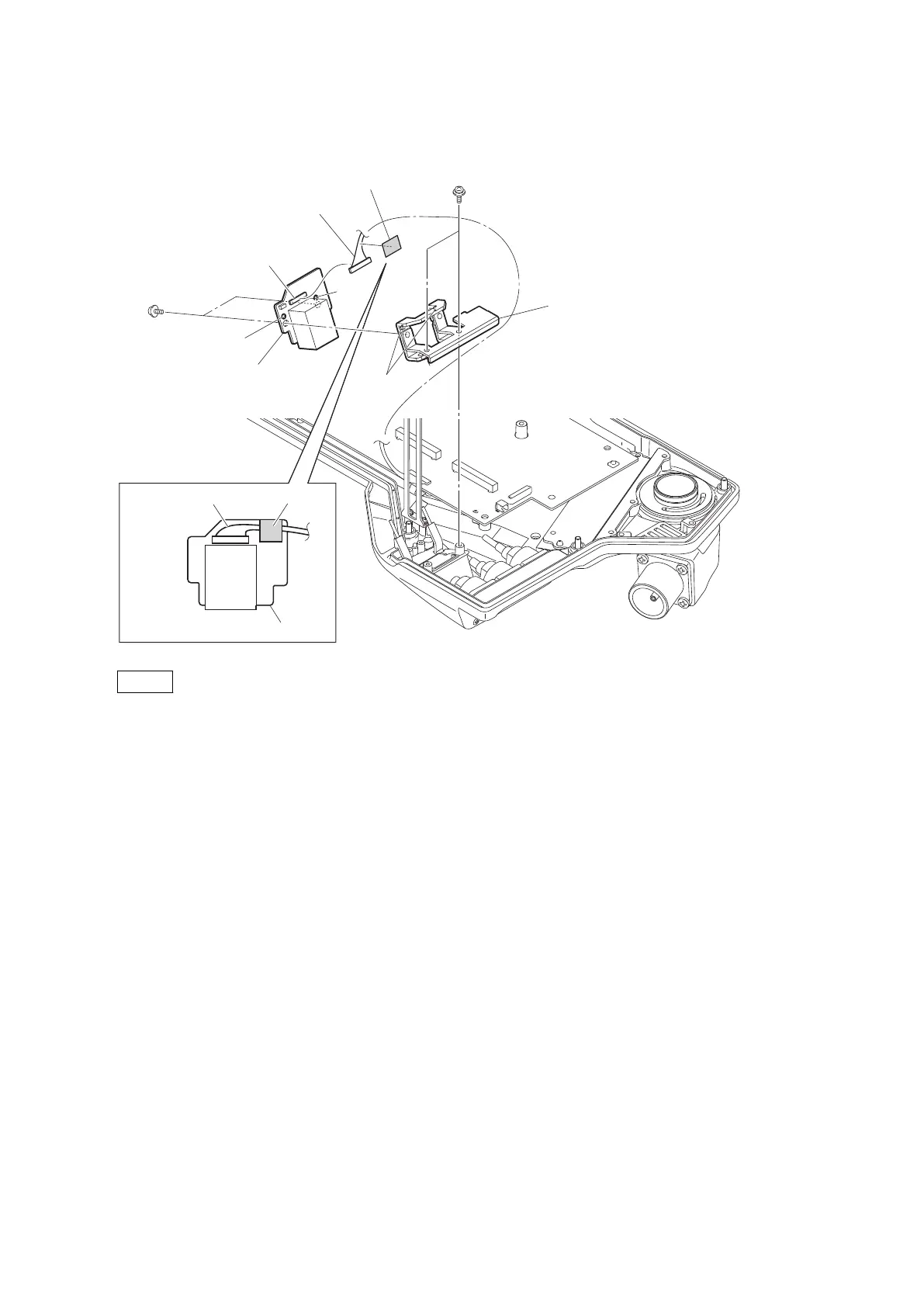
3. Remove the two screws, and detach the CN bracket (CN-3434).
4. Remove the two screws, and detach the CN-3434 board.
CN bracket (CN-3434)
CN-3434 board
Hole
Hole
PSW2 x 5
PSW2 x 5
Fine-wire coaxial cable
Fine-wire coaxial cable
UL tape
UL tape
CN-3434 board
CN001
Bosses
Notes
• When installing the CN-3434 board, match the two bosses with the two holes.
• When installing the fine-wire coaxial cable, attach the UL tape at the location shown in the figure.
5. Install the removed parts by reversing the steps of removal.
4-3-5. Optical Multi Cable Assembly
Preparation
1. Remove the outside panel assembly. (Refer to“4-3-1. Outside Panel Assembly”)
2. Remove the MEM-147 board assembly. (Refer to“4-3-2. MEM-147 Board/TX-146 Board”)
Procedure
1. Remove the screw, and detach the earth lug.
2. Remove the tape AS.
3. Release the two optical fiber cables from the clamper.
HDC4300
4-12



 To Next Page