3 Design and functional description
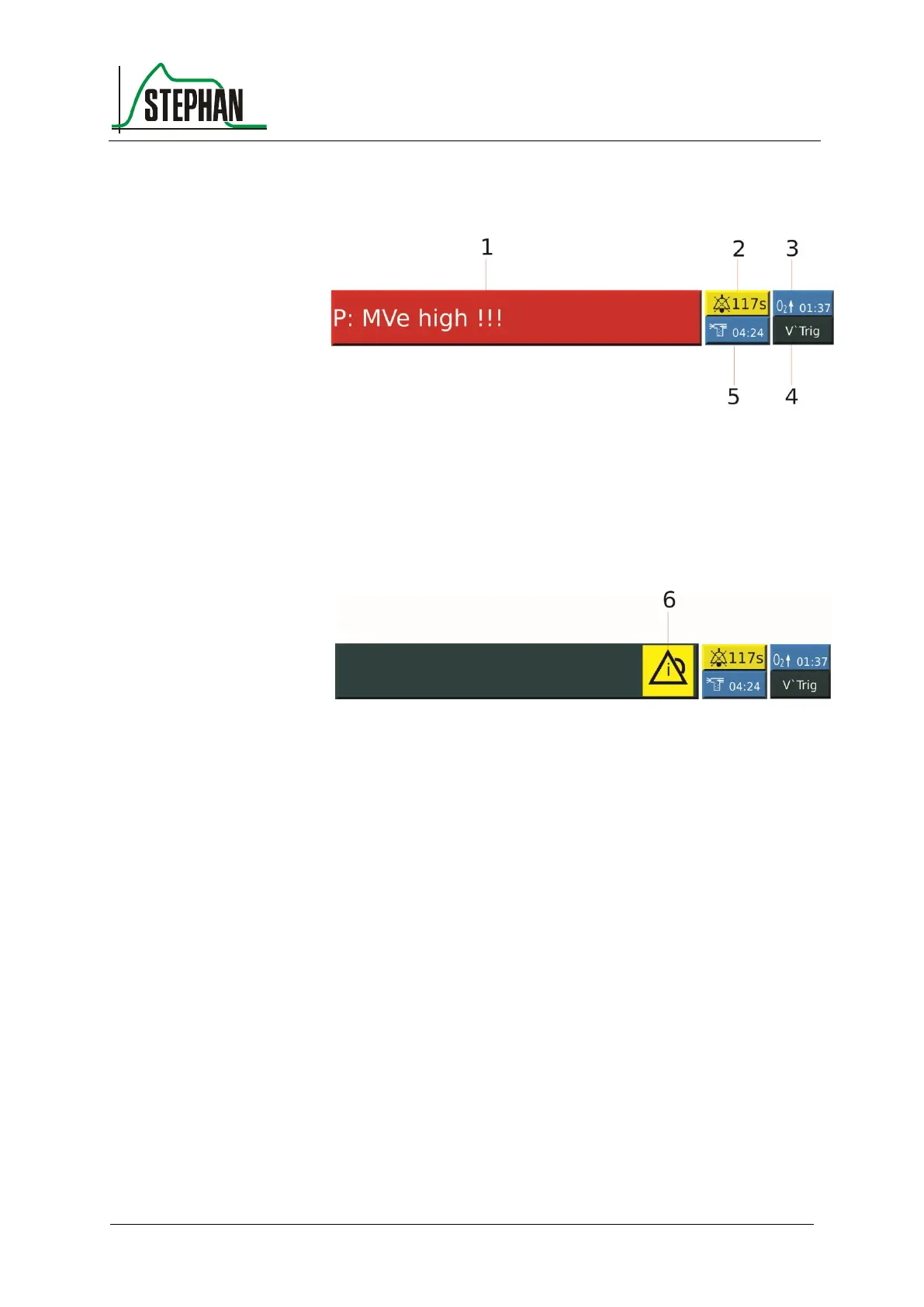
3.2.8 Status, alarm and info display
Fig. 30: Status, alarm, and info display with active alarm
2 Alarm suppression time display
5 Nebulization time display
3 Pre-oxygenation time display
Fig. 31: Status, alarm, and info display, alarm history display
The alarm display always shows the active alarm with the highest priority
(notification = blue, MP alarm = yellow, HP alarm = red). Pressing the
alarm display opens the alarm history (see chapter 3.2.3.3). If there are
no active alarms, but a non-acknowledged alarm history exists, the
corresponding icon appears on the alarm display. The icon disappears
after deleting the alarm history.
Pressing the »Alarm suppression« button (see chapter 3.1.2) mutes all
alarms for a duration of two minutes. The corresponding icon appears on
the display, and a countdown timer indicates the remaining alarm
suppression time.
Pressing the »Preoxy« button (see chapter 3.1.3) displays the
corresponding icon, and the preset preoxygenation time starts to count
down.
Pressing the »Aerosol« button (see chapter 3.1.3) displays the
corresponding icon, and the preset nebulization time starts to count down.
Alarm display and
alarm history
Alarm suppression
display



 To Next Page