Entering the aisle
Guidance procedure
– Drive the industrial truck towards the wire
groove (induction track). Stop in front of the
wire groove.
– The angle of the industrial truck relative to
the wire groove must not be greater than
60°.
– Set the steering to the straight-ahead posi-
tion.
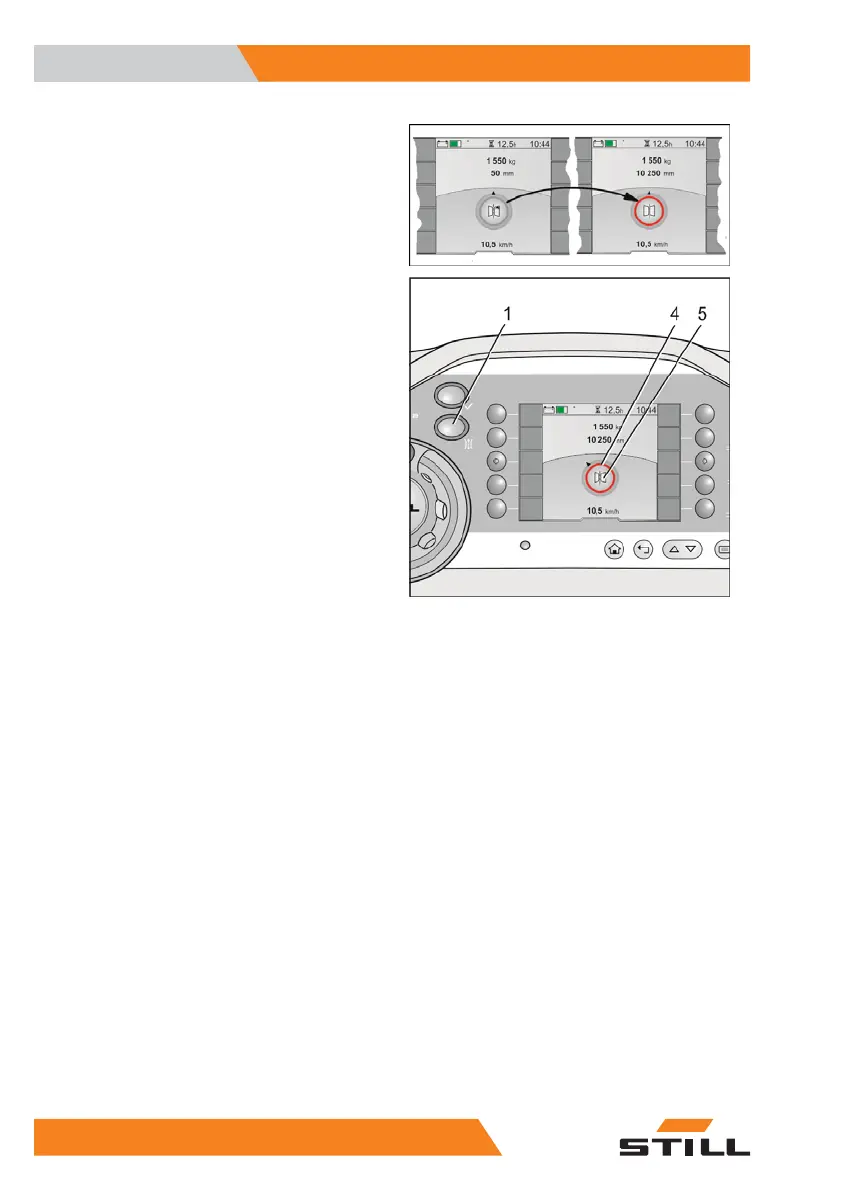
– Select automatic steering by pressing the
"Manual/Automatic" button (1). The wire
search starts.
– The coloured ring around the "guidance sta-
tus" symbol (4) goes red.
– Continue towards the wire groove. The driv-
ing speed is automatically reduced.
– When the controller detects the induction
track via the first antenna, the controller
switches to automatic mode.
– An acoustic signal will be heard.
– The coloured ring around the "guidance sta-
tus" symbol (4) changes colour from red to
yellow.
– Continue driving. The industrial truck is driv-
en automatically along the centre of the
wire groove.
– The steering function via the steering wheel
is now switched off.
– When both antennas detect the induction
track, the wire search is terminated. The
coloured ring around the "guidance status"
symbol (4) changes colour from yellow to
grey.
– Continue driving. After a short distance, the
industrial truck is now guided to the guide
wire. The coloured ring around the "guid-
ance status" symbol disappears. Now only
the guidance symbol (5) is visible.
– The truck can now be driven out of the rack-
ing at the permissible speed.
Special equipment
7
Inductive guidance IZF
116 5231 804 2502 EN - 04/2020


 To Next Page