NOTE
The more precisely the driver drives the mid-
dle of the industrial truck onto the wire groove,
the faster the guidance procedure will be com-
pleted. This means that several of the above
steps can be skipped.
Entering the aisle
– Guide the industrial truck onto the induction
track and drive into the aisle in automatic
driving mode.
– When the sensor system of the industrial
truck has detected the aisle, the maximum
permissible speed within the aisle is possi-
ble.
CAUTION
Risk of collision with the racking
Entering the aisle by steering manually is not permit-
ted. If the industrial truck enters the aisle by manual
steering, the industrial truck is stopped immediately.
You can continue driving once you switch to auto-
matic mode.
Automatic driving within the aisle
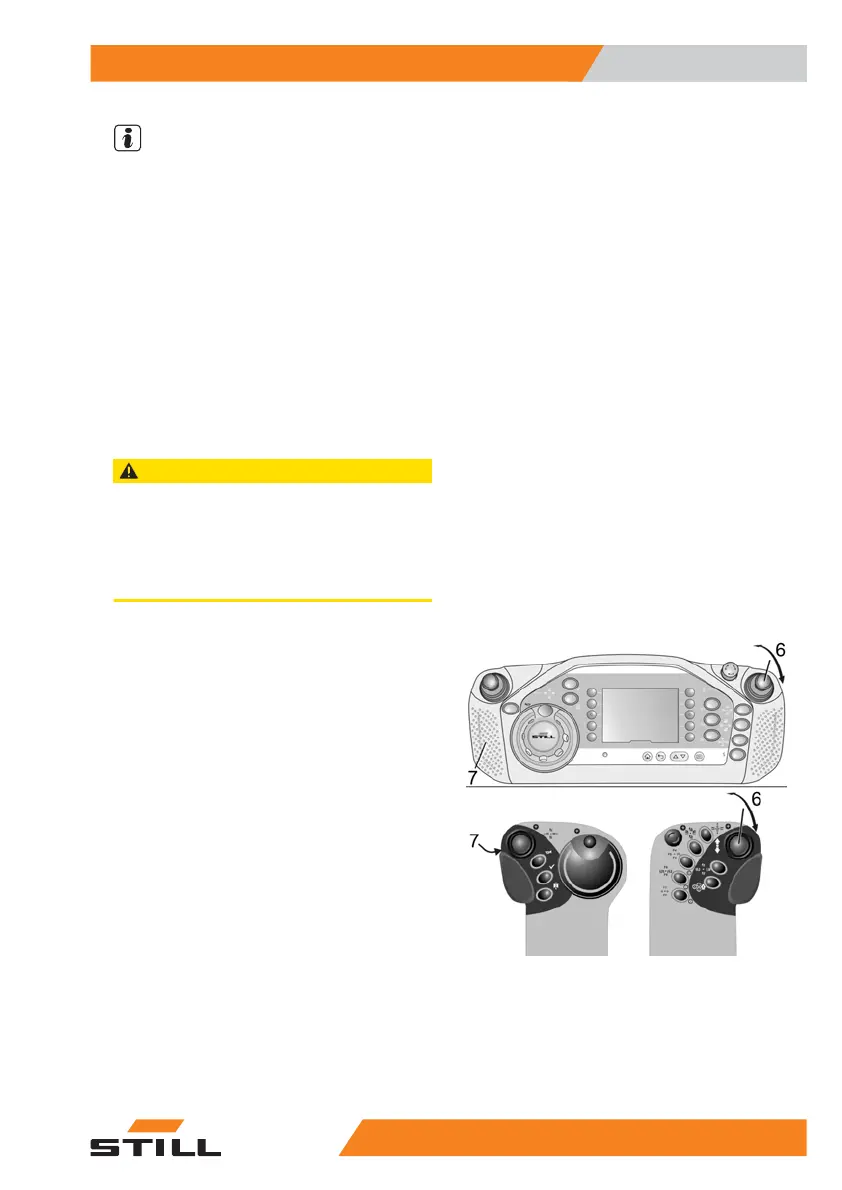
To operate the industrial truck in automatic
driving mode, the left-hand sensor surface for
two-hand operation (7) and the right-hand op-
erating lever (6) must be actuated. If the cab
lift needs to be lifted or lowered at the same
time as this, both operating levers must be ac-
tuated accordingly. If the steering knob is acci-
dentally turned to its straight-ahead position
(middle detent) during automatic driving mode,
the industrial truck is automatically braked to a
standstill.
Switching from automatic mode to manual
mode within the aisle
If the industrial truck is accidentally switched
to manual steering within the aisle, the indus-
trial truck is immediately braked to a standstill.
It is then only possible to continue at creep
speed.
Driving speed adaptation
Special equipment
7
Inductive guidance IZF
1175231 804 2502 EN - 04/2020


 To Next Page