5
Changes the view to the main
page with the menu shown in the
right-hand menu bar.
If a settings page is displayed, the
current setting can be saved.
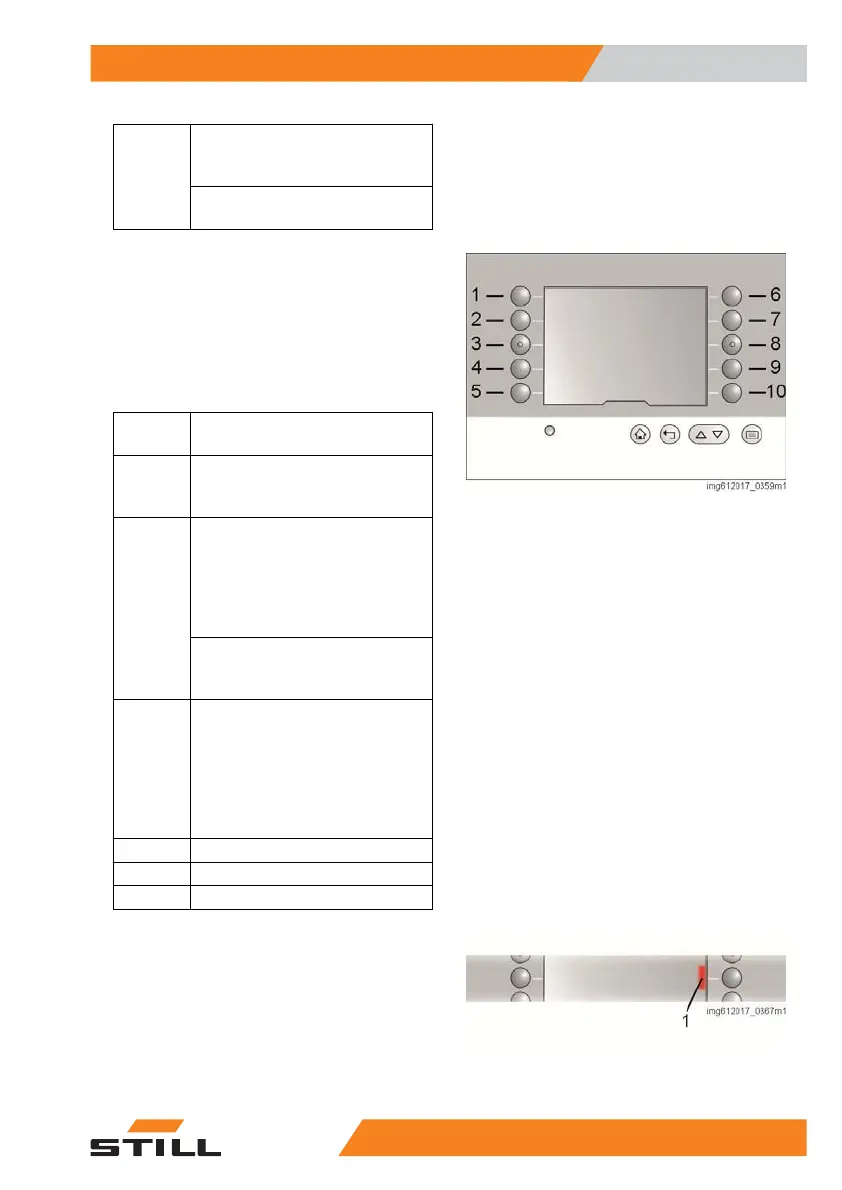
The function of membrane keys (1) to (10) is
shown directly next to the keys in the display.
The function of the buttons changes depend-
ing on the menu that is displayed.
The layout of the main page is always the
same when the industrial truck is delivered ex
works.
Item
number
Function
1
The energy-saving mode of the
industrial truck is activated or de-
activated.
5
The navigation information is
shown or hidden. For this, the key
switch for the navigation must be
set to AUTO. Otherwise, the sym-
bol is greyed out and therefore
cannot be selected.*
If the button is pressed and held
when a drive order is active, the
drive order is deleted.*
6
The right-hand menu bar with the
available data regarding height
preselection opens. If the symbol
is greyed out, the industrial truck
is equipped with the navigation
option and the key switch for nav-
igation is set to AUTO.*
9 Switch the work light* on/off
10 Switch the fan* on/off
* Option
If a function or button is selected, this is indi-
cated with a coloured bars (1) next to the but-
ton. If the function is deselected, this coloured
bar is no longer present.
Overview
3
Operating the display
375231 804 2502 EN - 04/2020


 To Next Page