The information contained in this document is confidential, and only for the information of the intended recipient and may not be published or redistributed without the prior written consent of Summa NV.
Summa nv Tel +32 59 27 00 11 Fax +32 59 27 00 63 Email support@summa.com Website www.summa.com Page 53 of 76
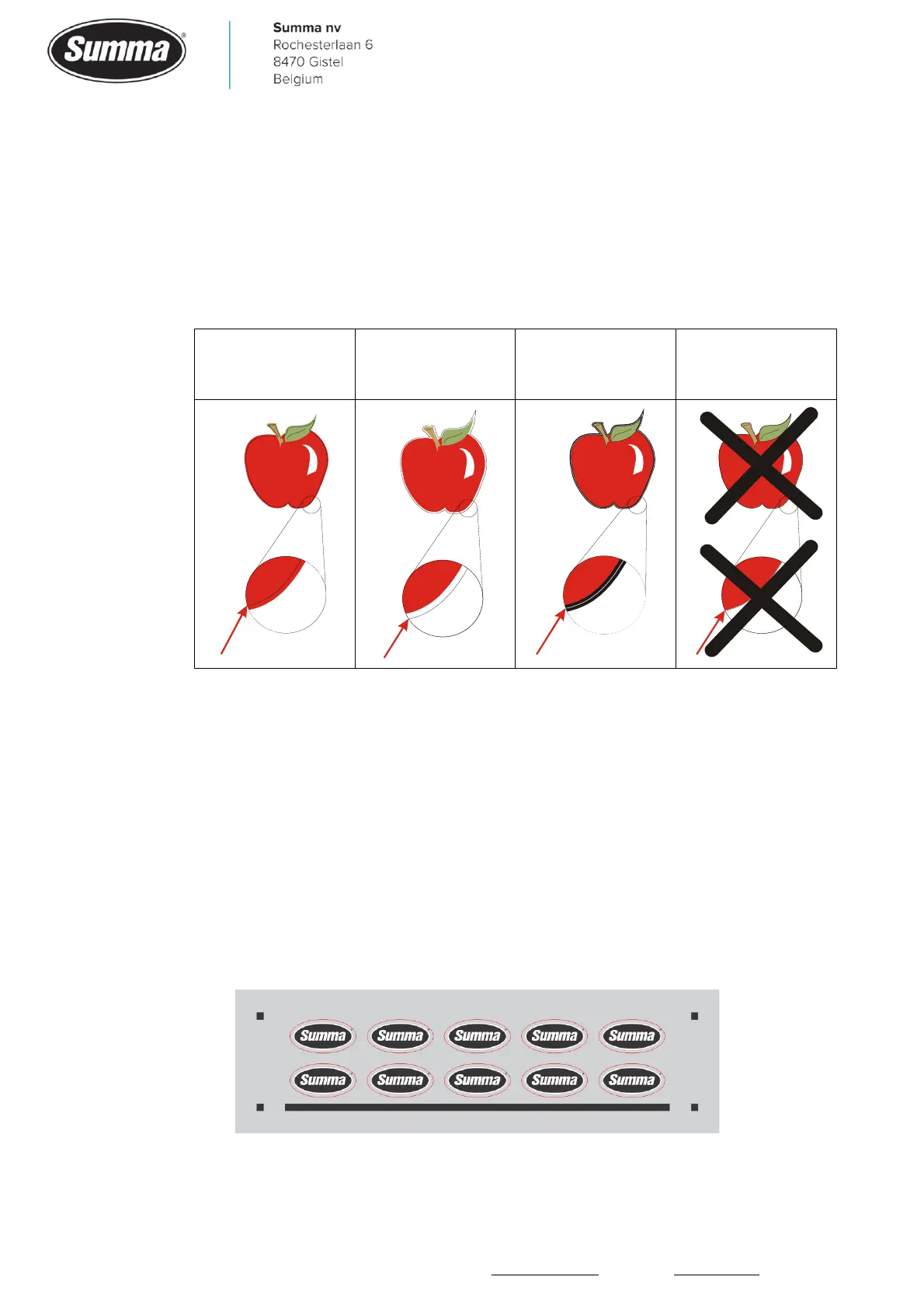
• The contour line may have been put on the edge of the design. The slightest movement in the
media may then result in an unsatisfactory cut. Instead, practice one of the following
techniques:
▪ Place contour lines just inside the graphics (recommended) (1).
▪ Place contour lines outside the graphics (2).
▪ Create thick borders around graphics and place contour lines inside these borders (3).
• The distance between the registration marks along the X-axis (media transportation direction)
has to be equal for all registration marks, and should not exceed 1200 mm.
• The software generating the contours (RIP) may contain a bug. Update the software.
• The media may have been put upside down in the machine. Rotate the media 180° in the
machine and run the job again.
• In case the shift is more prominent in the middle of the width of the job, then there may be
some bowing of the media. This because the media has been deformed due to the heating
used to cure the ink in the film. Use the alignment method OPOS-XY to compensate for this.
▪ How the design was created:









 To Next Page