STEP EXCITE: Service & maintenance manual - rev. 1.4
Page 7.13
7.2.3. 500I AND 500I SP VERSION
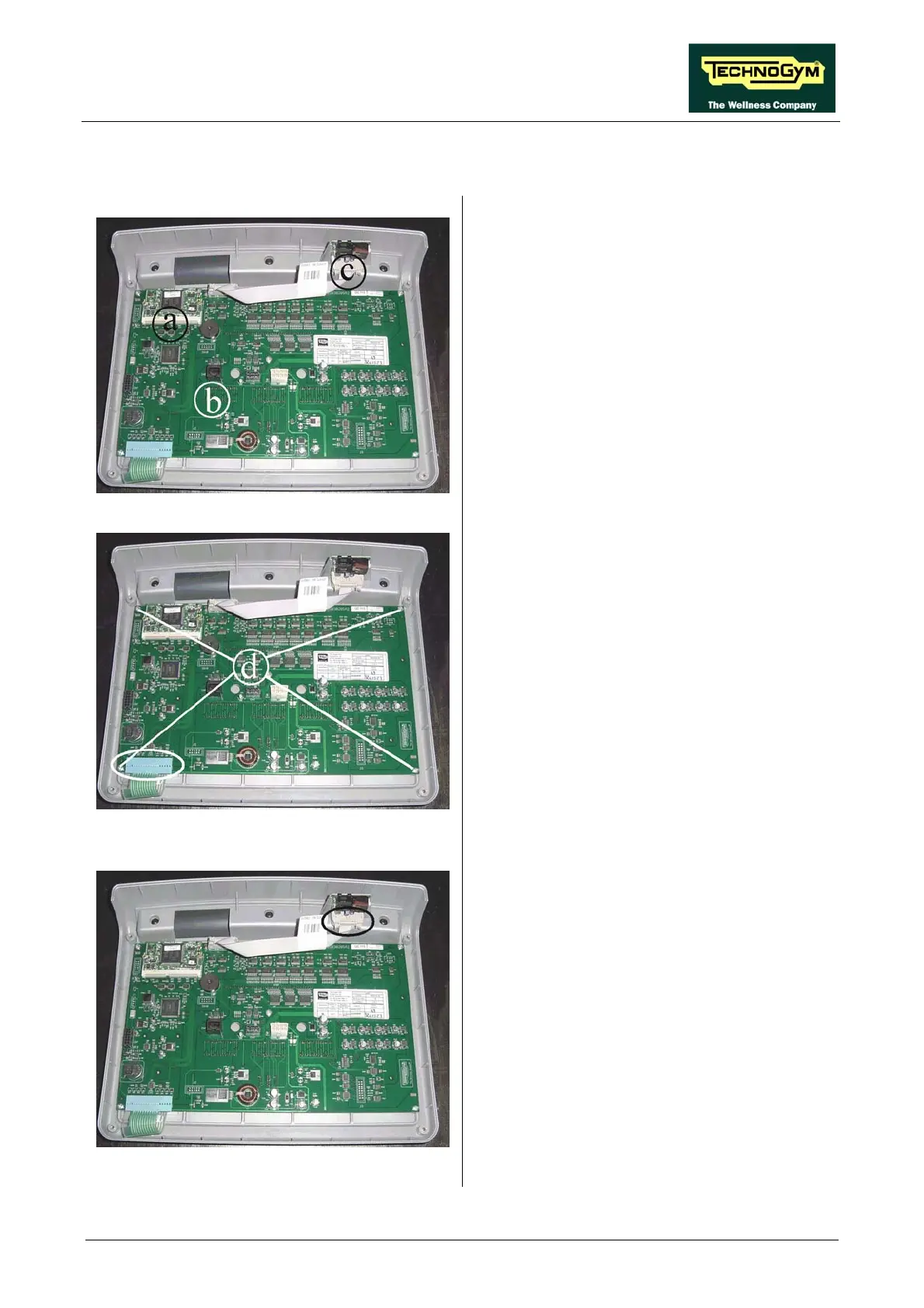
Figure 7.2-24
Carry out the procedure described in paragraph
7.1. “Disassembling the display”.
Then place the display on a work bench. It is
now possible to disassemble its three circuit
boards:
• The 386 board a;
• The display board b;
• The CSafe board c.
Figure 7.2-25
386 board a:
1. Release the fixing tabs The circuit board will
lift up slightly.
2. Remove it from the connector on the display
board.
display board b:
1. Unplug the keyboard connector indicated in
the figure.
2. Back off the 5 screws d using a medium
Phillips screwdriver.
3. Remove the circuit board.
Figure 7.2-26
CSafe board c:
1. Unplug the connector indicated in the figure.
2. Remove the circuit board from the top.
To reassemble the electronics boards, carry out
the above steps in reverse order.














 To Next Page