STEP EXCITE: Service & maintenance manual - rev. 1.4
Page 7.15
7.3.2. 700IE TOUCH SCREEN WELLNESS TV VERSION
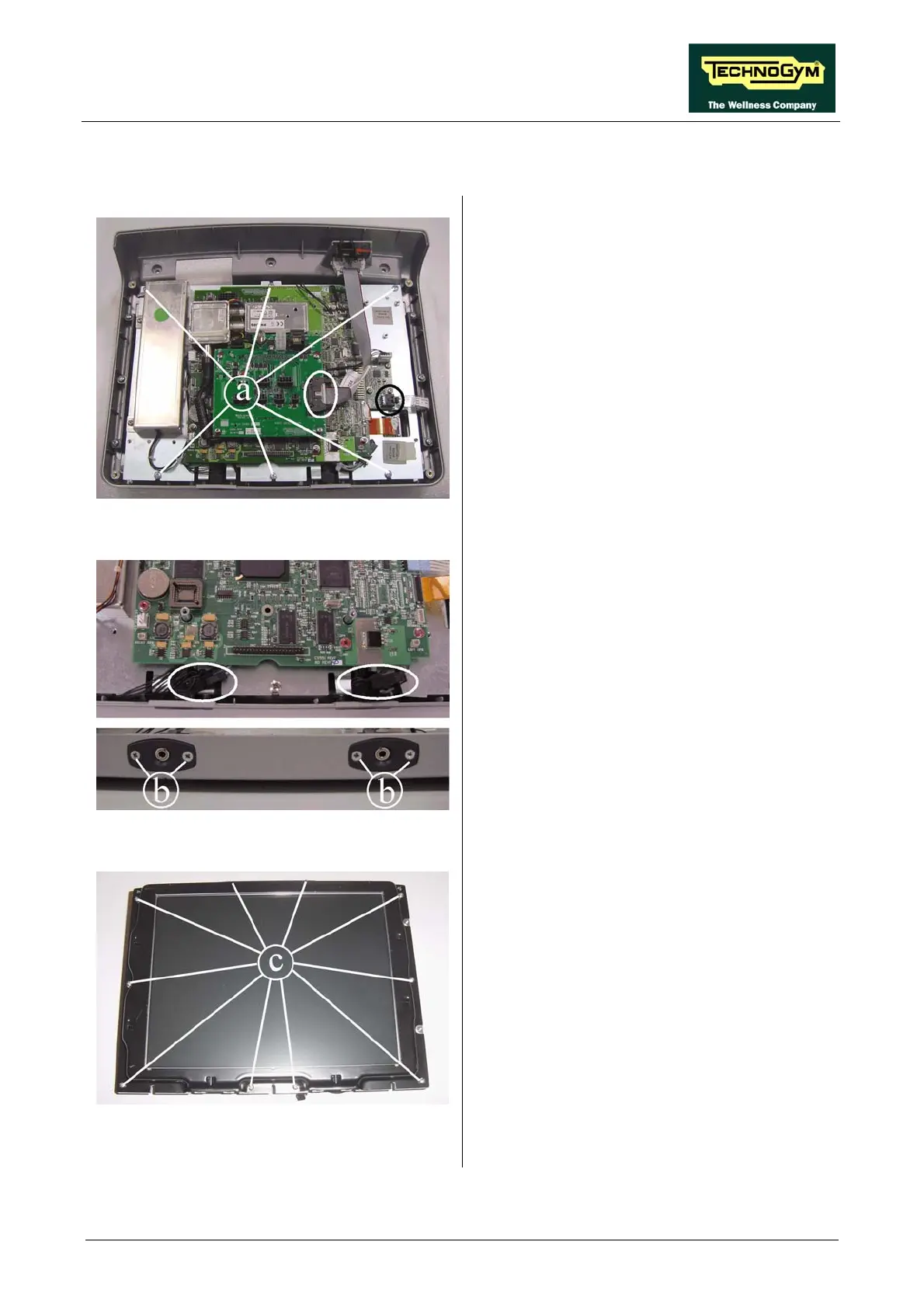
Figure 7.3-3
Carry out the procedure described in paragraph
7.1. “Disassembling the display”.
1. Unplug the connectors from the touch screen
and CSafe board, indicated in the figure.
2. Back off the 6 screws a which secure the
plate and all the display circuit boards to the
front cover.
Figure 7.3-4
3. Back off the 2 screws b securing the
headphone jack to the display, using a small
Phillips screwdriver.
4. Unplug the connectors indicated in the
figure.
5. Remove the two headphone jacks from the
display housing.
6. Lift up the plate to which all the circuit
boards and the LCD are fixed.
Figure 7.3-5
7. Back off the 10 screws c securing the touch
screen protection plate, using a small Phillips
screwdriver.
Continued on following page →














 To Next Page