STEP EXCITE: Service & maintenance manual - rev. 1.4
Page 7.7
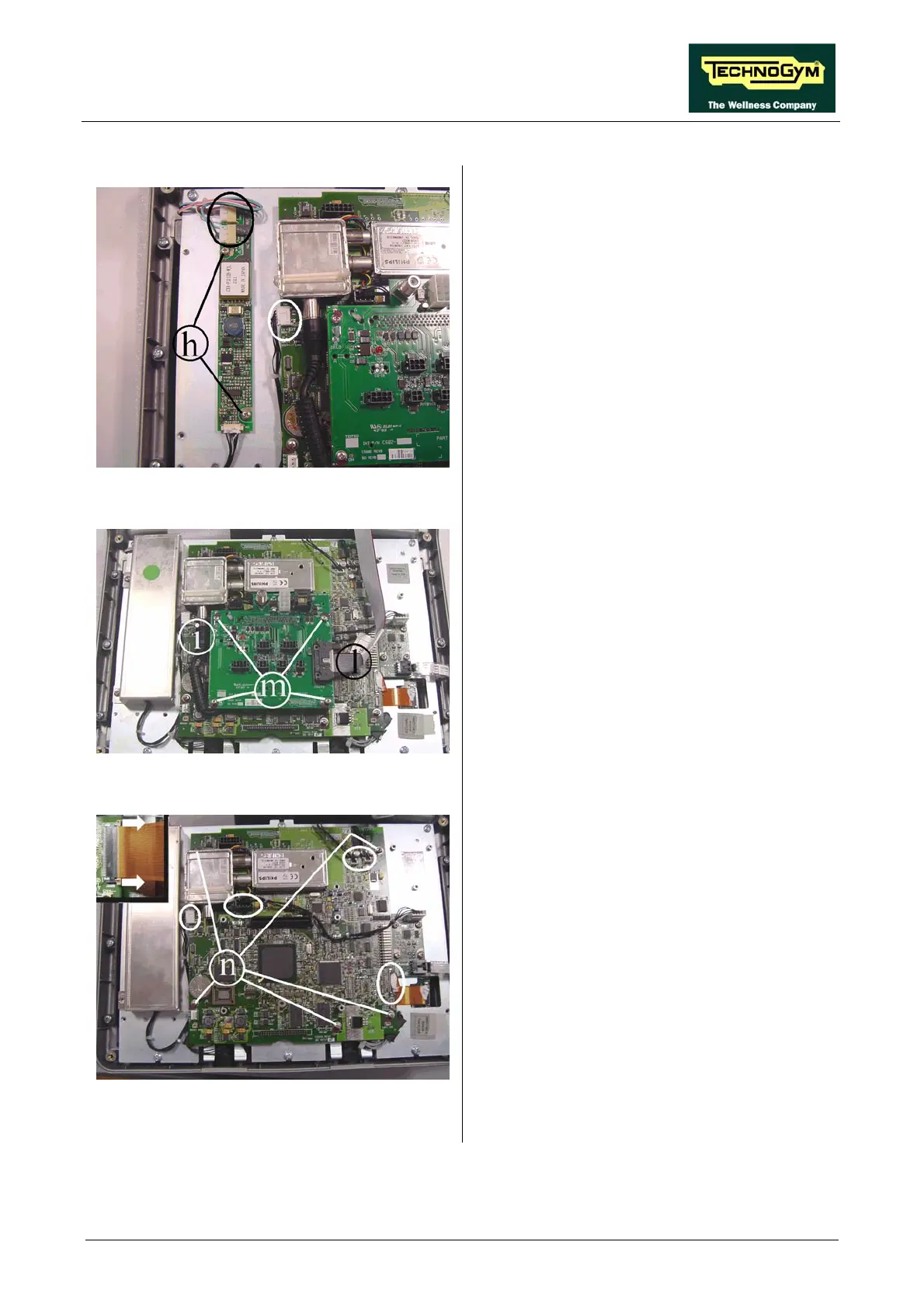
Figure 7.2-8
1. Unplug the connectors indicated in the
figure.
2. Back off the two screws h securing the board
to the plate of the display.
3. Remove the LCD inverter.
Figure 7.2-9
Connector board c:
1. Unplug connectors i and l.
2. Back off the screws m using a medium
Phillips screwdriver.
3. Remove the circuit board from the display,
taking care not to damage the connector that
attaches it to the CPU board.
Figure 7.2-10
CPU Board d:
1. Disassemble the connector board.
2. Unplug the cables indicated in the figure,
coming from the TTL board, LCD inverter,
touch screen and headphone jack.
3. To unplug the cable from the TTL board,
open the connector on the CPU as shown in
the close-up at the top left, and remove the
cable.
4. Back off the 5 screws n using a small
Phillips screwdriver.
5. Remove the CPU board.
Continued on following page →














 To Next Page