101
16. SETTING-OUT LINE
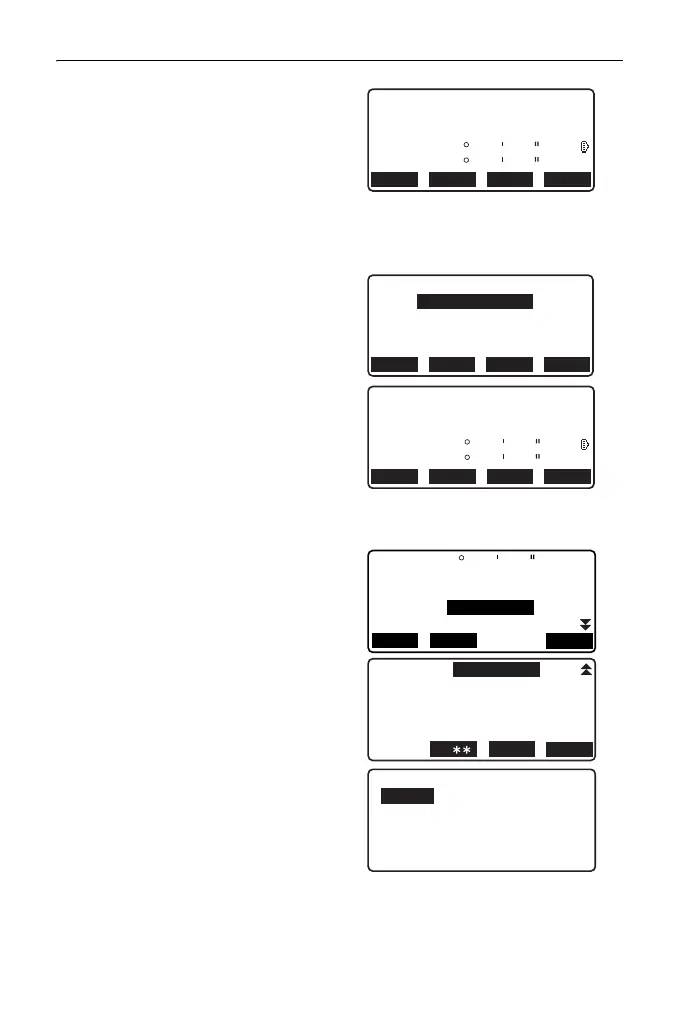
5. Press [OK] to use the
measurement results of the first
point.
•Press [MEAS] to observe the
first point again.
•Press [HT] to input instrument
and target height.
6. Sight the second point and press
[MEAS].
7. Press [OK] to use the
measurement results of the
second point.
•Press [MEAS] to observe the
second point again.
•Press [HT] to input instrument
and target height.
• Scale factor settings can be set
in the screen shown at right.
8. Press [OK] on the third screen of
step 7 to define the baseline.
<Set-out line> is displayed. Move
to setting-line measurement.
"16.2 Setting-out Line Point"/
"16.3 Setting-out Line Line"
•Press [Sy=1] to set scale factor
y to “1”.
HT
12.122
113.464
91.088
C
Np:
Ep:
Zp:
REC
ZA
HA-R
90
120
00
10
00
00
REC HT MEAS OK
Define 2nd PT
Np:
Ep:
Zp:
REC
0.000
0.000
0.000
RECLOAD MEAS OK
13.212
113.464
145.874
C
Np:
Ep:
Zp:
ZA
HA-R
90
120
00
10
00
00
REC HT MEAS OK
Azmth
Hcalc
Hmeas
ScaleX
Sy=1
Sy=Sx
OK
1.000091
13.003m
17.294m
ScaleY
1.000091
93 20 31
Set-out line
Point
Line



 To Next Page