16. SETTING-OUT LINE
104
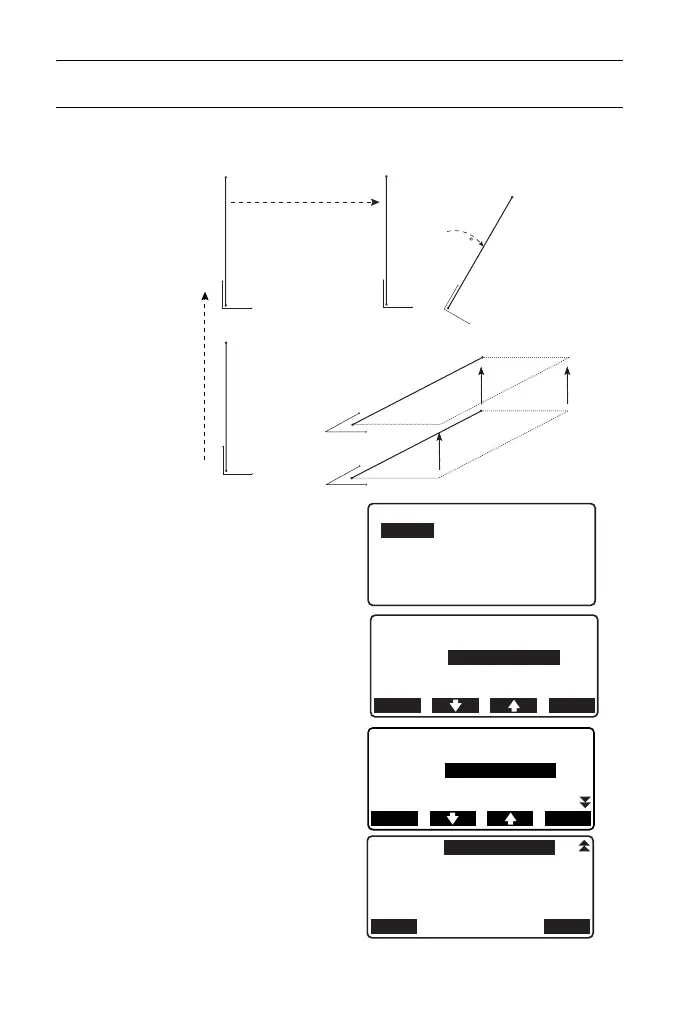
PROCEDURE Offsetting the baseline
The baseline can be offset in three dimensions using four methods: lengthwise
offset, lateral offset, height offset, and rotation angle offset.
1. Select “Point” in <Set-out line>
2. Press [OFFSET] to display
<Baseline offset>.
3. Set the following items.
(1) Incr: Increment by which
offsets can be decreased/
increased using the arrow
softkeys.
(2) Length: Lengthwise offset
(3) Lateral: Lateral offset
(4) Height: Elevation offset
(5) Rt.ang: Rotation angle offset
• []/[]: Press to decrease/
increase the value by the
amount set in "Incr".
Lengthwise
offset
Lateral offset
Rotation
angle offset
Height
offset
Set-out line
Line
Offset
0.000m
OK
Incr 1.000m
0.000m
OFFSET
Baseline offset
Length
Lateral
0.000m
Incr 1.000m
0.000m
Height
0.000m
MOVE OK



 To Next Page