25. ROUTE SURVEYING
192
25.8.3 Displaying curve properties
It is possible to check the curve properties set in “25.8.2 Inputting Curve
Elements”. To make alterations, follow the procedure described in “25.8.2
Inputting Curve Elements”.
• The curve property data will be displayed in ascending order of curve number.
PROCEDURE
1. Input the IPs.
“25.8.1 Inputting IPs (Intersection
Points)”
2. Input the elements for the curve.
"25.8.2 Inputting Curve Elements"
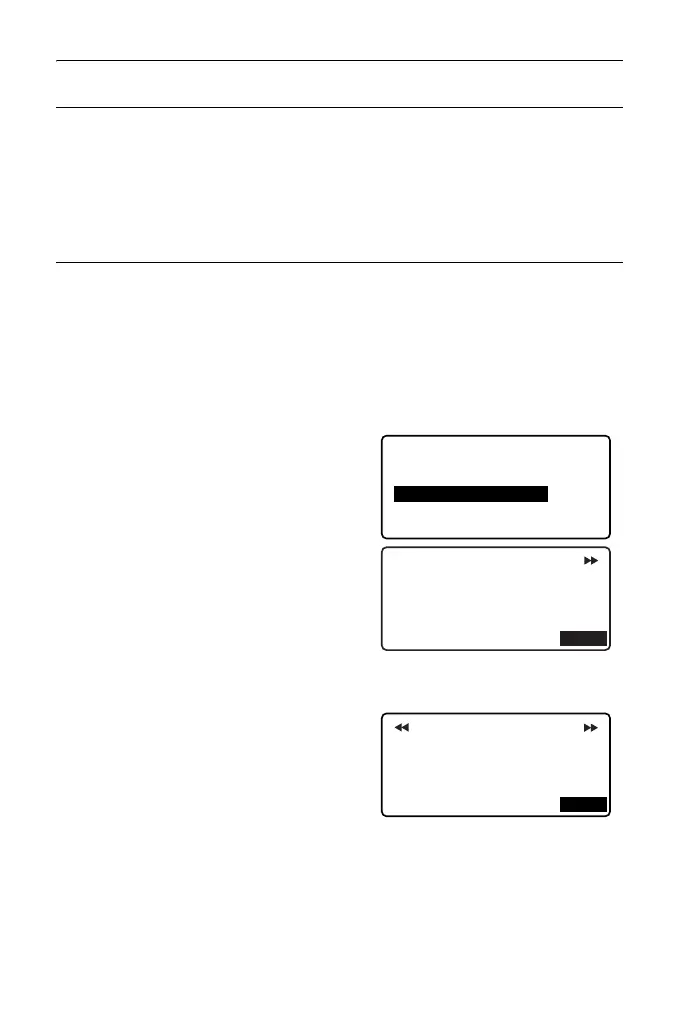
3. Align the cursor with "Review
elements" and press {ENT}.
Use {}/{} to move through property
screens in the following order: BP
Point -> IP Point -> EP Point -> curve
properties -> BP Point of the next
curve.
4. Press [OK] to return to <Define
elements>.
Input IP
Define elements
Input element
Review elements
Clear
Np:
Ep:
100.000
Element1/BP
100.000
OK
St.ofs
Radius
60.000m
0.000m
Para A1
50.000m
Para A2
50.000m
Element1
OK



 To Next Page