23
5. BASIC OPERATION
* 2 Vertical angle
Switching vertical angle display status: "33.1 Configuration -Config Mode-"
ZA : Zenith angle (Z=0)
VA : Vertical angle (H=0/H=±90)
To switch vertical angle/slope in %, press [ZA/%]
* 3 Horizontal angle
Press [R/L] to switch the display status.
HA-R: Horizontal angle right
HA-L: Horizontal angle left
* 1,2,3
To switch usual “SD, ZA, HA-R” display to “SD, HD, VD”, press [SHV].
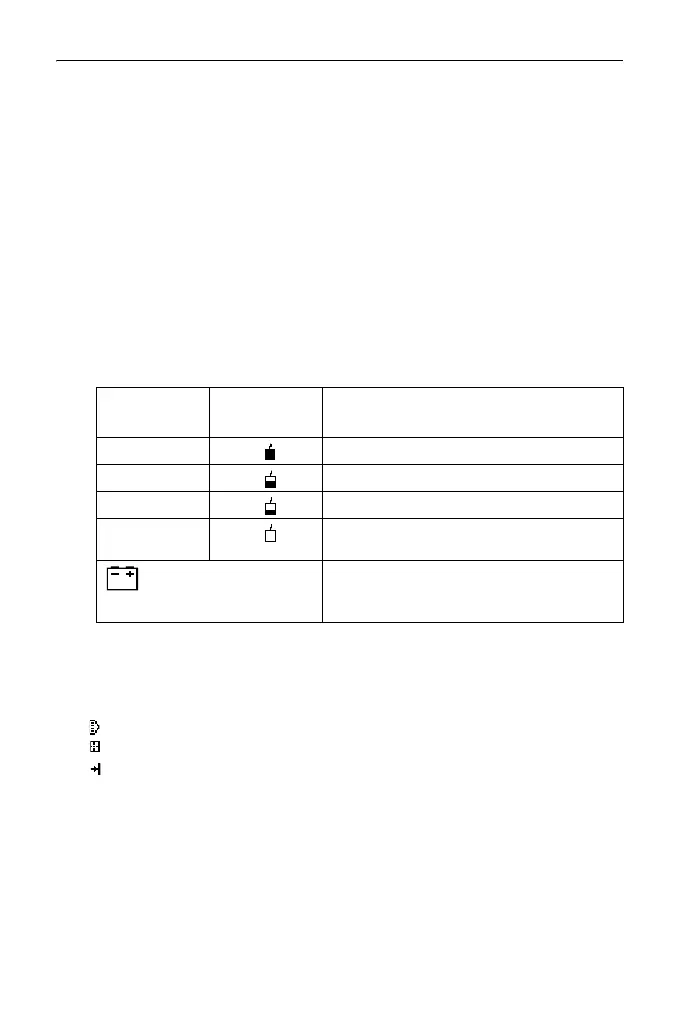
* 4 Remaining battery power (Temperature=25°C, EDM on)
"6.1 Battery Charging"
*5 Target display
Press {SHIFT} to switch the selected target. This key function can be used
only on the screens on which the target symbol is displayed.
:prism
:reflective sheet
:reflectorless
* 6 Tilt angle compensation
When this symbol is displayed, the vertical and horizontal angles are
automatically compensated for small tilt errors using 2-axis tilt sensor.
Tilt compensation setting: "33.1 Configuration -Config Mode-"
Using BDC70
Using external
battery
Battery level
level 3 Full power
level 2 Plenty of power remains.
level 1 Half or less power remains.
level 0 Little power remains.
Charge the battery.
(This symbol is displayed
every 3 seconds)
No power remains.
Stop the measurement and charge the
battery.



 To Next Page