SonixTablet Service Manual 00.053.129, Revision C Chapter 3: System Installation
3-11
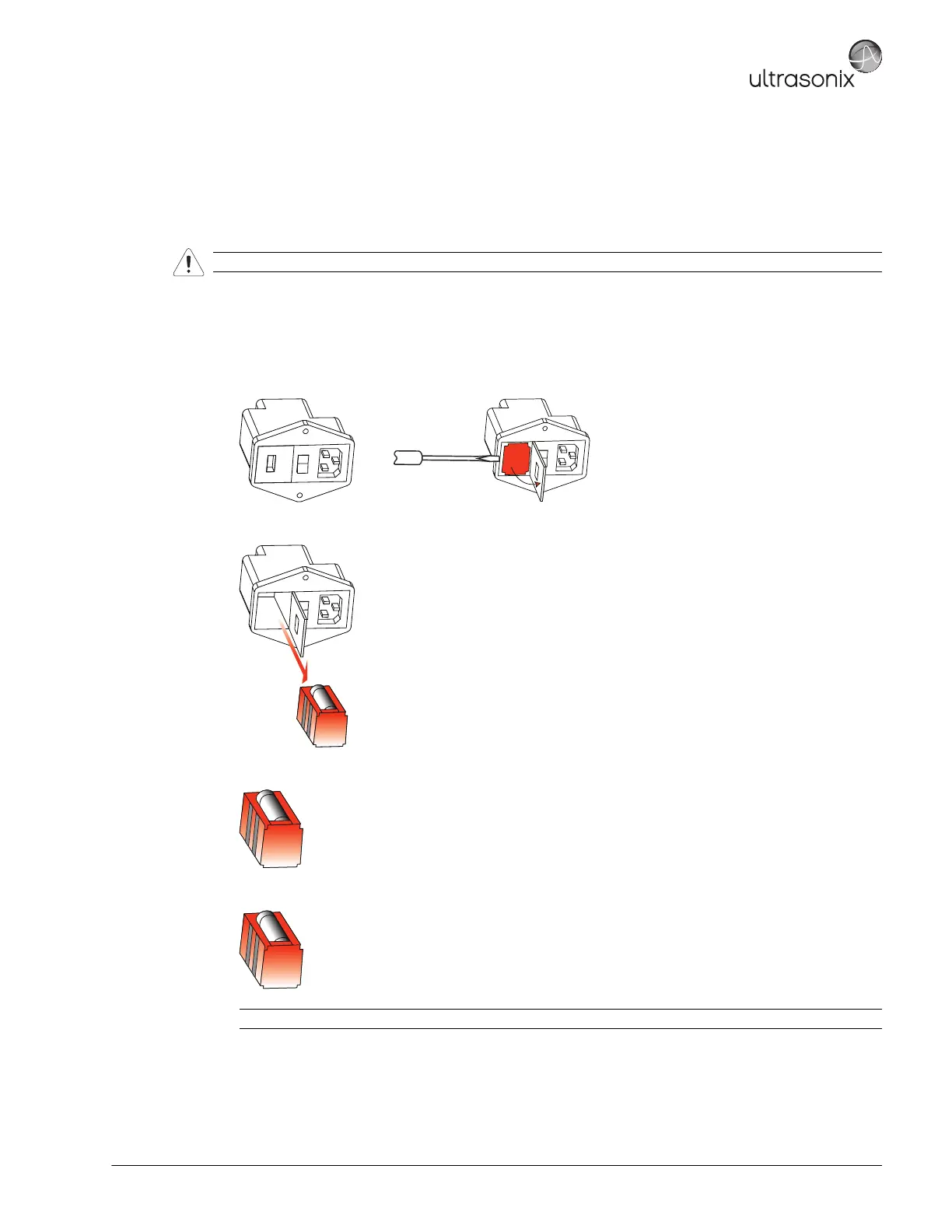
3.3.2.2 Changing Fuses
Equipment/Tools Required:
• two (2) 3AG Slo-Blo, 7A/250V fuses
• fine tipped, narrow shafted, flat head screwdriver (e.g, ⅛" (3mm) jewelers screwdriver).
To Change the Fuses:
1. Power off and unplug the power cord from both the wall outlet and the system.
2. Use the screwdriver to open the fuse box lid.
3. Position the screwdriver at the top (as in step 2), using it to remove the fuse box.
4. Replace one or both fuses, as required.
5. Reinsert the fuse box.
6. Close the fuse box lid.
Warning: Do not perform any internal system maintenance if the UPS breakers are turned on.
Caution: Ensure the correct voltage setting is visible and that it matches the setting on the EMI filter (3.3.1.1).



 To Next Page