SonixTablet Service Manual 00.053.129, Revision C Chapter 6: Peripherals and Accessories
6-1
CHAPTER 6: PERIPHERALS AND ACCESSORIES
6.1 PERIPHERAL COMPONENTS
6.1.1 Local Printer Setup
To Connect the USB Printer:
1. Ensure the printer has been installed.
2. Connect the peripheral power cord to a wall outlet.
3. Insert the USB connector into one of the six (6) USB ports on the Side Connectivity Panel.
4. Ensure the system in plugged in and powered on.
5. The USB printer will automatically communicate with the system and configure itself.
6. Configure Custom Keys (6.1.3) and Image Sheet Printing (6.1.3.3) as required.
6.1.2 Network Printer Setup
This section uses the HP DeskJet 5440 as the example Network Printer and is meant only as a guide as not all
networks are identical.
These instructions can also be used as a reference for installing other system network printers.
To Connect the Network Printer to the System:
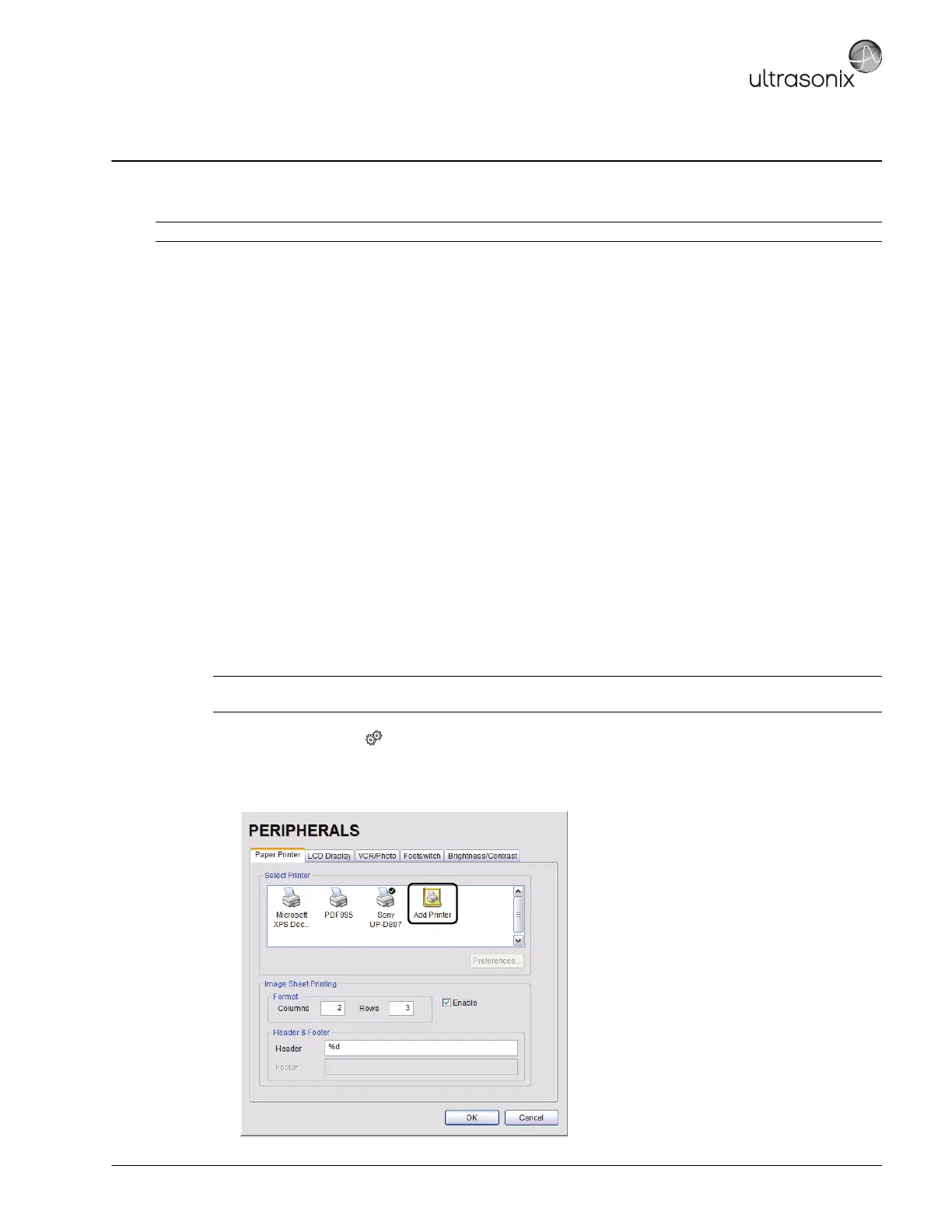
1. Tap the touch screen button.
2. Select Administrator > Peripherals.
3. In the Paper Printer dialog, double select Add Printer.
Caution: Refer to the most recent price list to determine the exact make(s)/model(s) of Ultrasonix-approved devices.
Note: Before proceeding, ensure that the network has a shared printer. Contact your System Administrator if
you're not sure.



 To Next Page