ELECTRICAL SYSTEM
M8540Narrow, M9540Narrow, WSM
N9-S7
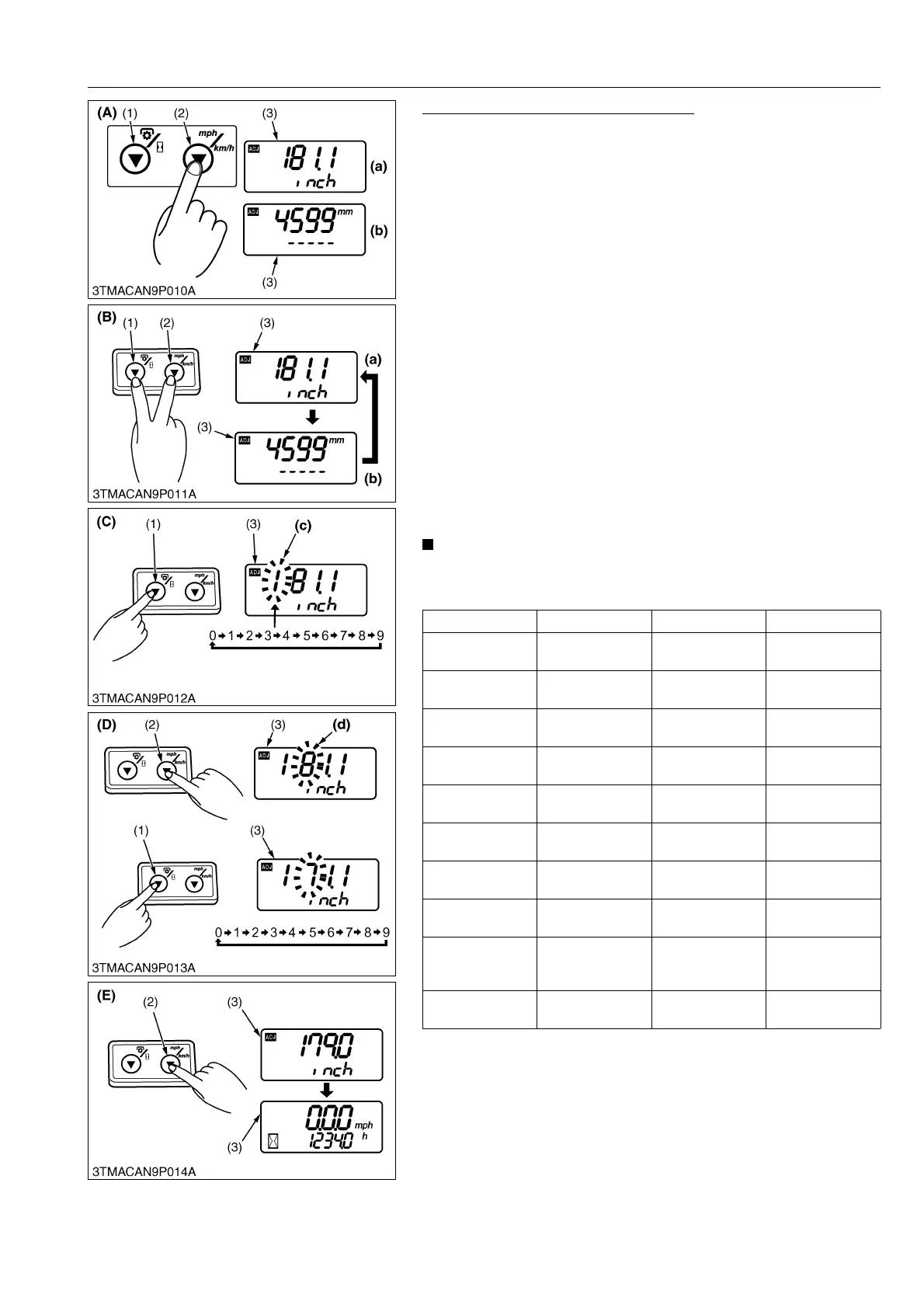
Entering Traveling Speed Coefficient
[Example: Entering 179.0 inch]
1. While pressing the traveling speed select switch (2), turn the
key switch to "ON" position. The setting of the current tire's
circumference is displayed in inches (a) or millimeters (b). The
highest-digit numeral starts flashing.
2. Each time both the PTO/Hour meter select switch (a) and
traveling speed select switch (2) are pressed at the same time,
the unit changes for inches (a) or millimeters (b). Select the inch
display mode.
3. Note that the highest-digit numeral (c) is flashing. Press the
PTO/Hour meter select switch (1) to select "1". (The numeral
changes from 0 to 9 at each push of the switch.)
4. Press the traveling speed select switch (2), and the next highest
digit (d) starts flashing. Now press the PTO/Hour meter select
switch (1) to select "7".
5. Enter "9" and "0" for the remaining digits in the same
procedure.
6. Make sure the entry is "179.0". Press and hold the traveling
speed select switch (2) longer than 2 seconds. The setting is put
in memory, and the LCD monitor (3) goes back to the hour
meter mode.
7. Turn the key switch to "OFF" position to exit.
• The setting will be cancelled if the key switch is turned OFF
halfway in the procedure.
Tire circumference chart (reference)
9Y1210236ELS0030US0
Rear tire size Entry Rear tire size Entry
12.4R24
3612 mm
(142.2 in.)
360 / 70R28
3914 mm
(154.1 in.)
13.6R28
4109 mm
(161.8 in.)
380 / 70R20
3399 mm
(133.8 in.)
14.9LR20
3418 mm
(134.6 in.)
380 / 70R24
3748 mm
(147.6 in.)
230 / 95R32
3974 mm
(156.5 in.)
380 / 70R28
4059 mm
(159.8 in.)
230 / 95R36
4288 mm
(168.8 in.)
420 / 65R24
3628 mm
(142.8 in.)
320 / 85R24
3641 mm
(143.3 in.)
420 / 70R28
4203 mm
(165.5 in.)
320 / 85R28
3943 mm
(155.2 in.)
440 / 65R24
3713 mm
(146.2 in.)
340 / 85R28
4049 mm
(159.4 in.)
440 / 65R28
4031 mm
(158.7 in.)
360 / 70R20
3317 mm
(130.6 in.)
M8540 POWER
KRAWLER™
model
3741 mm
(147.3 in.)
360 / 70R24
3603 mm
(141.8 in.)
––
(1) PTO/Hour Meter Select Switch
(2) Traveling Speed Select Switch
(3) LCD Monitor
(A) Procedure to enter the traveling
speed coefficient mode
(B) Procedure to select display for
inches or millimeters
(C) Procedure to select numerical at
highest digit
(D) Procedure to change next
highest digit and select
numerical
(E) Procedure to put in memory
(a) Displayed in inches
(b) Displayed in millimeters
(c) Highest-digit numerical
(d) Next Highest-digit numerical



 To Next Page