ZEISS OPERATION Axio Imager 2
Operating the motorized microscope via the touchscreen of the TFT display
152 430000-7544-001 01/2016
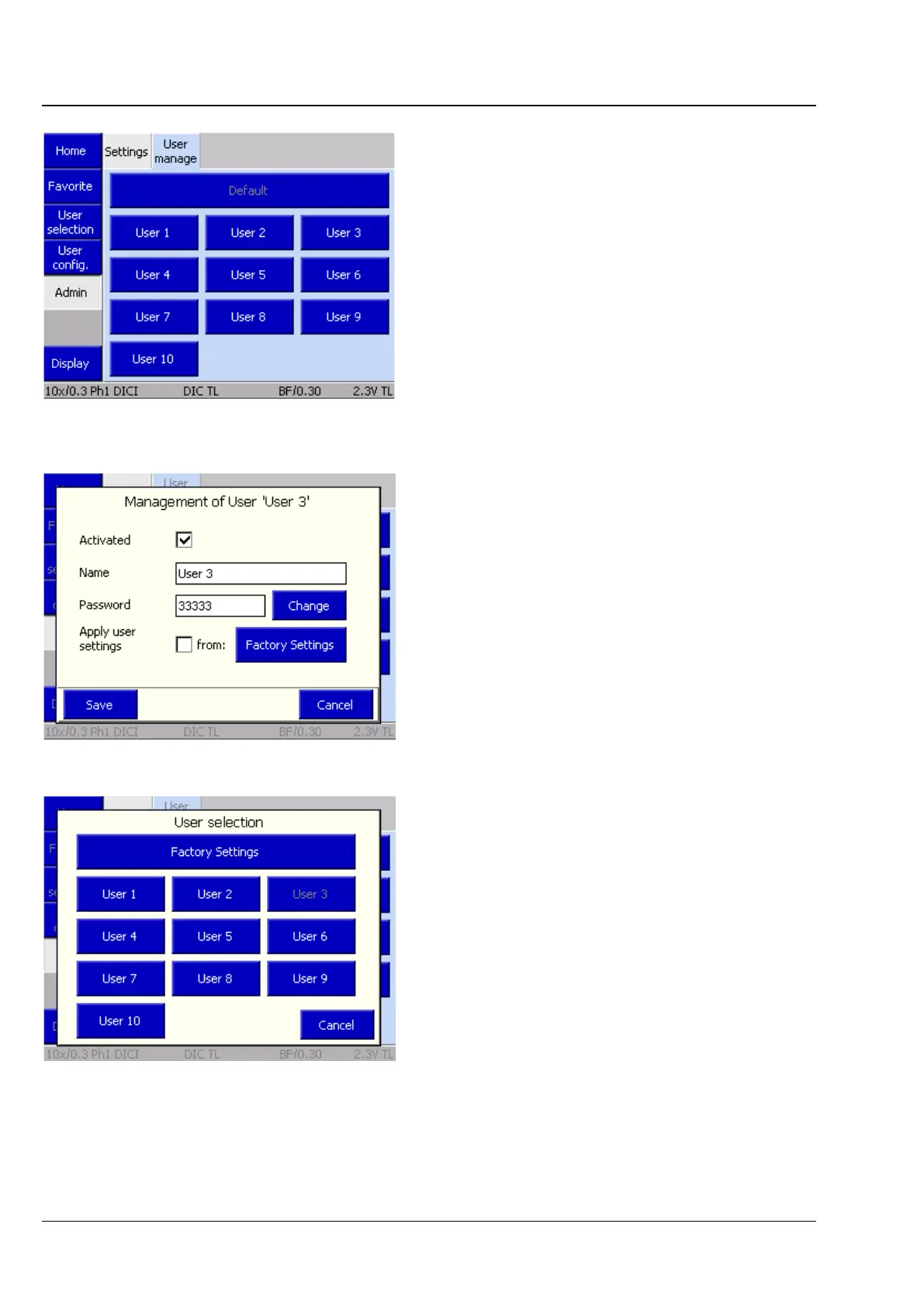
(2) User manage tab
On this tab, the administrator can create, manage
and preconfigure users.
Upon pressing the User # button, a pop-up menu
appears containing the following functions:
− User activation / deactivation
− User’s name
− Allocation of password
− Adoption of user settings
If user settings are to be transferred from an
existing user, the Adopt user settings checkbox
must be activated.
Pressing Factory Settings then opens another
pop-up menu. The user whose settings are to be
adopted can be chosen here.
Important: The adoption will only function for
previously configured users.
• After being adopted, the new user must be
activated by clicking the checkbox.
• Pressing the Save button completes this
operation.
The new user can now be chosen on the User
selection page and the configuration refined, if
necessary.
Fig. 186 Microscope -> User -> Admin ->
User administration
Fig. 187 User administration for User 3
Fig. 188 Adopting user settings








 To Next Page