ZEISS OPERATION Axio Imager 2
Illumination and contrast methods
162 430000-7544-001 01/2016
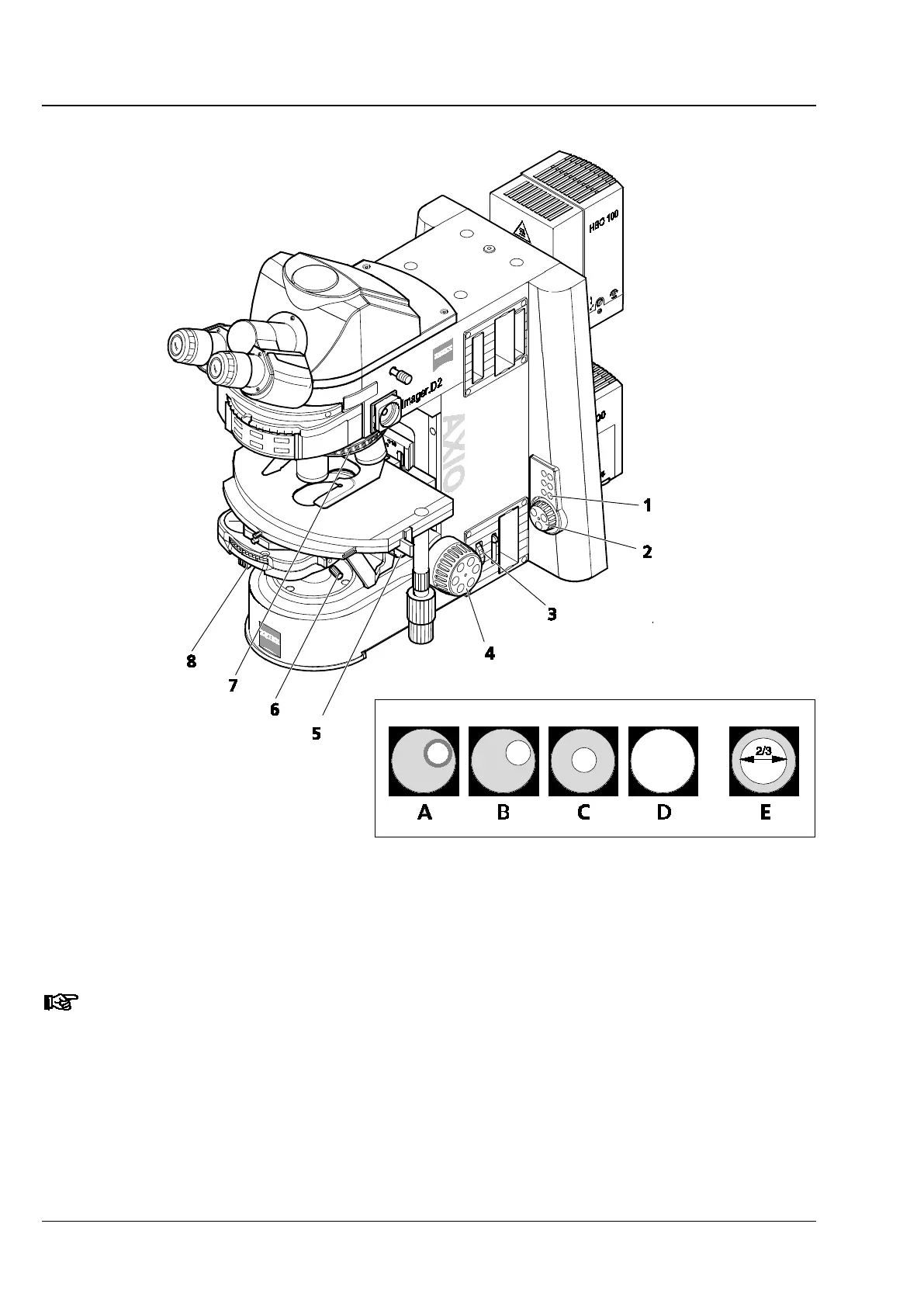
Fig. 191 Microscope settings on the Axio Imager 2 for transmitted light - brightfield
• Use both centering screws (Fig. 191/6 or Fig. 192/1) on the condenser carrier to center the luminous-
field diaphragm image (Fig. 191/C). Then, open the diaphragm until its edge just disappears from the
field of view (Fig. 191/D).
When changing the condenser, the luminous-field diaphragm normally remains centered, unless
the centering screws have been adjusted.
• To adjust the aperture diaphragm (contrast), remove one eyepiece from the tube and look through the
tube with the naked eye. Adjust the aperture diaphragm (Fig. 191/8) to approx. 2/3 ... 4/5 of the
diameter of the exit pupils of the objectives (Fig. 191/E). In most applications, this aperture diaphragm
setting provides optimum contrast at almost ideal resolution, and is therefore the best compromise for
the human eye.
• Insert the eyepiece back in the tube socket.








 To Next Page