Instructions for Use 9 Analyzing Exam Data and Creating Reports
2660021169042 Rev. A 2018-03 9.2 Reports
2660021169042 Rev. A 2018-03 115 / 246
9.2.3 Cube Report
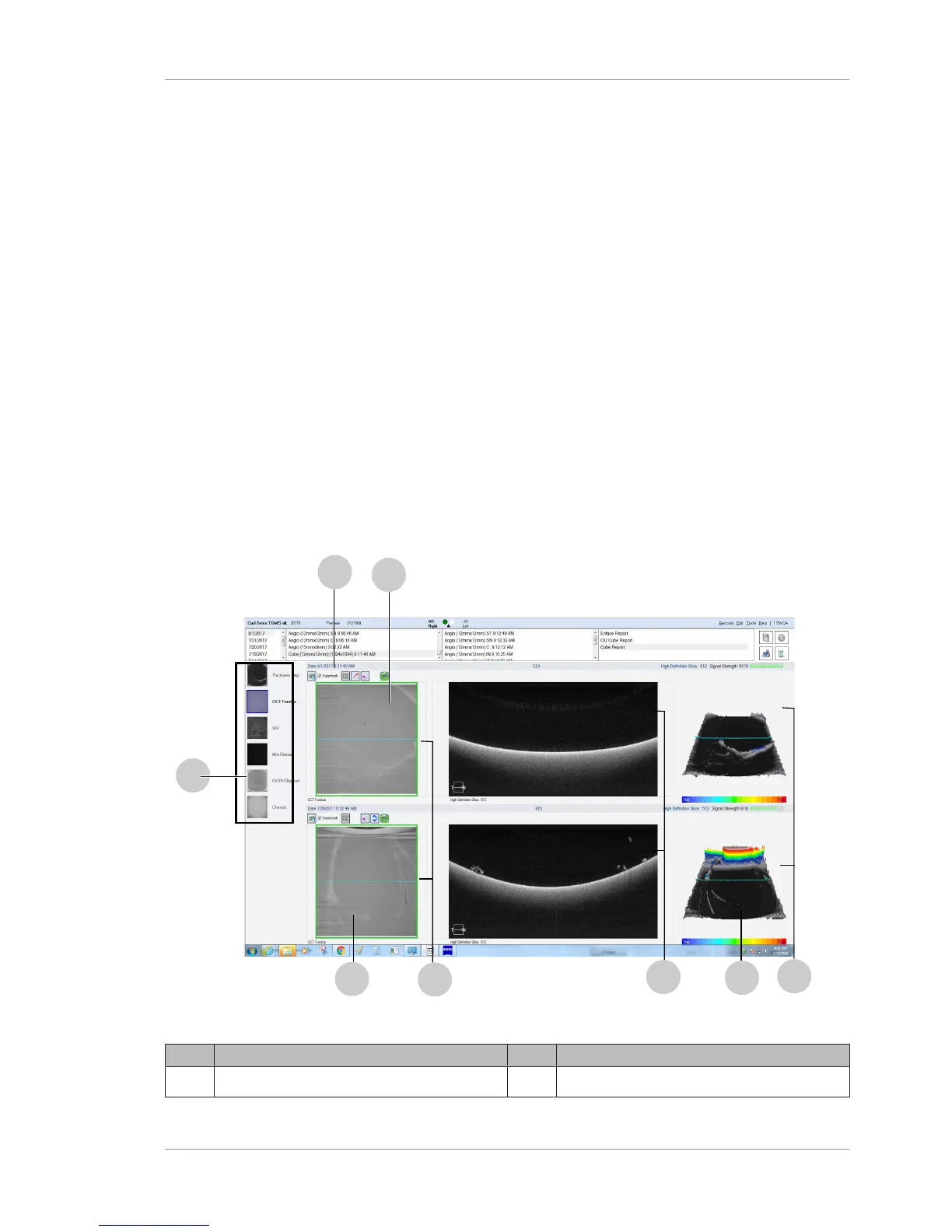
The PLEX® Elite 9000 Cube Report provides interactive OCT
images. The Fundus Image can be overlaid on the selected OCT
image. Each scan shows an associated 3-D thickness map, the
colors of which denote Macular thickness in micrometers (µm). B-
Scans can be generated in HD mode, and image features can be
measured and annotated.
Image Options (such as Brightness and Contrast management,
Zoom, etc.) are accessed by hovering over either of the OCT Images
or the B-Scans. .
Presets are an excellent starting point for exploring retinal topog-
raphy. Presets are described in depth in Using Presets [}142]. After
selecting a specific layer of interest, depth and cross-sectional
location can be manually adjusted further using the Segmentation
Lines provided on the B-Scans, and/or the Slice Navigators provided
on the OCT Images. A detailed description of using the Segmen-
tation Lines and Slice Navigators can be found in Image Navigation
[}137].
9.2.3.1 Cube Report Screen
Figure28: Cube Review Screen
Pos. Explanation Pos. Explanation
1 Review Screen Option Buttons 2
Presets (see Using Presets [}142])













 To Next Page