iPAM400 – Product Manual
U-0629-0171.doc – Issue: 04 complete, approved
Page 111 of 138
8.13 Fuse Replacement
8.13.1 AC Mains Supply / Battery Supply / Auxiliary DC Supply Output Fuses
Replacing the AC Mains Supply, Battery Supply, and/or Auxiliary DC Supply Output Fuse:
1. Remove the iPAM400 front panel; see Section “8.1 Removing the Front Panel” (page 99).
2. Power the mainframe off; see Section “8.2 Powering the Mainframe Off” (page 100).
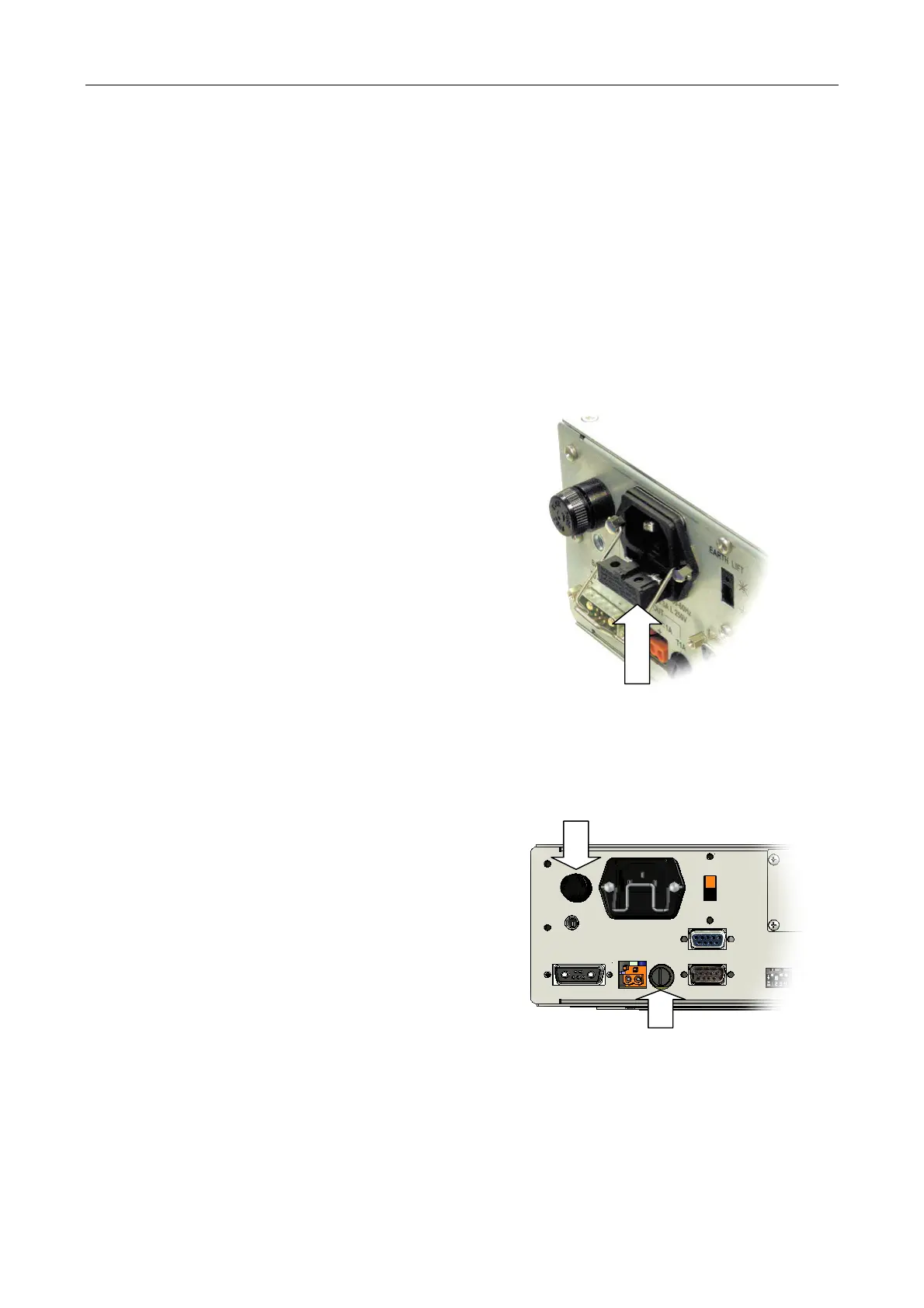
3. In order to replace the AC mains supply fuse:
a. Disconnect the AC mains cable from the
IEC inlet located on the rear panel of
the unit.
a. Pull out the fuse drawer which is
located by the IEC inlet on the rear
panel of the unit.
b. Inspect the fuse. If blown, then replace
with type T6.3A 20 mm 250 V; find spare
in Table 6 (page 116).
c. Reconnect the AC mains cable to the
IEC inlet located on the rear panel of
the unit.
d. Secure the power cable with the
retaining clip in order to prevent
accidental removal.
FUSE DRAWER
FUSE TYPE: T6.3A 20 mm 250 V
4. In order to replace the DC supply (BATTERY
IN) fuse:
a. The fuse is located to the left of the AC
mains inlet on the rear panel of the unit
b. Inspect the fuse. If blown, then replace
with type T25A 1¼" fuse; find spare in
Table 6 (page 116).
5. In order to replace the auxiliary DC supply
output (AUX OUT) fuse:
a. The fuse is located to the right of the
AUX OUT connector on the rear panel of
the unit.
b. Inspect the fuse. If blown, then replace
with type T1A 20 mm fuse; find spare in
Table 6 (page 116).
BATTERY IN
(FUSE TYPE: T25A 1¼")
(Cablin
not shown for clarity.)
AUX OUT
(FUSE TYPE: T1A 20 mm)
6. Power the mainframe on; see Section “8.5 Powering the Mainframe On” (page 103).
7. Re-fit the front panel; see Section “8.6 Powering the Mainframe On” (page 104).



 To Next Page