iPAM400 – Product Manual
U-0629-0171.doc – Issue: 04 complete, approved
Page 60 of 138
6.2.1 Connecting Remotely via PuTTY (for a host PC running Windows)
To Run PuTTY:
PuTTY can be run from a host PC running
Windows.
1. Power and start the iPAM400, if not
already done.
2. Run PuTTY by double clicking its EXE
file.
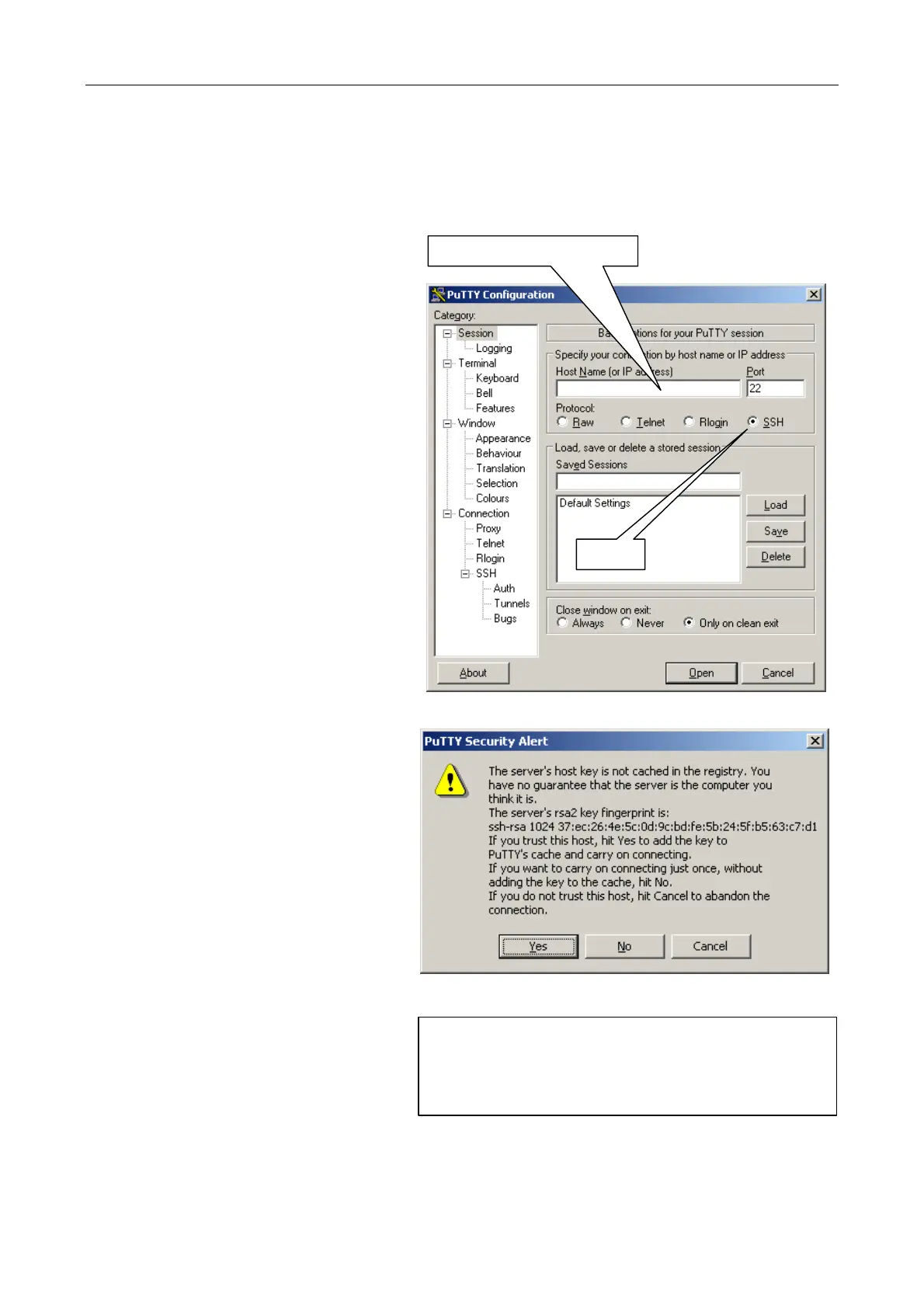
The “PuTTY Configuration” window
will be displayed.
3. Select SSH protocol option.
4. Enter the iPAM400 hostname or IP
address (Host Name) and press Open.
The iPAM400 IP address or hostname
can be found in your system design
documentation.
iPAM400 hostname or IP address
SSH
5. If this is the first time that you log into
this iPAM400 from this PC, then a
warning message from PuTTY will be
shown. This will indicate that the
security key from the host (iPAM400)
is not known.
Accept the key by pressing Yes.
6. The iPAM400 will prompt for login.
Login as “root” with the password
provided for the installation.
login as: root
password
:
7. When you have finished your session, log out by entering “logout”.
The PuTTY window will close itself automatically.



 To Next Page