EasyManua.ls Logo

ASTRO VG-873 - Page 233

ASTRO VG-873
579 pages
Print Icon
To Next Page IconTo Next Page
To Previous Page IconTo Previous Page
Loading...
Chapter 4 INTERFACE SETTINGS
215
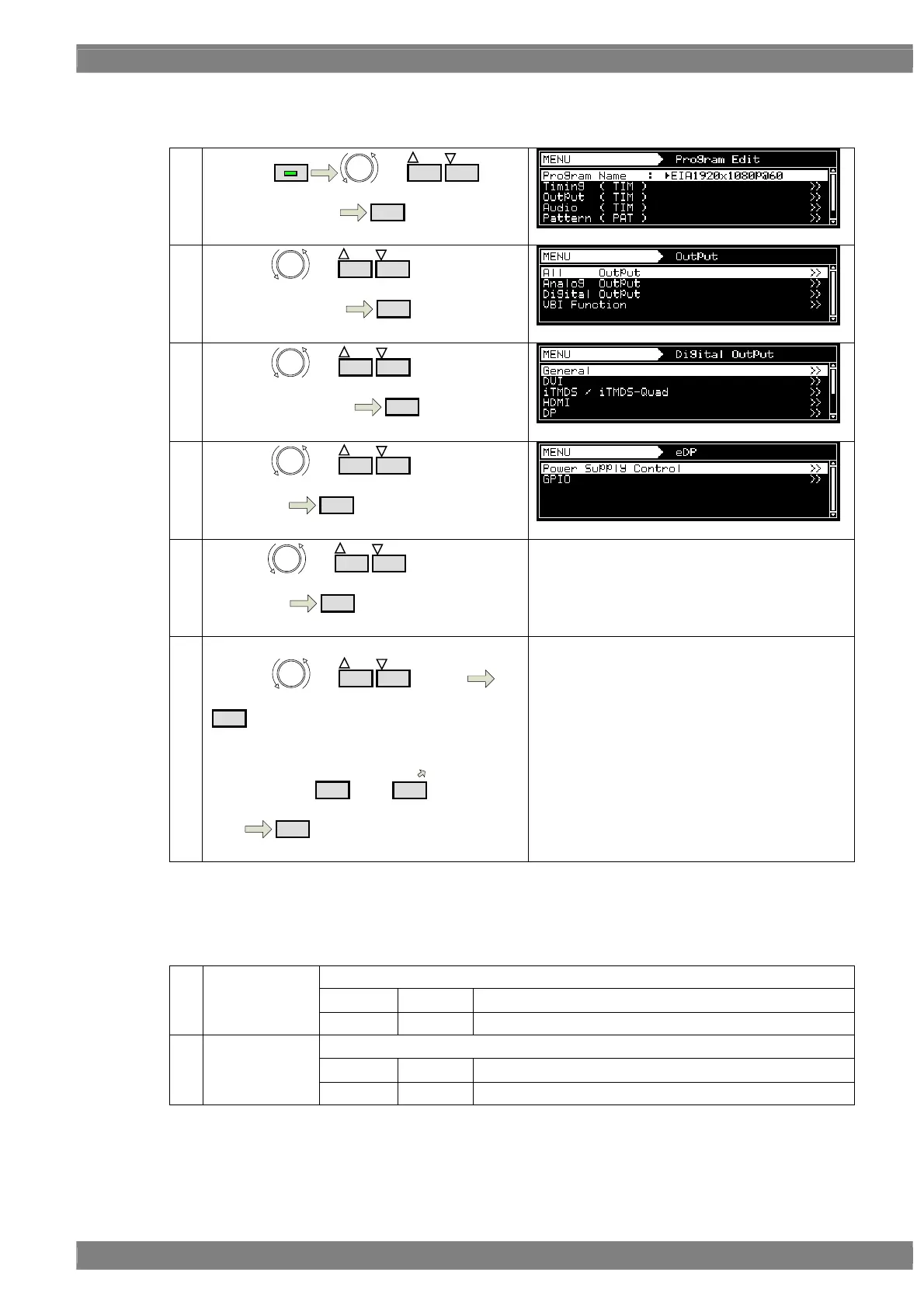
c) Setting for GPIO
①
By using
MENU
or
INC
DEC
,
select Program Edit
SET
②
By using or
INC
DEC
,
Select Output ( TIM )
SET
③
By using or
INC
DEC
,
Select Digital Output
SET
④
By using or
INC
DEC
で
Select eDP
SET
⑤
By using
or
INC
DEC
,
Select GPIO
SET
Refer to 《Parameter for GPIO setting》 in next.
《Input parameter》
By using or
INC
DEC
, select it
SET
Or
Select by
0/STATUS
to
9/F
(number
keys)
SET
Note) power output and power control is executed by maximum 2 lines.
《Parameter for GPIO setting》
Set level in GPIO0 to 7.
0
L Set Level as Low.
(1) Level
1 H Set Level as High.
Set PullUP in GPIO0 to 7.
0
OFF Set PullUp OFF.
(2) PullUp
1 ON Set PullUp ON.

Table of Contents