Chapter 4 INTERFACE SETTINGS
65
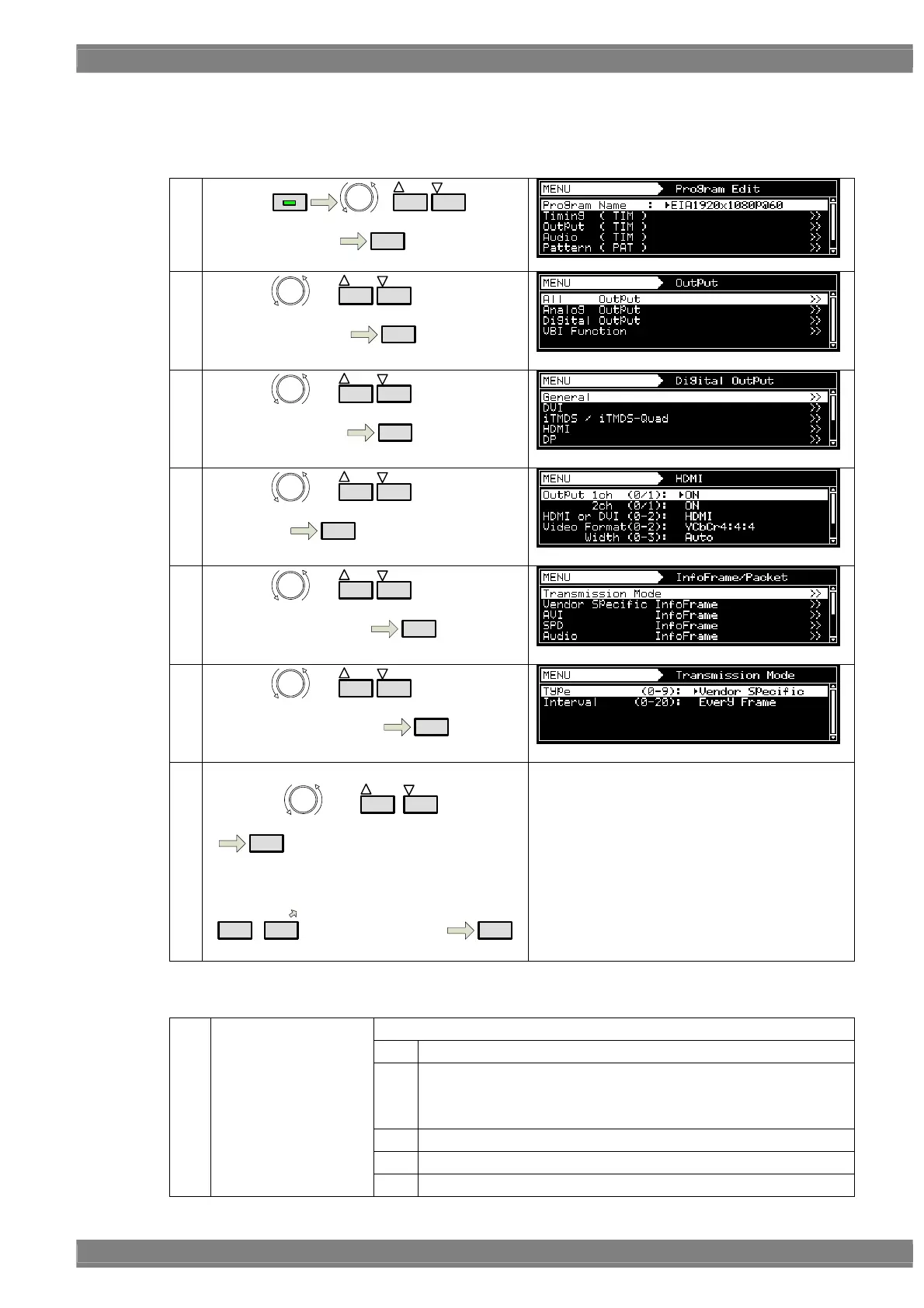
《 Set interval of sending InfoFrame/Packet 》
Among InfoFrame/Packet, sending interval of one kind of packet can be changed.
①
By using
MENU
or
INC
DEC
,
select Program Edit
SET
②
By using or
INC
DEC
,
select Output ( TIM )
SET
③
By using
or
INC
DEC
,
Select Digital Output
SET
④
By using
or
INC
DEC
,
Select HDMI
SET
⑤
By using or
INC
DEC
,
Select InfoFrame/Packet
SET
⑥
By using or
INC
DEC
,
select Transmission Mode
SET
⑦ 《Input parameter》
By using
or
INC
DEC
, select
it
SET
Or
0/STATUS
-
9/F
select by number keys
SET
About setting parameter, refer to the below list
Transmission Mode Setting Parameter.
Transmission Mode setting parameter
Select the packet to set this function.
0 Vendor Specific
1 AVI InfoFrame
Note: it is not possible to change transmission interval of AVI
InfoFrame in HDMI 300MHz unit VM-1823.
2 SPD InfoFrame
3 Audio InfoFrame
(1) Type(0-9)
4 MPEG InfoFrame



 To Next Page