Page 94Aviom A640 Personal Mixer User Guide
Console Card Inputs
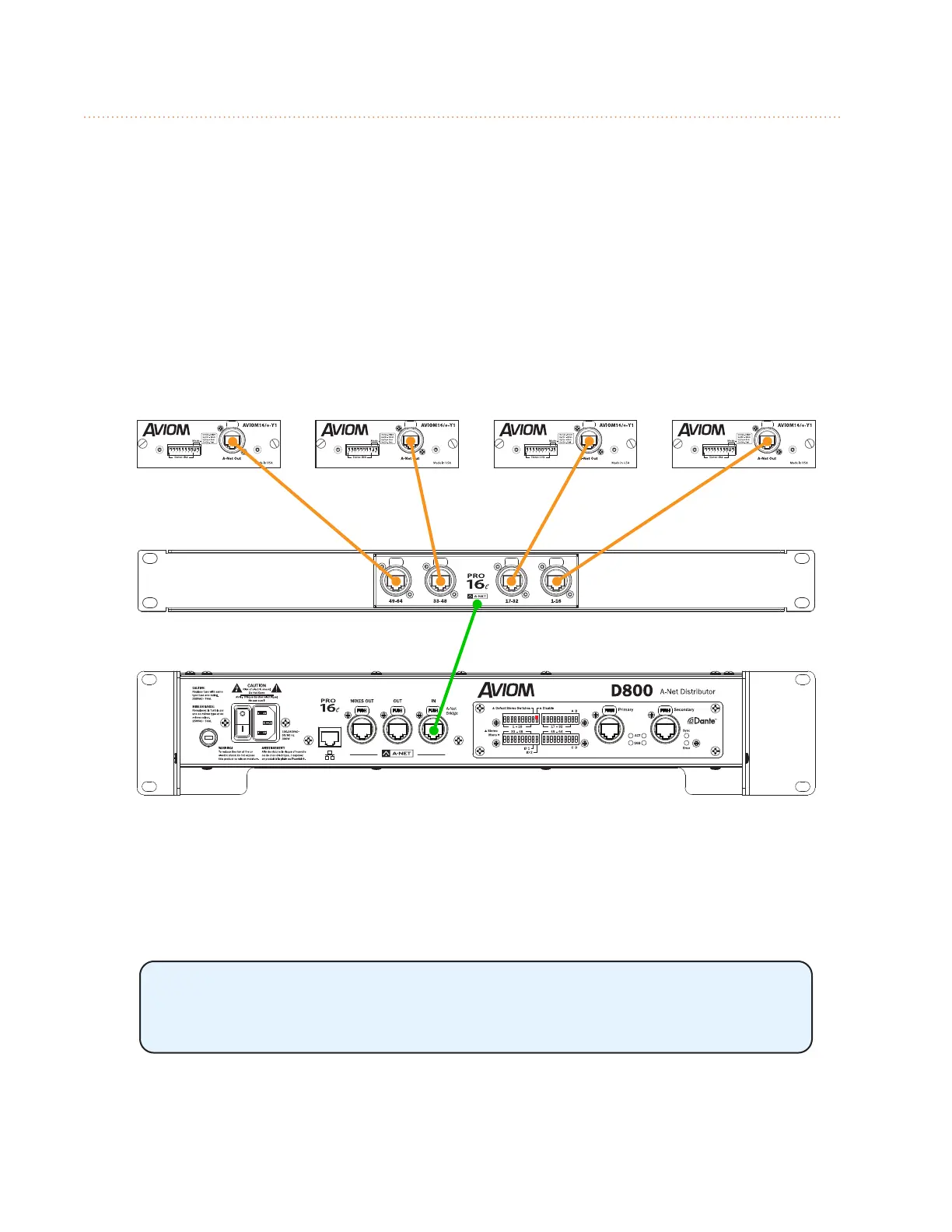
Up to four 16-channel digital console cards may be combined to create a Pro16e A-Net network. The
D800 or D800-Dante A-Net Distributor and the SB4 System Bridge are required to merge the four
separate A-Net data streams into one.
All console cards used in this manner must be connected to the same clock source, either in the
same mixing console or in multiple mixing consoles that are synced via word clock. Failure to sync
the clocks for all console cards will result in digital audio clocking artifacts in the audio.
The A-Net Out from each console card connects to one of the four ports labeled 1-16, 17-32, 33-48,
and 49-64 on the SB4 System Bridge. The SB4 rear-panel ports route the data in groups of sixteen
channels to the SB4’s front-panel A-Net Bridge port which allows a single Cat-5 cable to send all input
sources to the D800.
A-Net data from four console cards create a 64-channel Pro16e network.
The A-Net Bridge port of the SB4 is then connected to the A-Net In port of a D800 A-Net Distributor.
The D800 merges the four data streams into one and outputs one combined set of 64 A-Net Slots
from its front-panel A-Net Out ports.
When using a D800-Dante A-Net Distributor, its Dante Disable switch must
be in the up position to enable the A-Net input of the D800-Dante (only one
interface may be used at a time).



 To Next Page