Page 9Aviom A640 Personal Mixer User Guide
A640 Front Panel Interface
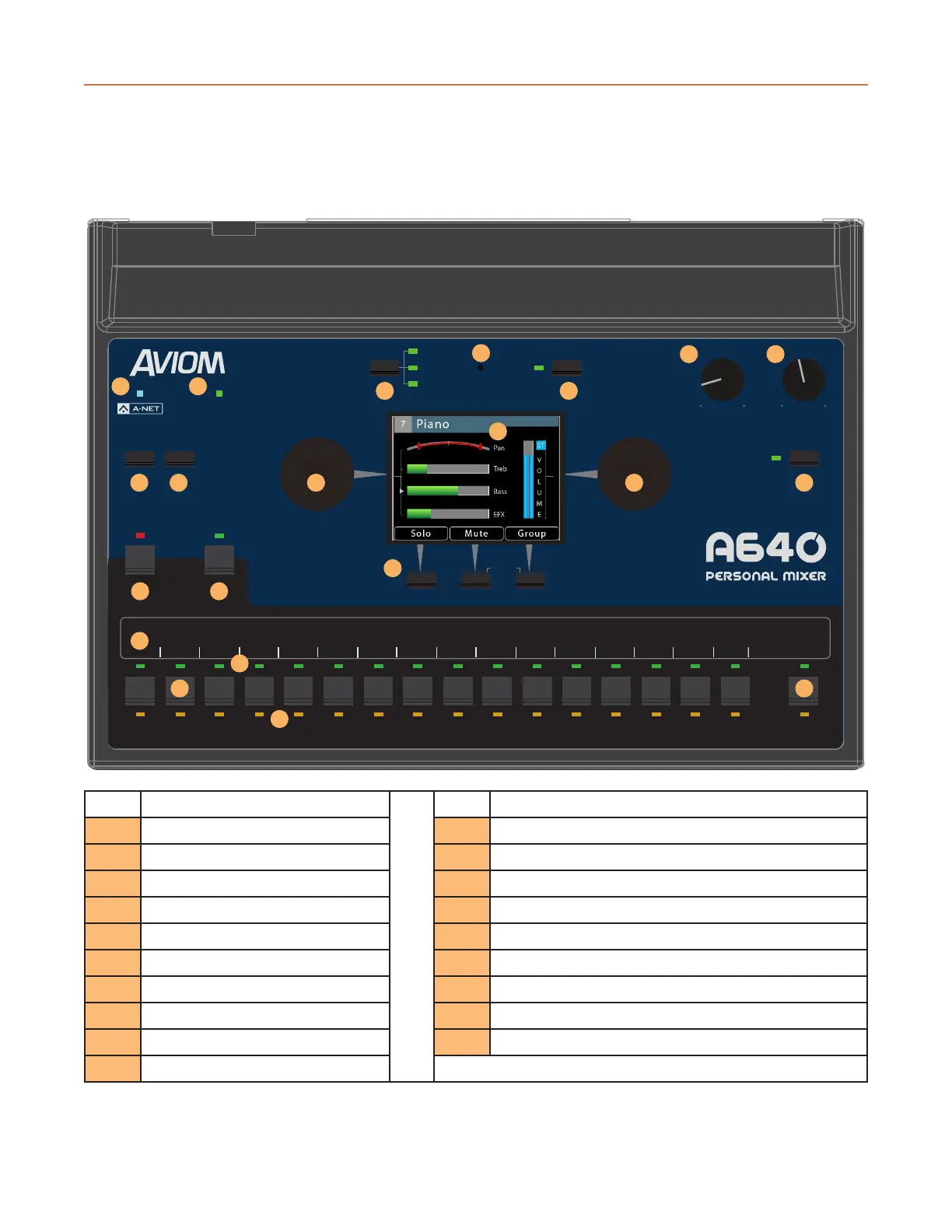
The A640 Personal Mixer's front panel controls and features are described below.
AmbienceIntercom
Save Recall
Signal/Clip
Aux Volume Master Volume
Master EQ
Channel
Mix
Names
Trim All
View Mixer Setup
1 2 3 4 5 6 7 8 9 10 11 12 13 14 15 16 Favorite
1
3
2
12
15
16
17
18
19
13
13
5
10 10
14
11
6
9
7 8
4
Function Function
1 A-Net LED 11 Color Liquid Crystal Display (LCD)
2 Signal/Clip LED 12 Intercom Button
3 Save Button 13 Ambience Button & Built-in Ambience Mic
4 Recall Button 14 Assignable Soft Buttons & Trim All function
5 View Button 15 Channel Label Strip
6 Mixer Setup Button 16 Channel Buttons
7 Aux Volume 17 Channel Active LEDs
8 Master Volume 18 Channel Mute LEDs
9 Master EQ Button 19 Favorite Button
10 Left/Right Rotary Encoders



 To Next Page