Page 34Aviom A640 Personal Mixer User Guide
Mix View
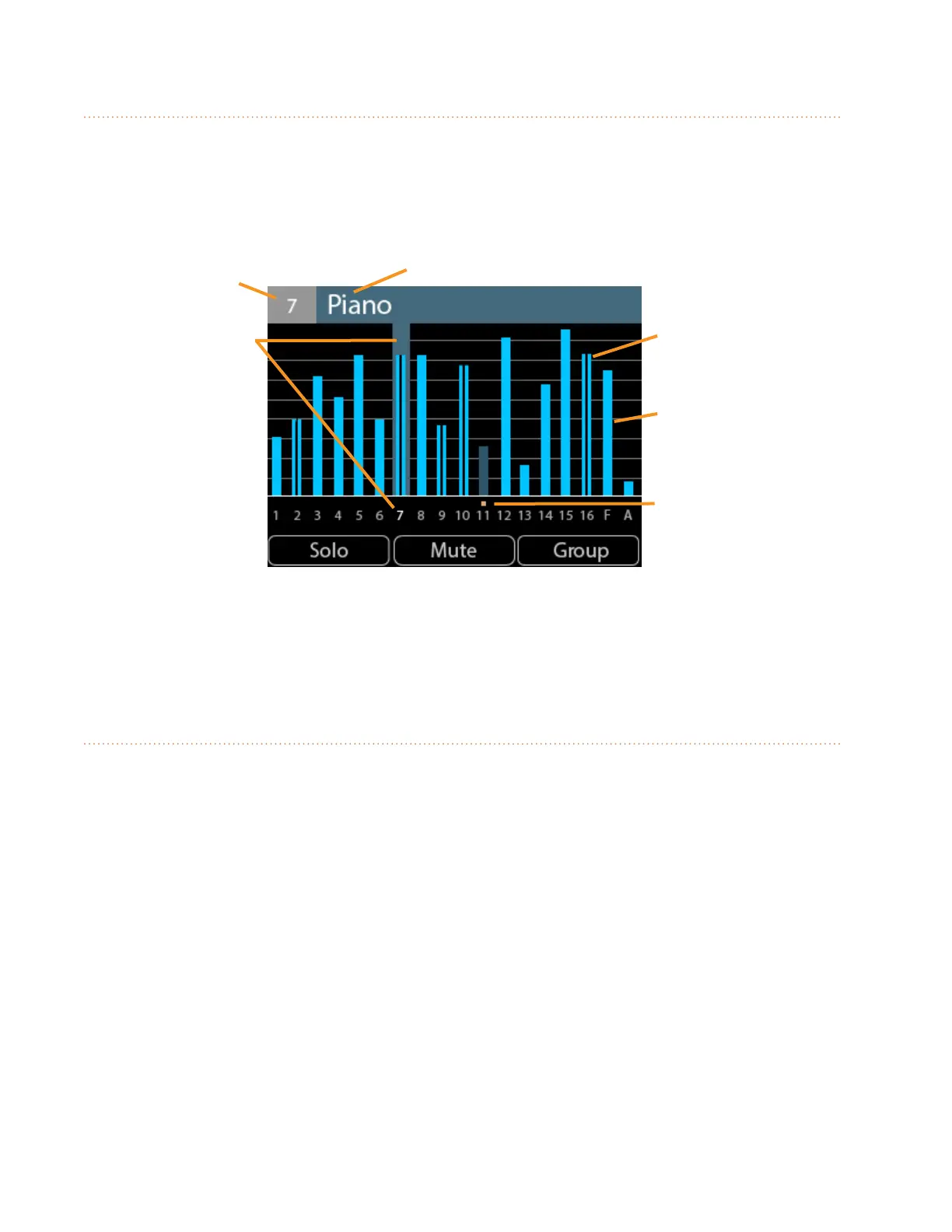
To see the volume level of every channel in a mix, use the Mix View. Mono channels are displayed
with a single blue volume level bar; stereo audio has a double blue bar. A selected channel (or Group)
is highlighted and its channel number is shown in white. Muted channels have gold Mute indicators
above the channel number, and their blue volume level bars are dimmed.
Channel Number Channel (or Group) Name
Stereo
Channel
Mono
Channel
Muted
Channel
Selected
channel
The Favorite and Ambience channels are also displayed in Mix View, indicated on screen with an F for
the Favorite channel and an A for the Ambience mic channel. When using the A640 Personal Mixer in
Custom mode, the Favorite channel is replaced with a fully-assignable channel 17.
Editing in Mix View
Each channel's volume and mute on/o can be changed while in Mix View. The left encoder will
scroll left or right through the mix channels. Use the right encoder to change the volume level for the
selected channel (or Group). The left and right encoder push buttons are inactive in Mix View.



 To Next Page