Page 20Aviom A640 Personal Mixer User Guide
A640 Rear Panel
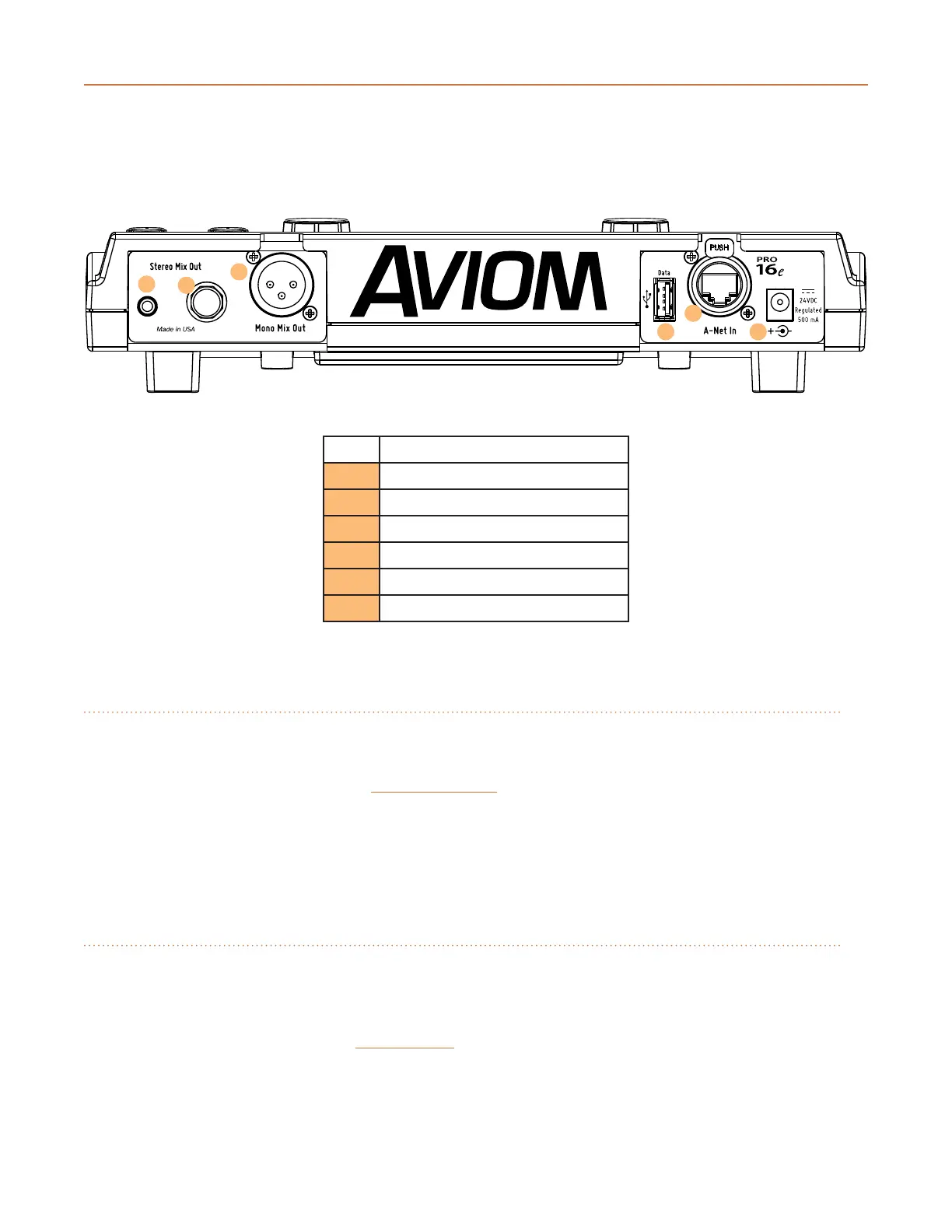
The A640 Personal Mixer's rear panel components are described below.
1
3
2
4
5
6
Function
1 1/8-Inch Stereo Output
2 1/4-Inch Stereo Output
3 XLR Mono Mix Output
4 USB Port
5 Pro16e A-Net In Port
6 DC Power Connector
Stereo Audio Outputs
The A640 Personal Mixer's current stereo mix is available at the 1/8-inch and 1/4-inch TRS (tip, ring,
sleeve) outputs on the rear panel. Plug standard stereo headphones or earbuds into the jacks,
adjusting the listening level with the MaSteR VoluMe knob on the front panel.
Both stereo outputs may be used at the same time. Use headphones/earbuds with similar output
impedances to avoid volume level dierences between users.
XLR Mono Output
In addition to the stereo mix, the A640 outputs a mono version of the current mix which is available
at the XLR output on the rear panel. The mono output may be connected to a wireless in-ear
transmitter, audio recording device, bass shaker, powered speaker, etc. Adjust the mono aux mix's
output level with the independent aux VoluMe knob on the front panel.



 To Next Page