Page 80Aviom A640 Personal Mixer User Guide
As with Pro16 mode, any one of the standard mixer channel buttons may be assigned to the A640’s
Favorite channel button, allowing easy access to a frequently-used channel. Hold the FaVoRite
button and press a mixer channel button to assign it.
Mono vs. Stereo Channels
It is important to understand that the A-Net network controls which incoming channels are mono or
stereo, not the A640 Personal Mixer. A stereo link is a global setting available to all Personal Mixers in
an Aviom personal mixing system.
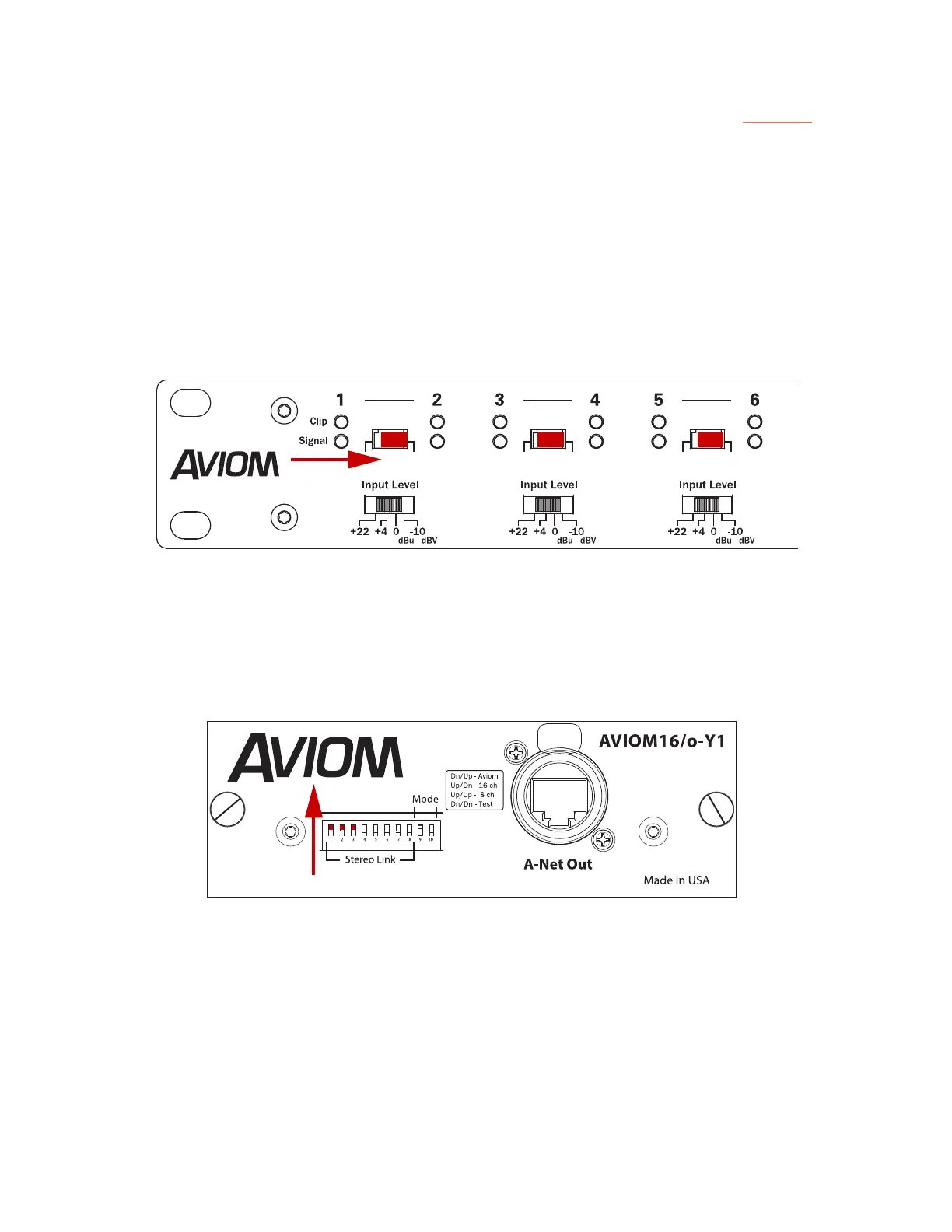
Stereo Links are set up by moving the Stereo Link switches on an analog input device such as an
AN-16/i to the right.
Stereo Links on the AN-16/i Input Module
For a digital console card, such as Aviom’s Y1 card for Yamaha MY devices, a set of eight DIP switches
is used. Console cards built by Aviom partners using Aviom’s A-Net technology also provide stereo
link capabilities.
Stereo Links on the Y1 Yamaha console card
For a system based on a Dante network, the stereo links are set up at the Dante A-Net Distributor
using DIP switches. Stereo Links activated on a Dante A-Net Distributor are made available to all
Personal Mixers connected to its A-Net Out ports.



 To Next Page