Page 81Aviom A640 Personal Mixer User Guide
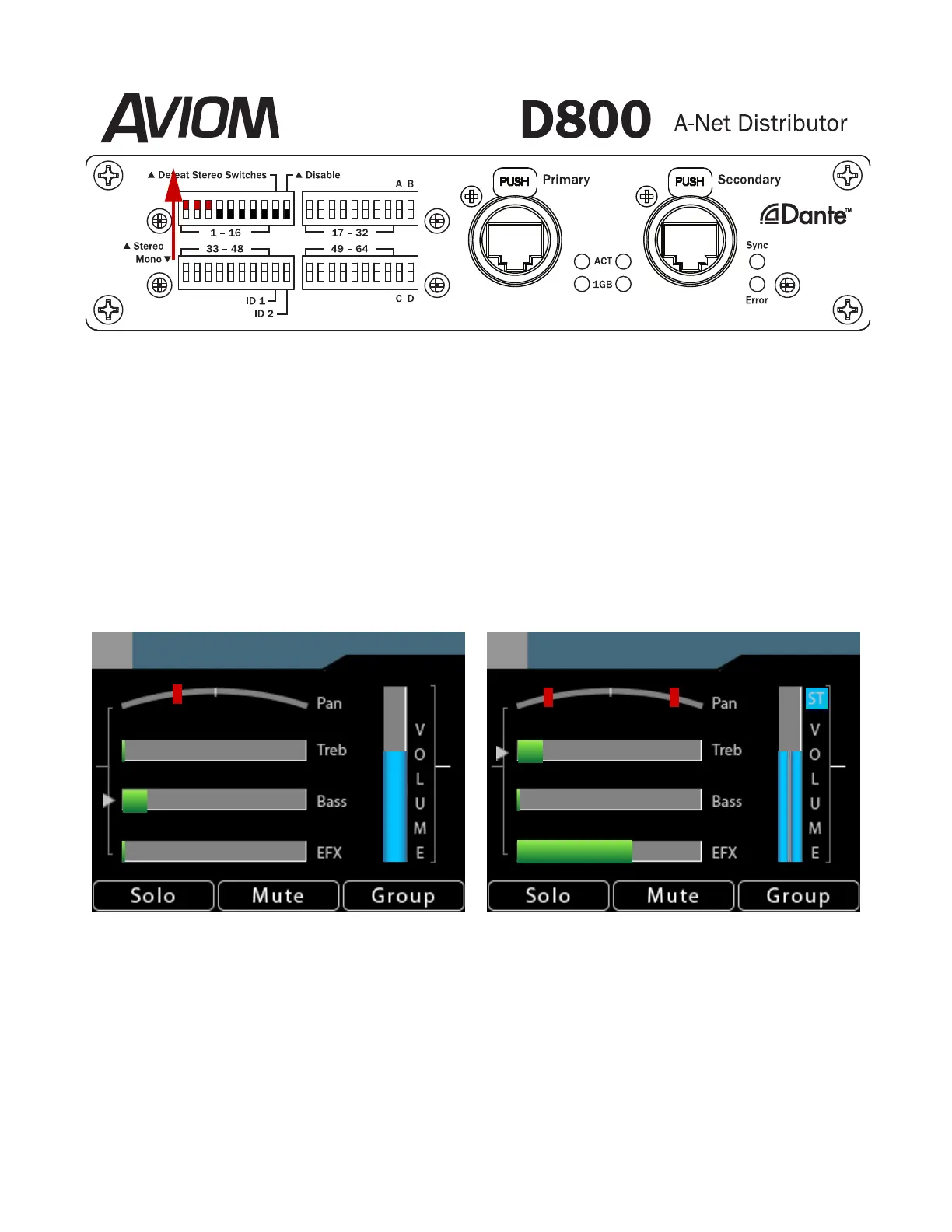
DIP switches set Stereo Links on the D800-Dante A-Net Distributor
When the global stereo link for any network channel pair is o, the A640 mixer channel is mono.
Default mode uses the left channel of the pair (the odd number) as the mono source, and ignores the
right side audio (the even number).
For example, when the stereo link for channel pair 1-2 is set to o (mono), A640 mixer button #1 will
receive network channel 1 and will ignore network channel 2. The Pan indicator (in Channel View)
shows one Pan position marker. Any audio assigned to channel 2 is not heard.
The following graphic shows the dierences between a mono and stereo channel, as seen in Channel
View.
Chan 1
1
Chan 1
1
A mono channel (left) has a single Pan indicator and a mono volume level indicator.
A stereo channel (right) has two Pan indicators, a dual level bar, and a Stereo ST con.
If a stereo link is set on (stereo) for network channel pair 1-2, two network digital audio signals
are assigned to the rst mixer channel button on the A640 in Default mode. The Pan indicator (in
Channel View) shows two stereo position markers. Stereo channels have dual volume bars and a
stereo indicator [ST} next to the volume bars.



 To Next Page