Surface Information
58 Progressa+ Bed Instructions for Use (216321 REV 2)
Warning—(Warnings continued) To help prevent injury and/or equipment damage, obey these
warnings:
• Warning—The surface impermeability and pressure relieving capabilities of the surface could
be affected by needle sticks or other bladder punctures. Caregivers should be instructed to
AVOID surface cover and bladder damage caused by improper use of x-ray cassette holders and
sharp objects that may puncture or lacerate the surface. The surface should be regularly
inspected for damage. Undetected damage to the surface may result in patient harm.
Refer to the GCI home screen or Surface status page on the GCI screen to determine the active therapy
surface mode.
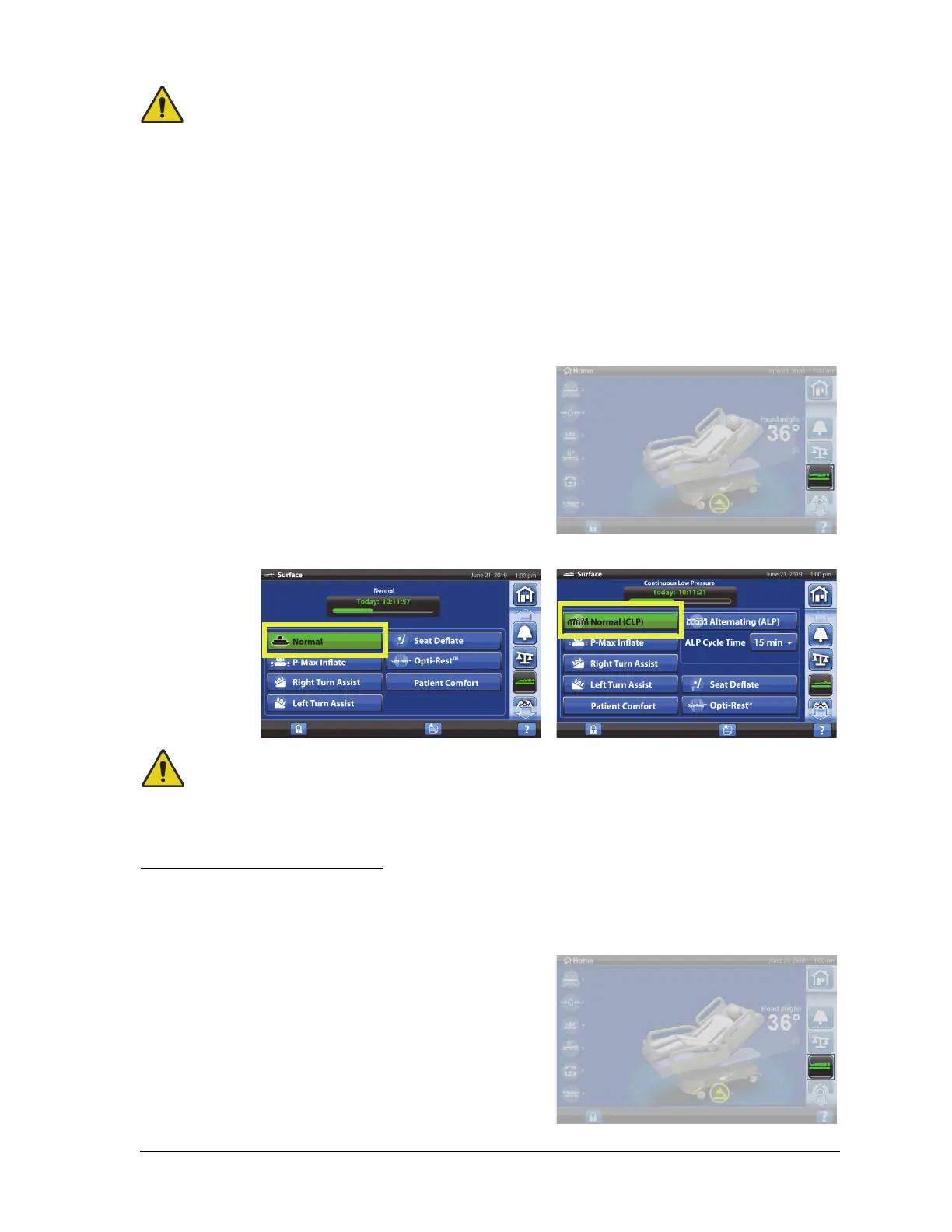
To Put the Surface in Normal/Normal (CLP) Mode
1. Press the Surface menu control.
2. Press Normal/Normal (CLP).
Warning—Patients with body weight or height near the recommended limits should be monitored
more frequently for desired results. Lower the head section to optimize pressure performance if
necessary.
Alternating Low Pressure (ALP)
The ALP option is a pressure redistribution mode that provides pressure relief through cyclical changes
in loading and unloading in the head, seat and foot zones of the surface.
To Activate
1. Press the Surface menu control.













 To Next Page