Surface Information
Progressa+ Bed Instructions for Use (216321 REV 2) 59
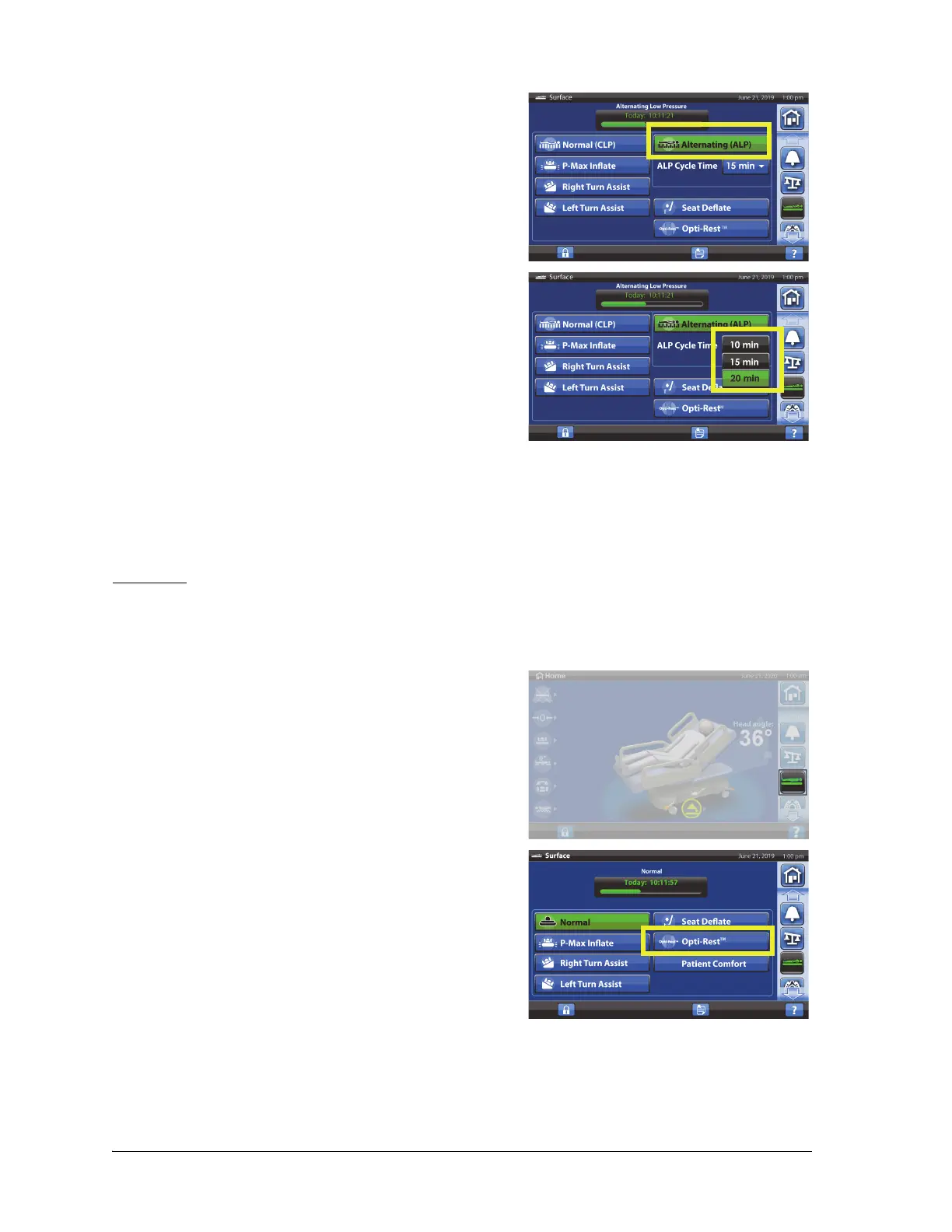
2. Press Alternating (ALP).
3. ALP is active when the control turns green.
4. To change the ALP cycle time, press the drop down
time menu and select the desired time:
• 10 minutes (default)
• 15 minutes
• 20 minutes
To Deactivate
1. Press the Surface menu control.
2. Press Normal/Normal (CLP).
The Patient Comfort control will not show when ALP is active.
Opti-Rest
The Opti-Rest mode offers wave-like motions in the mattress while maintaining pressure relief. It
adjusts the pressure in the chest, seat, and thigh zones producing a massaging wave-like action.
To Activate
1. Press the Surface menu control.
2. Press Opti-Rest.
3. Opti-Rest is active when the control turns green.
To Deactivate
1. Press the Surface menu control.
2. Press Normal/Normal (CLP).













 To Next Page