Surface Information
62 Progressa+ Bed Instructions for Use (216321 REV 2)
Turn Assist
The Turn Assist mode will inflate the surface assisting the caregiver to turn the patient for linen changes,
dressing changes, bed pan placement, back care, and other nursing procedures. Pressing Right Turn
Assist will turn the patient to the patient's right side.
For enhanced posterior patient access, P-Max Inflate may be used once the patient has been turned to
the desired side.
The siderail the patient is turning towards MUST be in the up position to activate turn assist. If the
siderail is down, a triple beep will sound and a message will appear on the GCI screen indicating the rail
must be up to initiate. Once the patient has started to turn, the siderail the patient is turning away from
can be lowered for easier patient access. Three beeps will sound as a safety alert, and a message will
appear on the GCI screen when the siderail is lowered.
Before You Activate Turn Assist
• Make sure to remove any loose items on the surface.
• Make sure the head of the bed is less than 40°.
• Make sure the foot of the bed is less than 30°.
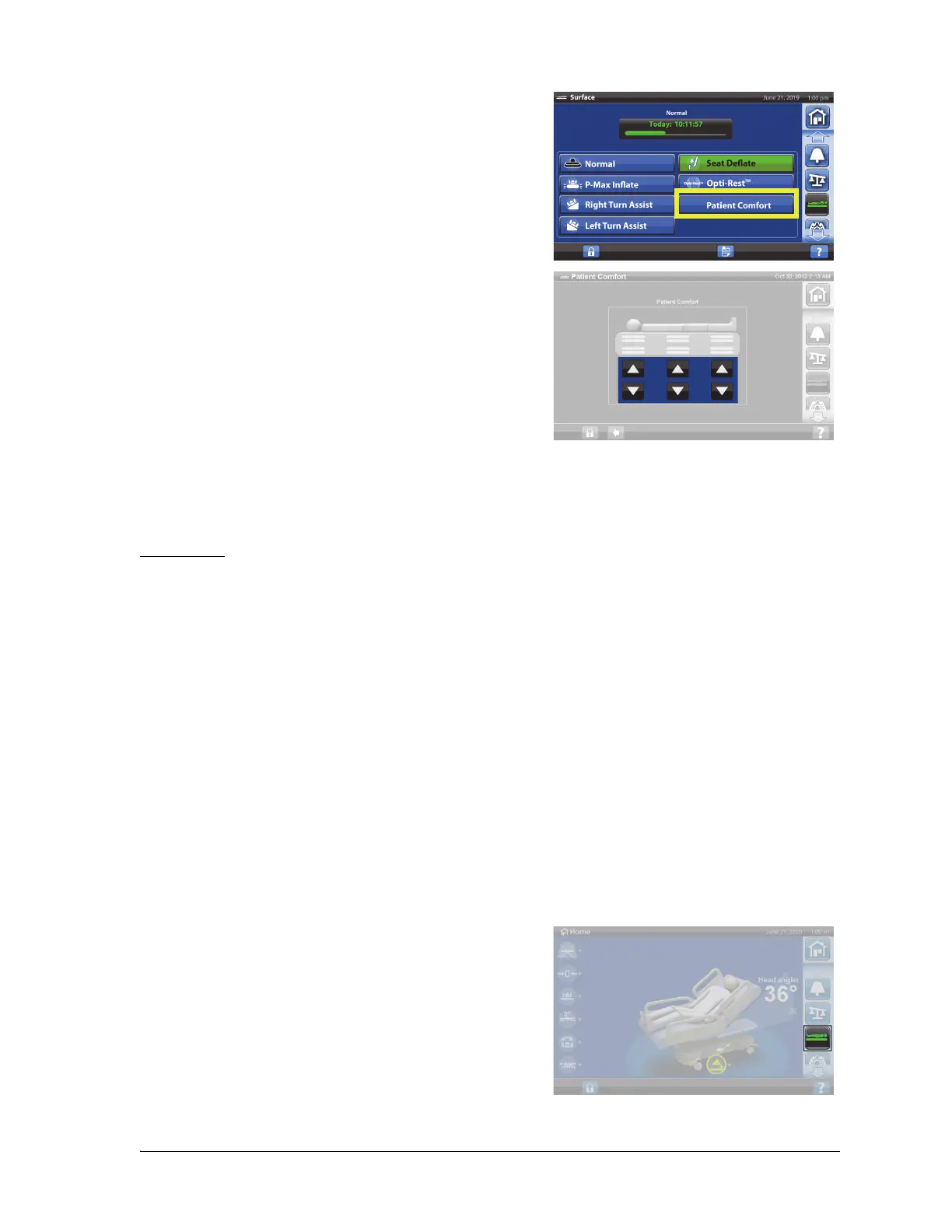
2. Press Patient Comfort.
3. Use the Patient Comfort controls to change the
pressure in the head, seat, and lower leg sections of the
surface:
•To Increase the pressure, press the Up arrow.
•To Decrease the pressure, press the Down arrow.
To return to Normal mode
1. Press the Surface menu control.
2. Press Normal/Normal (CLP).
To Activate
1. Press the Surface menu control.













 To Next Page