Surface Information
Progressa+ Bed Instructions for Use (216321 REV 2) 67
Setup
Start Percussion and Vibration
1. Put the patient on the bed.
2. Align the shoulders with the shoulder position label located on the inside of
the head-end siderail.
NOTES:
• If Percussion and Vibration is desired with Bed Exit on, Bed Exit must be turned on before
Percussion and Vibration is started. Only Out of Bed Mode will work during Percussion and
Vibration Therapy.
• Bed Exit Position Mode (most sensitive) or Exiting Mode (middle mode) is active, Bed Exit will
switch to Out of Bed Mode (least sensitive) during Percussion and Vibration Therapy. Once the
therapy is complete the bed will re-arm to the initial Bed Exit Alert Mode.
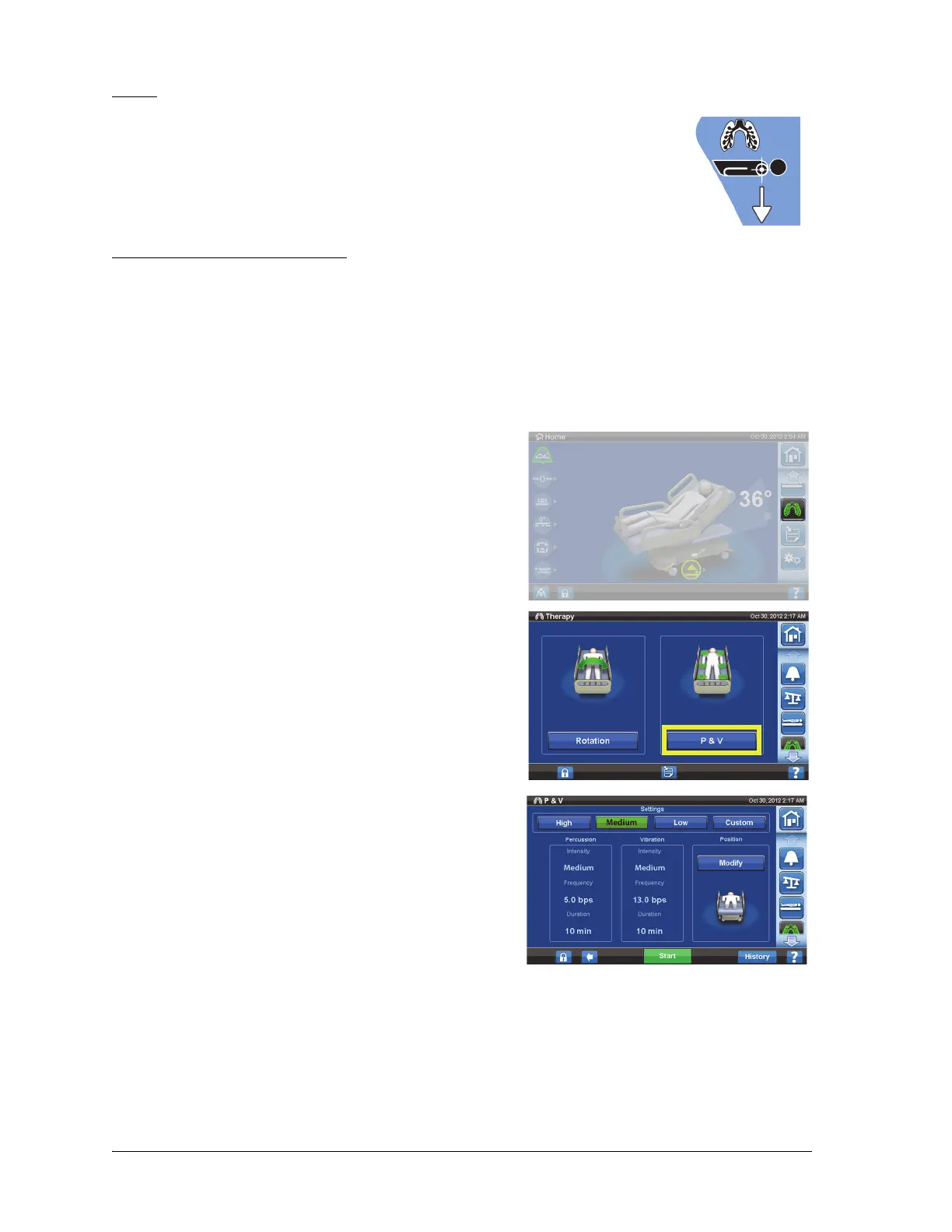
1. Press the Pulmonary Therapy menu control.
2. Press P & V.
3. Press High, Medium, or Low. For Custom, see “Set
Custom Settings” on page 68.
4. Press Modify to change the position if applicable.
a. Select Left, Center, Right, or Rotation position
and adjust settings as applicable.
b. Press the back arrow.
5. Press Start to begin P&V.













 To Next Page