20 BD FACSCanto II Instructions for Use
Electronics Components
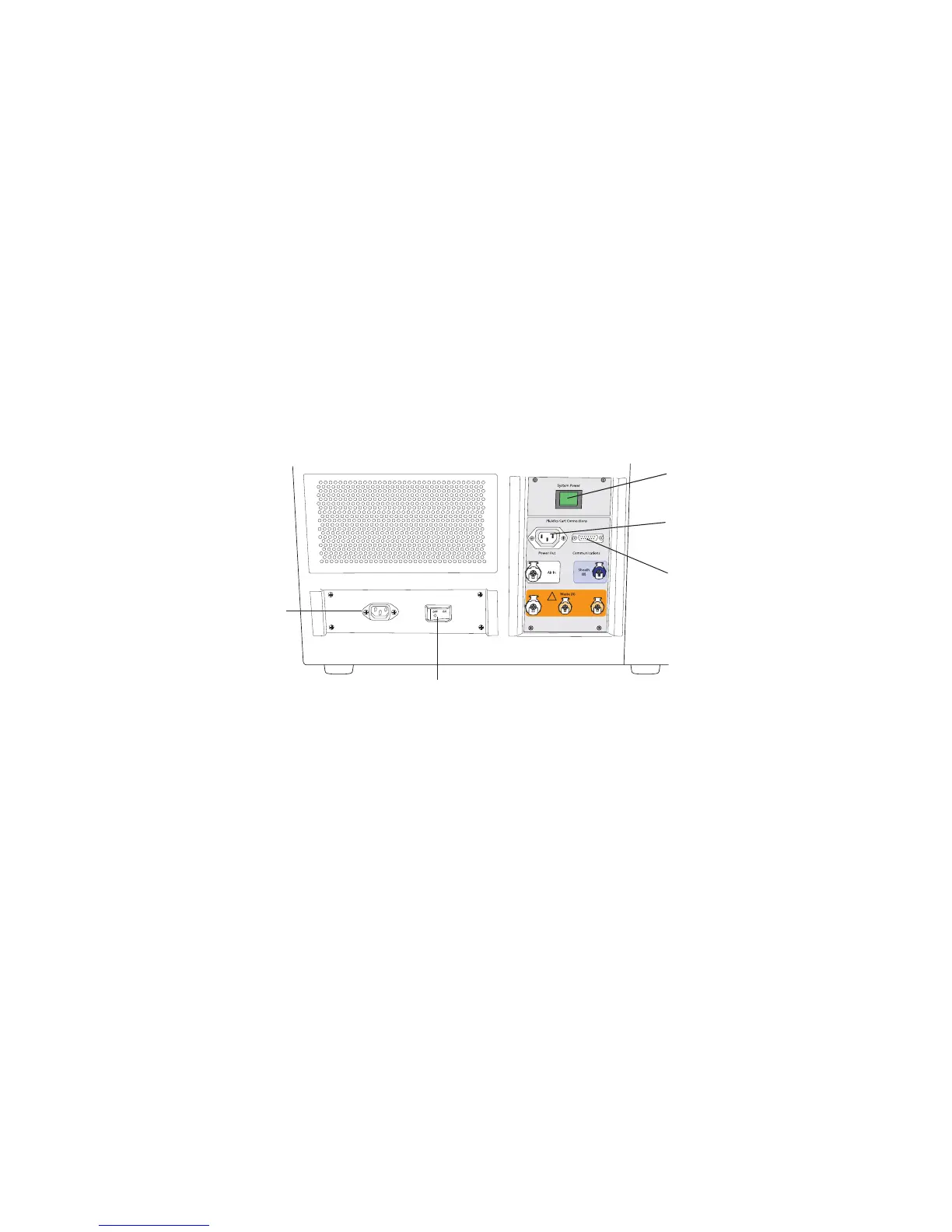
Power to the cytometer, lasers, and fluidics cart is supplied by a power cord from
the cytometer plugged directly into a standard electrical outlet. BD recommends
using an uninterrupted power supply (UPS) unit to maintain cytometer power
during a power outage. The system power button turns on the cytometer and
fluidics cart, and powers the lasers.
NOTICE If a power failure occurs during a run, sample can leak from the SIT. To
prevent a biohazardous spill, place an empty tube on the SIT. Once power is
restored, remove the tube and perform a fluidics startup before resuming the run.
Figure 1-3 Flow cytometer power panel
The system circuit breaker is located next to the AC power cord. The breaker will
need to be reset if there is a power surge in the laboratory.
Acquisition indicator lights are located on the flow cell access cover on the front
of the cytometer (see Figure 1-4 on page 21). Each light corresponds to a detector
in the collection optics subsystem, and blinks when the signal at that detector
reaches a preset level. Acquisition threshold levels (set using the software)
override the presets. See Figure 1-5 on page 21.
Lights are activated only when the system is acquiring data, and only the
indicators corresponding to currently active parameters will blink.
system circuit breaker
system power
button
system AC power
cord plugs in here
power out to
fluidics cart
communication
cable to fluidics cart



 To Next Page