Operating instructions CS 300 Installation
6.110.98.5.01.40 en 4 - 11
4
Measure the length and width of the roller conveyor.
The mounting area must be 3mm larger than the roller conveyor:
–
length of roller conveyor
3mm
–
Width of roller conveyor
3mm
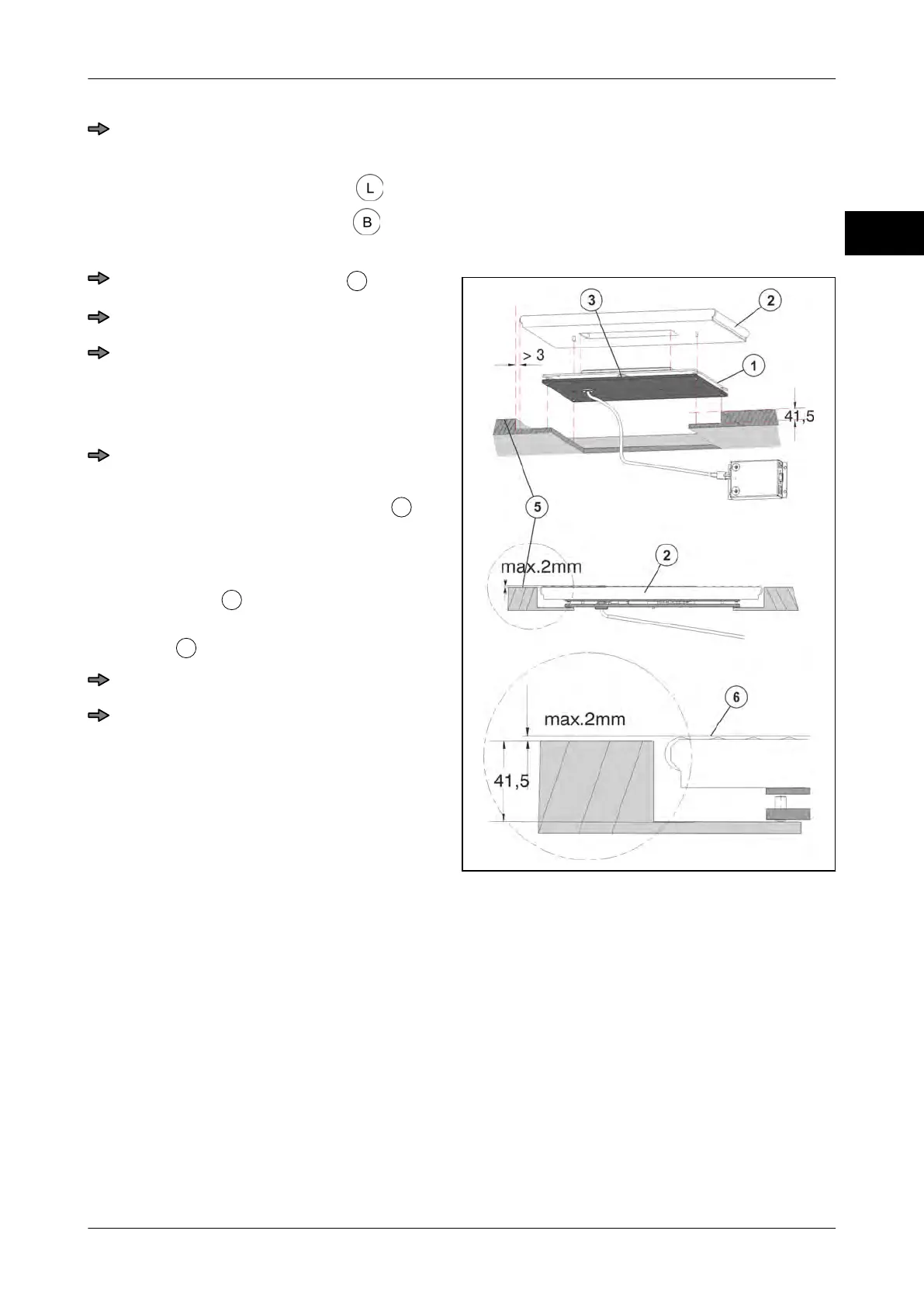
Installation of the scale in the POS counter
Fig. 19: Installing CS 300 ER-K
Remove the roller conveyor
.
Insert the scale into the mounting space.
Align the scale so that there is a dis-
tance of min. 3mm between load platter
or roller conveyor and installation frame
on all sides.
Turn adjusting screws until scale is in
horizontal position.
If the air bubble in the spirit level
is in
the center, the scale is in horizontal posi-
tion.
Make sure that the upper edge of the roll-
er conveyor
is flush with the upper
edge of the POS counter or max. 2mm
higher
.
Reattach the roller conveyor.
Check the installation and adjust if nec-
essary.
The scale can be fastened with fastening
screws.



 To Next Page