Installation Operating instructions CS 300
4 - 10 6.110.98.5.01.40 en
4
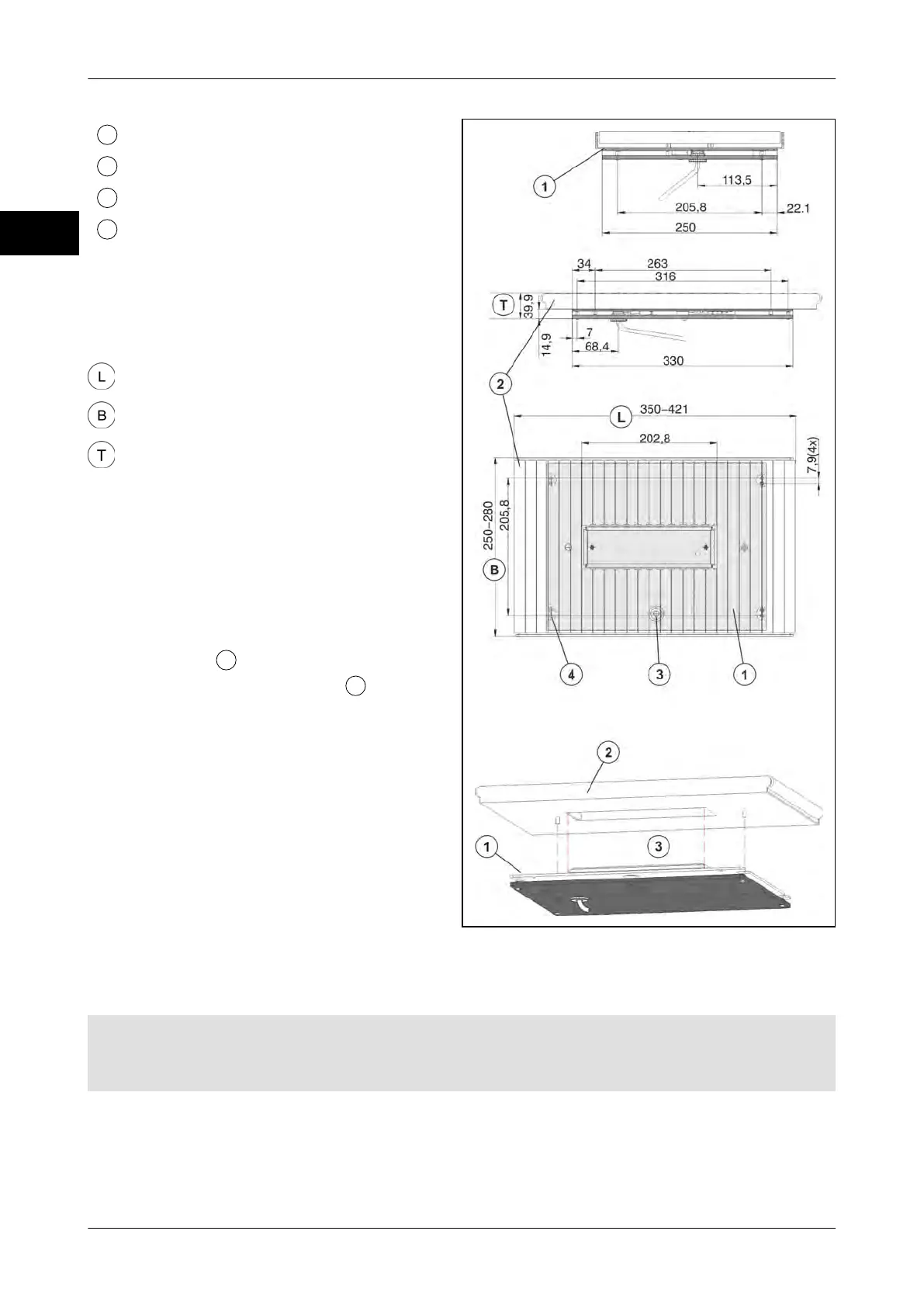
Scale
Roller conveyor
Spirit lever under roller conveyor
Adjusting screws
Dimensions of scale and roller conveyor
The outer dimensions (length/width/depth)
of CS 300 ER-K depend on the attached
roller conveyor.
350-421 mm depend. on roller conveyor
250-280 mm depend. on roller conveyor
39.9 mm
Roller conveyor
Weight of roller conveyor max. 3,15 kg.
The roller conveyor must meet the specified
requirements (dimensions, weight).
Modifications to the scale are not permitted.
After adjusting and fastening the scale, the
roller conveyor
is placed on the scale
load platter without being fixed
.
Fix it through the cutout in the counter.
Pay attention to the position. The cutout is
asymmetric.
Fig. 18: Dimensions CS 300 ER-K
Installation of scale CS 300 ER-K into POS counter
Requirements
The mounting area or cutout in the POS counter should be dimensioned so as to provide a
distance of min. 3mm to all moving scale parts including the roller conveyor.



 To Next Page